🛠️ Proxychains
Installation
sudo apt install proxychains4 -yCore Concept
Proxychains is a tool that forces any TCP connection made by a given application (netcat, nmap,curl,…) to follow through a proxy (or proxy chain) like SOCKS4, SOCKS5, HTTP, or HTTPS. Its superpower is that it makes non-proxy-aware tools (tools that don’t have built-in proxy settings) capable of routing their traffic through tunnels.
Its usage is just proxychains <command>, example usage:
# Scanning an internal network from your local machine through the compromised host
proxychains nmap -sT -Pn -p 80,445,3389 10.0.0.50
Configurations
As you can see from the core concept above, things about proxychains’s usage isn’t really about its syntax, but its configurations. proxychains configurations is stored inside /etc/proxychains4.conf, to change the config, you must uncomment the configurations that you want to use.
1. The Routing Types
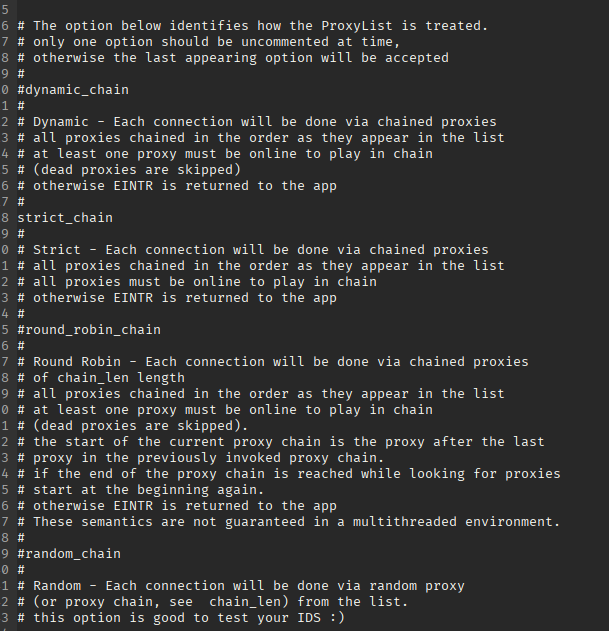
strict_chain (The Default & The CTF Standard)
- How it works: Traffic must flow through every single proxy in your list, in the exact top-to-bottom order you wrote them.
- The Catch: If even one proxy in the chain goes offline, your connection completely fails.
- When to use it: Internal network pivoting. If you have chained two compromised machines together to reach a deep internal subnet, the traffic must flow through Hop 1 to reach Hop 2.
dynamic_chain (The Survivor)
- How it works: It routes traffic through your proxies in order, but if a proxy is dead or unresponsive, it simply skips it and moves to the next one on the list.
- When to use it: Evading IP bans or using free, unstable proxies. If you scraped a list of 10 external SOCKS proxies to hide your attacks and 3 of them die, your Nmap scan or Gobuster run will keep going without crashing.
random_chain (The Ghost)
- How it works: It randomly selects proxies from your list for every new connection it makes. You can define
chain_len(e.g.,chain_len = 2), and it will randomly pick 2 proxies to bounce through for every request. - When to use it: High-level anonymity, or confusing a Web Application Firewall (WAF) by making your directory brute-forcing look like it is coming from a dozen different countries simultaneously.
2. Proxy DNS
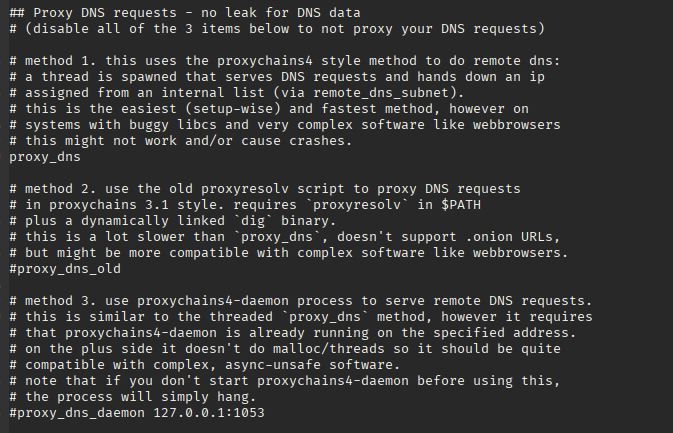
Always uncomment proxy_dns, this options delegates the DNS lookup to the proxy instead of using the host’s public IP.
3. Proxy List
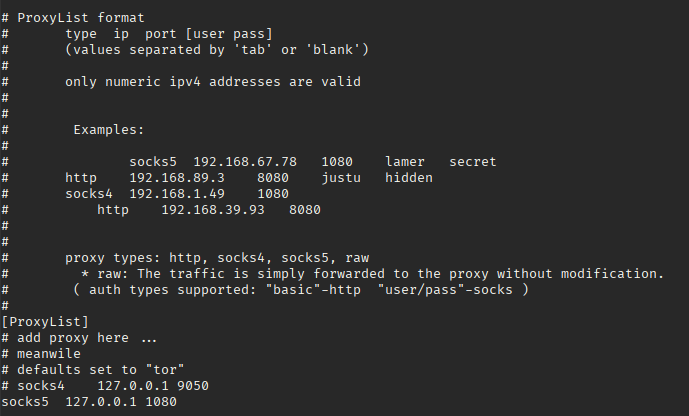
The list of proxy that we mentioned in 1. The Routing Types. The format is: <type> <IP> <username> <password>
type: only accepthttp,socks4,socks5, andraw. You’ll usesocks5for most of the time because it can transfer any kind of TCP and UDP packets,socks4sucks whilehttpcan only handlehttp,rawon the other hand is is used in very specific situations wheresocks5setting up a SOCKS5 tunnel is not possible.usernameandpassword: use on a shared network or environment (like in HackTheBox machines) to make sure that only you can have access to your tunnel.
Tips & Tricks
- Passwords and Username stored inside the config file is in plain text, make sure to not reuse passwords inside that file.
- Some tools that can work with
proxychains:- Web Browsers:
proxychains firefox - Web Enumeration:
gobuster,ffuf,dirb,wfuzz,nikto - Network Interacting:
curl,wget,ssh,netcat(for connecting, not listening),ftp - Exploitation/Cracking:
sqlmap,hydra,medusa,nxc(NetExec)
- Web Browsers:
Related Usage
| File | Created |
|---|---|
| HTB Machine - GiveBack | Thursday, February 5th 2026, 2:32:13 am |