🚩 HTB Sherlock - Vantage
Executive Summary
- Summary: We have 2 pcap files, one observe the web application traffic, the other observe the traffic exfiltrate from inside the system
- Status:
In Progress
Artifacts
The challenge gave us 2 files:
controller.2025-07-01.pcapweb-server.2025-07-01.pcap
Overall
The attacker at the IP 117.200.21.26 attacks at the webserver at the IP 157.230.81.229
Questions
What tool did the attacker use to fuzz the web server ? (Format- include version e.g, nmap@7.80)
The question is asking about web server, so we look into the packet captured recorded inside the web-server.pcap file. It is asking about the tool, so the first thing I think about is the User-Agent header field inside the HTTP requests. I picked a random HTTP packet, Right Click > Follow > HTTP Stream:
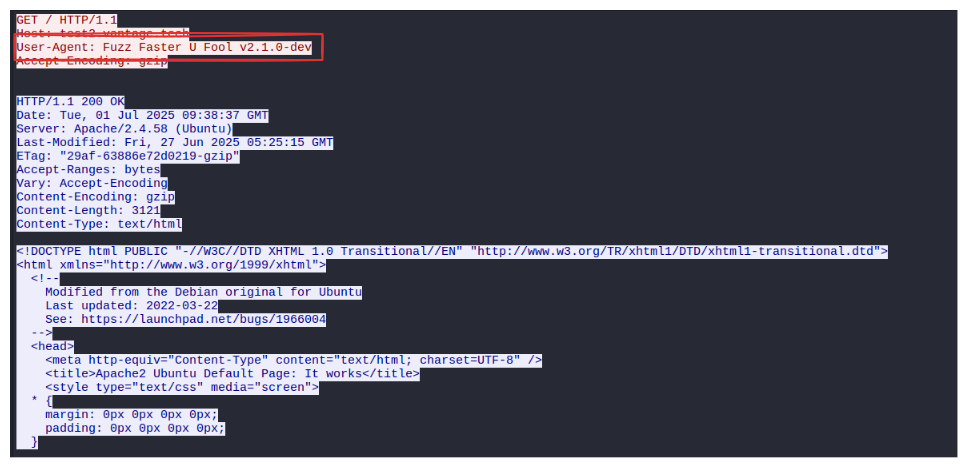
Answer: ffuf@2.1.0
Which subdomain did the attacker discover?
Observing the pattern of the the fuzzing packets, it seems like the failed attempts all returns 200 with a fixed size response (596).
Important: The attacker’s IP is
117.200.21.26and the webserver’s IP is157.230.81.229
Filter: http
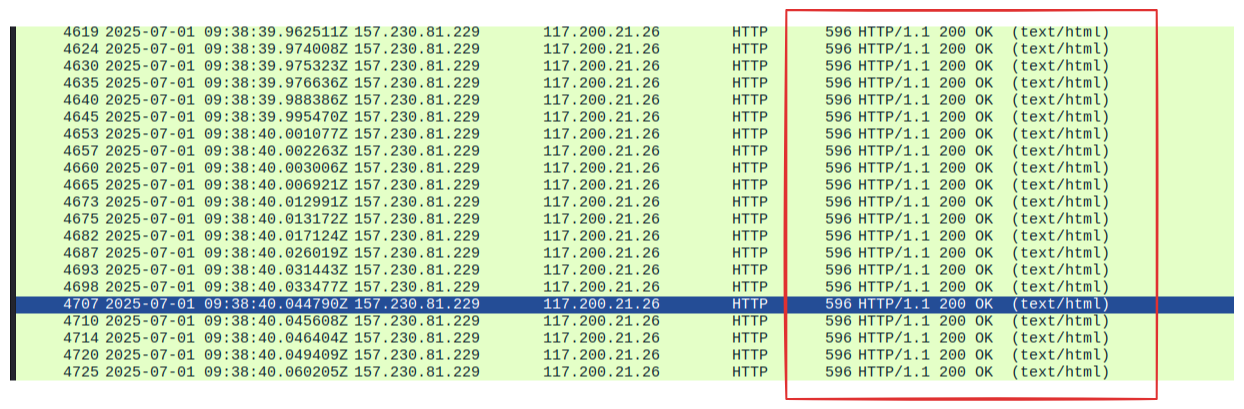
We look for the responses from the webserver to the attacker’s fuzzing requests that has a code that is different from 200 and the size different from 596
Filter http and ip.src==157.230.81.229 and ip.dst==117.200.21.26 and http.response.code!=200 and frame.len!=596
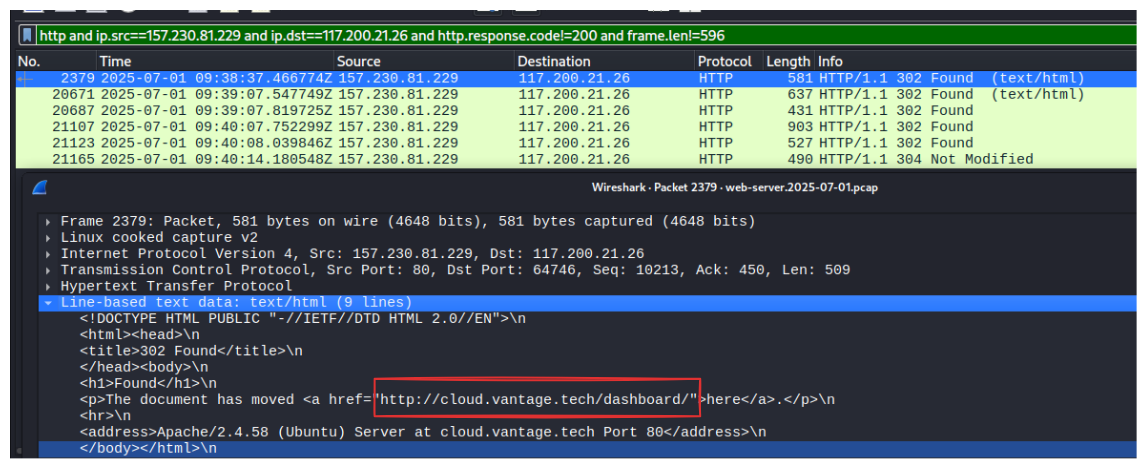
Answer: cloud
How many login attempts did the attacker make before successfully logging in to the dashboard?
The dashboard belongs to the domain cloud.vantage.tech so let’s put that into our filter:
Filter: http and ip.src==117.200.21.26 and http.host=="cloud.vantage.tech"

It seems like there is a login page inside the URI, so we just have to filter for the the path and the set the method to POST:
Filter: http and ip.src==117.200.21.26 and http.host=="cloud.vantage.tech" and http.request.uri contains "/dashboard/auth/login" and http.request.method=="POST"

Out of 4 login attempts, the first 3 attempts must be failed therefore:
Answer: 3
When did the attacker download the OpenStack API remote access config file? (UTC)
To see what files are downloaded, we can go to File > Export Objects > HTTP … set the text filter to cloud.vantage.tech.
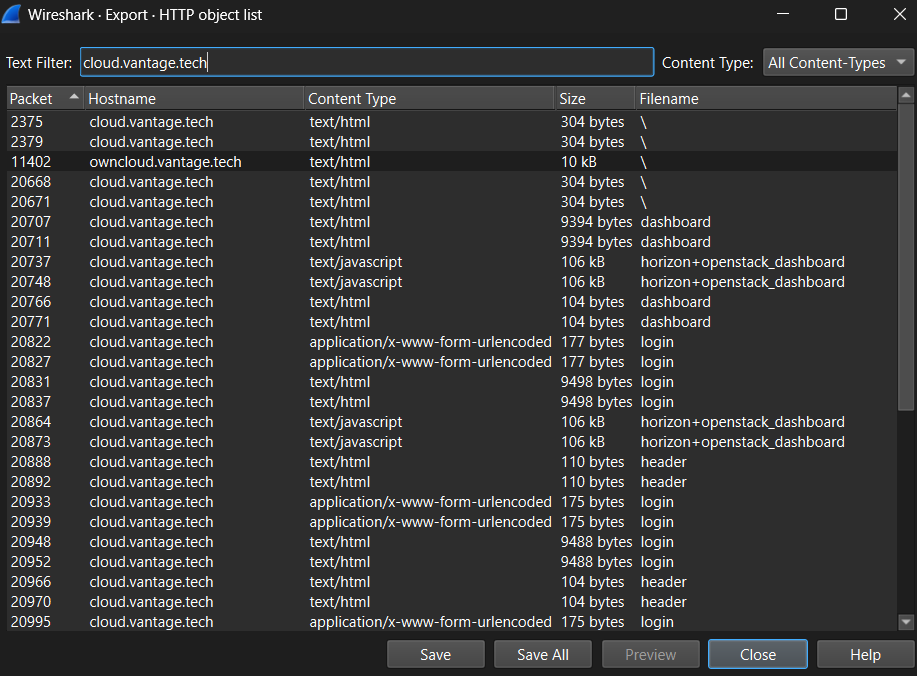
There are still quite a lot of result, we google for the terms “OpenStack API remote access config file name”:

The name does not seems to be very unified, but let’s see if we can find something similar:
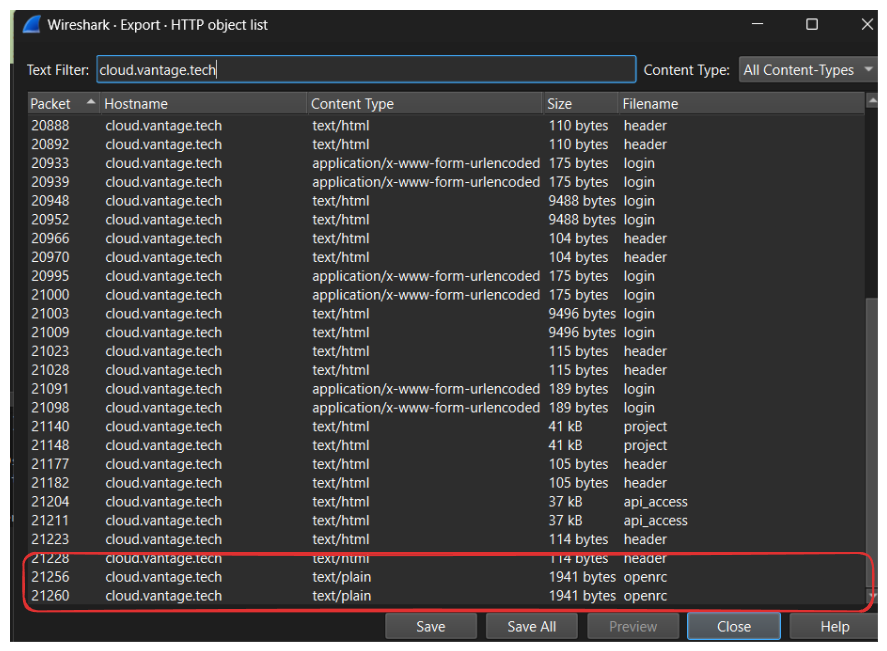
Got it! it is inside the packet 21256 and 21260. the filename is openrc. To find the exact time, we need to find the exact packet and look at its destination to see if it matches the attacker’s.
Filter: frame.number==21260

To get the URC time we click on View > Time Display Format > UTC Date and Time of Day
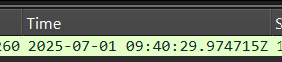
Answer: 2025-07-01 09:40:29
When did the attacker first interact with the API on controller node? (UTC)
This one is quite easy, just open the controller packet capture and look for the first captured frame with the IP source of the attacker:
Filter: ip.src==117.200.21.26

Answer: 2025-07-01 09:41:44
What is the project id of the default project accessed by the attacker?
We look through the HTTP filters again to see if there is anything interesting:

There is a request towards an endpoints that has the word project inside it, we check each of the frame by Right Click > Follow > HTTP Stream, and this is what we see inside the request send to dashboard/project/api_access/openrc:
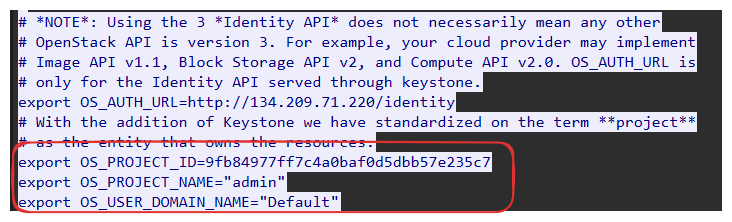
Answer: 9fb84977ff7c4a0baf0d5dbb57e235c7
Which OpenStack service provides authentication and authorization for the OpenStack API?
This one we can just Google
Answer: Keystone
What is the endpoint URL of the swift service?
Open the controller package capture and set the filter to http, we see that there are many request towards an endpoint that has the form: /indentity/v3/services/:random_hash, follow their HTTP trace, we’ll see that the response to those requests contains a JSON about the service containing information such as its name, and its path.
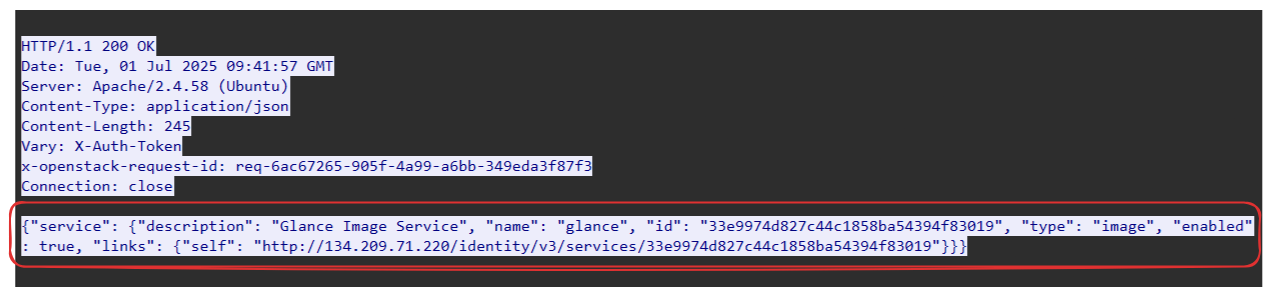
We’ll filter for such request using:
Filter: http and http.request.uri contains "/identity/v3/services"

There is an endpoint at /identity/v3/services that may contains the information about all of the services, we follow it’s HTTP stream, and it is exactly what we suspected:
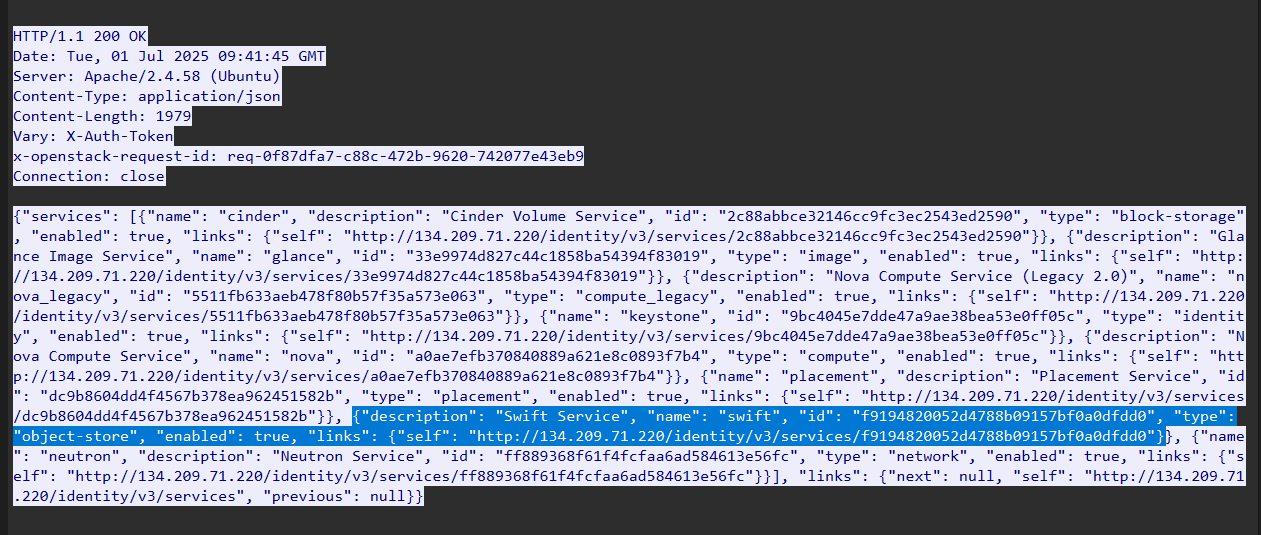
The endpoints reveals the information about the services, the links inside the JSON body is NOT the URL of the endpoint, it is just another page that contains the metadata about the service, not the service itself. Keeping on looking, I decide to moving upward inside the path to see if there is anything more:
Filter: http and http.request.uri contains "/identity/v3"

There is a request to an endpoint called /identity/v3/endpoints this might be the dictionary about the endpoints that we need to find. Following its HTTP stream:
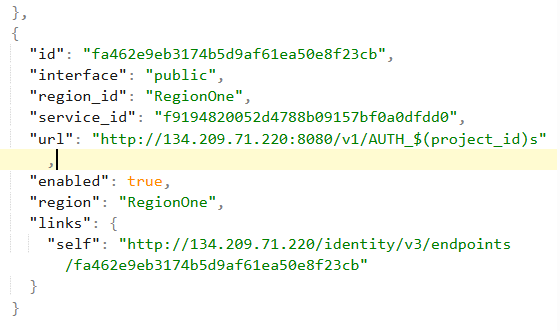
Not very sure what it does, but following the stream give me this pretty interesting block, I decide to to test the URL together with the service ID I got above from the services:
Answer: http://134.209.71.220:8080/v1/AUTH_f9194820052d4788b09157bf0a0dfdd0
Note
The answer on HTB is bugged, instead of taking the ID of the Swift Service, it takes the ID of the default project from question 6 instead (which even contradicts its official write-up)
How many containers were discovered by the attacker?
It seems like each project is a container? So what we need to count is the number of packet containing the URL http://134.209.71.220:8080/v1/AUTH_...?
Filter: http and http.request.uri contains "/v1/AUTH"

We’ll see that there are 5 requests that satisfy the filter. Following one of the request’s HTTP stream. We can see that the response does containing some sort of information.
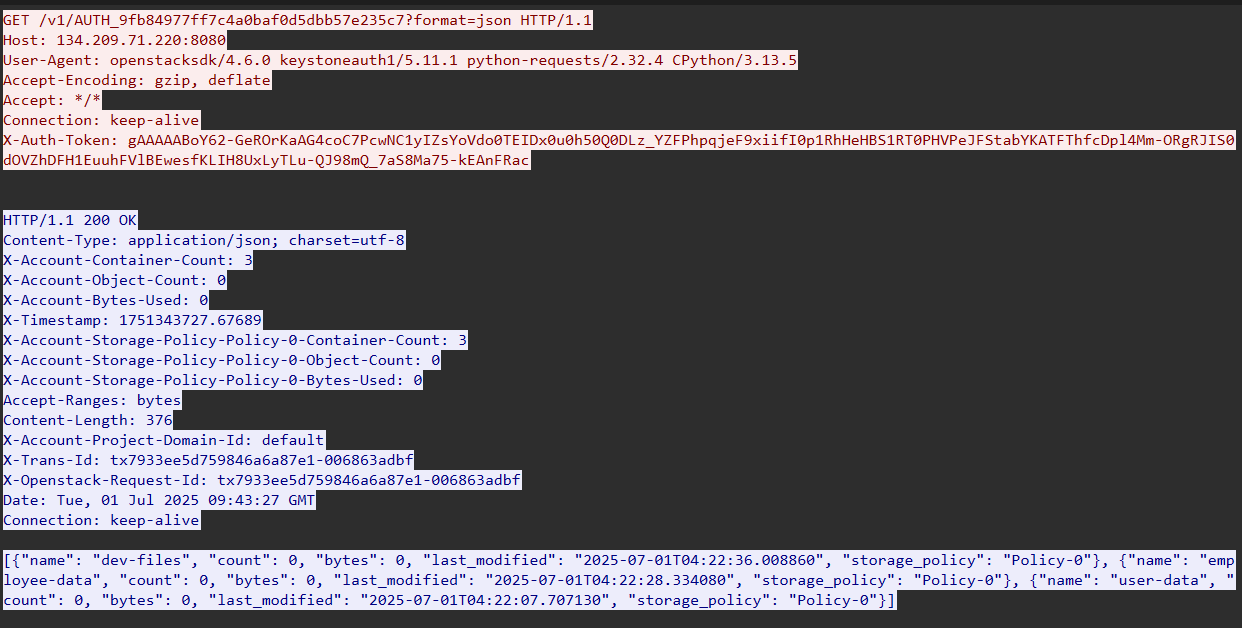
There is something that quite catches my eye is the X-Account-Container-Count header. Checking out all of the five observed HTTP packets, we’ll see that the first one has its header value set to 3 while the remaining does not has this header.
Answer: 3
When did the attacker download the sensitive user data file? (UTC)
There are two files that contains information about the users:

Input the time of the file user_details.csv, we got the answer
Answer: 2025-07-01 09:45:23
How many user records are in the sensitive user data file?
Export the file and read in excel we’ll see that there are 29 rows, so only 28 rows contain user data:
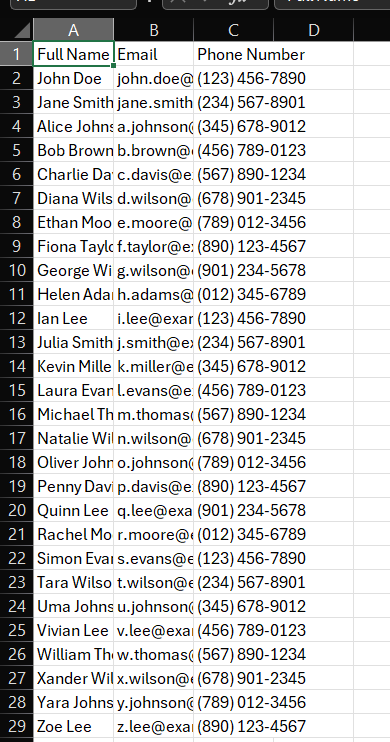
Answer: 28
For persistence, the attacker created a new user with admin privileges. What is the username of the new user?
Going back and read through the HTTP traffic, we’ll come across something pretty interesting, an HTTP response with the code 201 CREATED, opening its corresponding POST request to /indentity/v3/users, we’ll see the password and the username of the newly created user


Answer: jellibean
What is the password of the new user?
Still from that packet:
Answer: P@$$word
What is MITRE tactic id of the technique in task 12?
Bruh just google it.
Answer: T1136.003
References: Link