🚩 HTB Sherlock - RomCom
Executive Summary
- Scenario: Susan works at the Research Lab in Forela International Hospital. A Microsoft Defender alert was received from her computer, and she also mentioned that while extracting a document from the received file, she received tons of errors, but the document opened just fine. According to the latest threat intel feeds, WinRAR is being exploited in the wild to gain initial access into networks, and WinRAR is one of the Software programs the staff uses. You are a threat intelligence analyst with some background in DFIR. You have been provided a lightweight triage image to kick off the investigation while the SOC team sweeps the environment to find other attack indicators.
- Status:
Completed
Collection
Upon downloading the artifact from challenge’s page, we received a VHDX file, a type of virtual hard disk image used by Microsoft Hyper-V to store data like an operating system, programs, and files inside a single container.
The name of the artifact is quite long so let’s change its name to artifact.vhdx. Just like normal, we hash the file:
sha256sum artifact.vhdx
We then confirm that what we got is really a VHDX file:
file artifact.vhdx
Examination
To start working with a virtual disk image, we use the (incomplete) qemu-img tool to convert the original disk image to its raw format.
qemu-img convert -O raw artifact.vhdx out.rawWe use (incomplete) The Sleuth Kit to work analyze the raw image. We start with:
mmls out.raw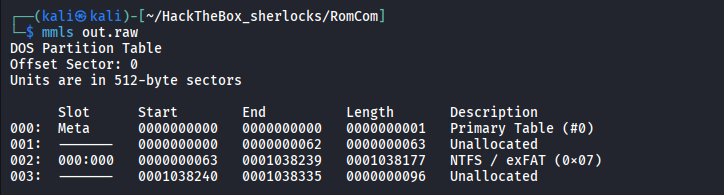
The commands prints out the partition table of the image, we see that the type of the partition table is DOS (which is an old type of partition table that uses 32-bit field to calculate sector addresses).
We can imagine a disk as one long row of numbered boxes, each rows can store 1 byte. Disks don’t read or write single bytes. They work in fixed-size blocks called sectors, here the mmls command said Units are in 512-byte sectors which means the sector size of this disk is 512 bytes.
Below all that is the actual partition table:
Slot     Start     End        Length     Description
000:     0         0          1          Primary Table (#0)    ← sector 0: the partition table itself
001:     0         62         63         Unallocated           ← gap; nothing is assigned here
002:     63        1038239    1038177    NTFS / exFAT (0x07)   ← THE partition, holding the data
003:     1038240   1038335    96         Unallocated           ← leftover space at the end
The Start and End column shows the starting and the ending SECTOR that each slot possesses. For example, the whole 512 bytes of sector 0 is dedicated to the partition table itself.
A filesystem is the organization inside a partition. A partition is still just a range of raw bytes. To hold named files and folders, it has to be formatted with a filesystem, which is a set of rules determine how should the data be written to the partition so that other things can read it (the OS for example). It is a set of structure that tracks:
- which files exist and what they’re called
- where each file’s content sits (which sectors)
- timestamps, sizes, permissions
- which space is free
Common filesystems include NTFS (Windows), FAT32/exFAT (USB sticks), ext4 (Linux) and APFS (macOS). Ours is (incomplete) NTFS.
Note: As funny as it is may sound, the
NTabbreviation in NTFS as well as many other things that are related to Windows (NT SYSTEM, etc.), actually meansNew Technology.
After we got the sector address of the NTFS, we can start looking at the filesystem using the fls command:
fls -r -o 63 out.raw
Earlier, in the file command’s result, we see that the file is created using DiscUtils, which is an open-source .NET disk library that KAPE uses to write its VHD/VHDX output. Since DiscUtils writes a minimal NTFS boot sector, it often omit the 55 AA signature at the end of NTFS’s boot sector.
The Boot Sector is the first sector of the NTFS partition, starting at sector 63 of the disk, let’s check its last 2 bytes:
xxd -s $((63*512 + 510)) -l 2 out.raw
The last 2 bytes are \00\00 which is definitely not \55\aa, let’s fix it:
printf '\x55\xaa' | dd of=out.raw bs=1 seek=$((63*512+510)) conv=notruncNow run the fls command again:
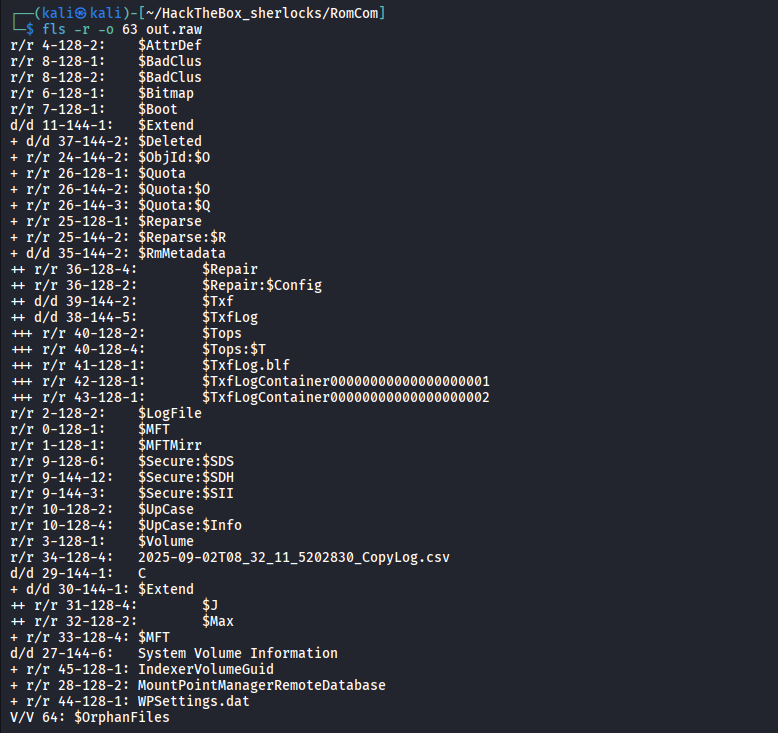
Now, everything is in place, ready for analysis.
Analysis - Questions
What is the CVE assigned to the WinRAR vulnerability exploited by the RomCom threat group in 2025?
Easy question with one Google search…
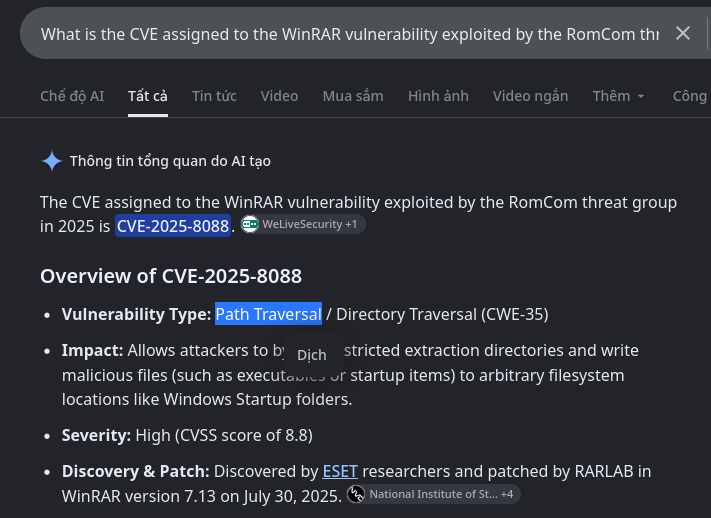
Answer: CVE-2025-8088
What is the nature of this vulnerability?
Still in the same Google search result, we know that this vulnerbility is a Path Traversal vulnerability.
Answer: Path Traversal
What is the name of the archive file under Susan’s documents folder that exploits the vulnerability upon opening the archive file?
Looking at the output of fls command, we see no archive file, maybe the file has been deleted by Susan, therefore, let’s take a look into the Master File Table for more information. To do that, let’s mount the out.raw file to our filesystem:
mkdir -p /mnt/RomCom
sudo mount -t ntfs-3g -o ro,loop,offset=$((63*512)) out.raw /mnt/RomCom
ls -la /mnt/RomCom
The MFT is stored at /mnt/RomCom/C/$MFT. Since this file is a binary file, we need to parse it to a more readable format. For that I used the mft_dump tool here.
mv mft_dump-v0.7.0-x86_64-unknown-linux-gnu mft_dump
chmod +x mft_dump
./mft_dump -o csv '/mnt/RomCom/C/$MFT' > mft.csv
Open the CSV file and search for Users/susan/Documents

Answer: Pathology-Department-Research-Records.rar
When was the archive file created on the disk?
The column right next to the first filename column stores the file-creation timestamp:

Answer: 2025-09-02 08:13:50
When was the archive file opened?
While the MFT records the system’s actions, the Journal file is what records user’s action, to know when the archive file is opened, we need to parse the /mnt/RomCom/C/\$Extend/\$J to CSV.
dotnet MFTECmd.dll -f '/mnt/RomCom/C/$Extend/$J' -m '/mnt/RomCom/C/$MFT' --csvf usnjrnl.csvSince we know the name of the archive file, we can quickly separate it:

NTFS can give a file a unique Object ID (a GUID), stored in its MFT record and indexed in $Extend\$ObjId. Windows’ Distributed Link Tracking service uses it so that shortcuts still work if the target file is moved or renamed. The usual trigger is that Windows creates a shortcut (.lnk) pointing to the file, and the most common reason for that is the user opening the file through Explorer, which adds it to Recent items.
So in USN data, an OBJECT_ID_CHANGE on a file that wasn’t otherwise modified is a well-known sign that the file was accessed by the user.
Answer: 2025-09-02 08:14:04
What is the name of the decoy document extracted from the archive file, meant to appear legitimate and distract the user?
For this question, we have to go back to the MFT file, there is a high chance that the user may extract the archive right into their current working directory (using the Extract Here option). Searching for Users/susan/Documents/, there is another file that looks like it might had been extracted from the archive.

Answer: Genotyping_Results_B57_Positive.pdf
What is the name and path of the actual backdoor executable dropped by the archive file?
Since the the CVE that the challenge is talking about is a path traversal vulnerability, the malicious actor may be able to write in whatever folder that they want under the victim’s session.
Right below the PDF file’s sentence inside the MFT, we can see that there were 2 more files called ApbxHelper.exe and Display_Settings.lnk were created at the exact same second as the PDF file. Both of which were created inside Susan’s AppData directory, the Display_Settings.lnk was created inside a very sensitive folder that is the AppData/Roaming/Microsoft/Windows/Start Menu/Programs/Startup/ which is Susan’s personal startup folder. At every logon, Windows Explorer automatically runs everything placed in it, whether that’s executables, shortcuts (.lnk), scripts (.bat, .vbs, .cmd) or other openable files.

With a short Google search, we also find out that the ApbxHelper.exe executable actually related to the threat group RomCom alongside with some other Indicator of Compromises related to their attack.
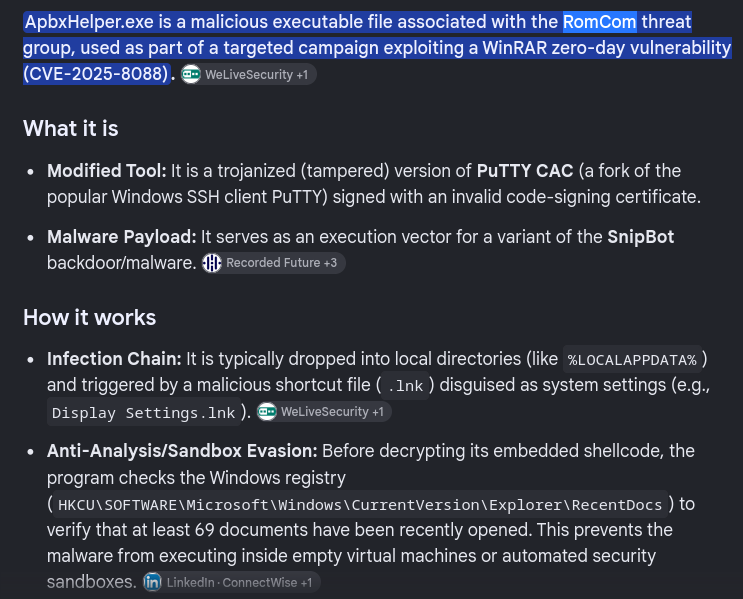
Answer: C:\Users\Susan\Appdata\Local\ApbxHelper.exe
The exploit also drops a file to facilitate the persistence and execution of the backdoor. What is the path and name of this file?
This one can be answered based what we found in the previous question
Answer: C:\Users\Susan\AppData\Roaming\Microsoft\Windows\Start Menu\Programs\Startup\Display Settings.lnk
What is the associated MITRE Technique ID discussed in the previous question?
A malicious file for persistence is dropped inside an auto startup folder for persistence falls inside T1547. Since the malicious file for facilitation is a shortcut / symbolic link, the techniques fall into the category:
Answer: T1547.009
When was the decoy document opened by the end user, thinking it to be a legitimate document?
As we’ve discussed in some question above, we know that by double clicking a file with File Explorer, a link file is created pointing to that file, in order to add it to the recent file folder.

By looking at the timestamp column right next to the filename, we can get the timestamp
Answer: 2025-09-02 08:15:05
References: Link